Octavo
Read-later app template · App screens
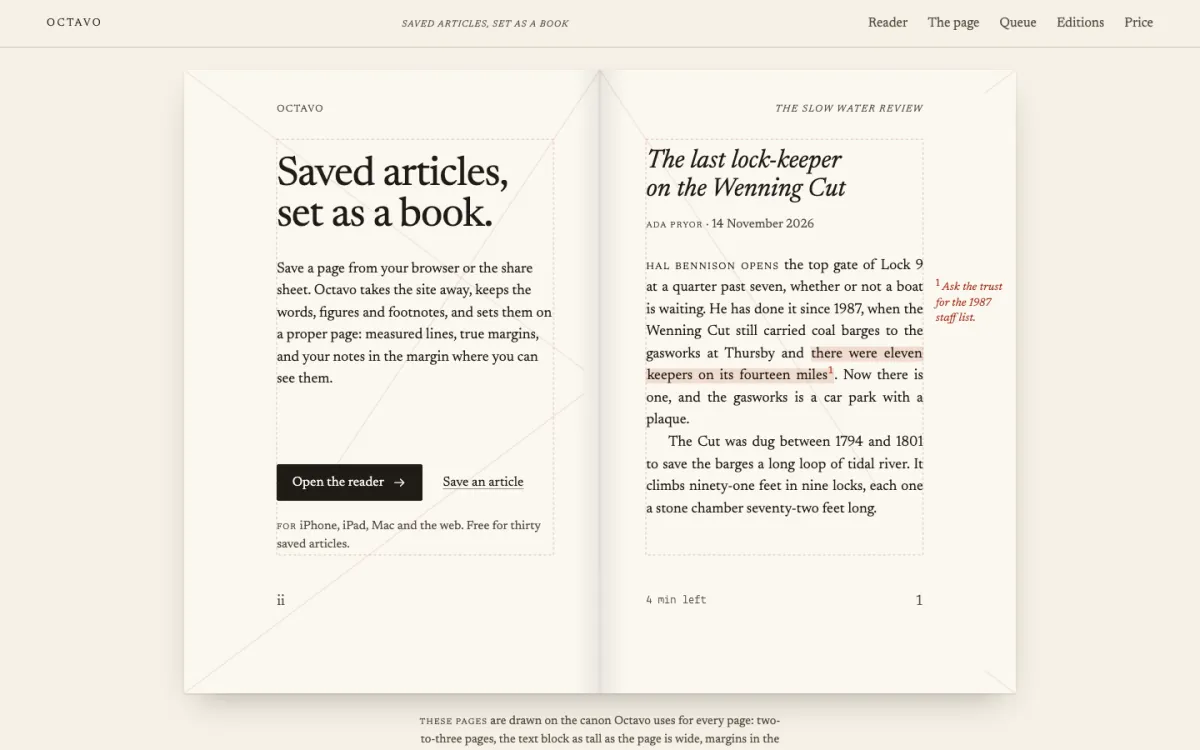
Classical book typography on warm paper: an open spread built on the Van de Graaf canon, running heads in small caps, folios, notes in the wide outer margin, and one rubric red that only ever marks what is yours.
The first screen is an open book. Two pages at two to three sit side by side, built on the Van de Graaf canon: the text block as tall as the page is wide, margins of 2 : 3 : 4 : 6. On the left page is the title, on the right the first page of a saved essay as Octavo sets it, with a highlight and a note in the margin. The construction lines draw themselves across the spread and settle to a faint red. A running head in small caps names the chapter you are in as you scroll, and each part ends on a folio that the index at the foot of the page refers to.
The reader is the working centre: an original essay about the last lock-keeper on a fictional canal, on a scrolling page with a running head and a foot. Change the size, the measure in characters, the leading and the theme (Paper, Vellum, Night); the page width follows the measure and the margins keep their proportion. Select a passage to highlight it or write a note, which floats into the outer margin beside its line (or sits under its paragraph on a narrow page), numbered in reading order. Marks are listed with Go to and Remove, and copy out as Markdown. The foot counts pages and minutes left from the essay's real word count at 238 words a minute.
Below, the canon is drawn and explained with live numbers taken from the reader's own text block, next to a plain list of what Octavo keeps from a page and what it leaves on the site. The queue is a contents page with dot leaders and minutes in place of page numbers: save an article by URL with inline validation, a three-step loading state, a sign-in failure, a network error with retry, an offline save that waits, and success at the top of the list; switch between Unread and Finished, mark finished, remove with undo. Editions (the changelog with dates), the two prices, and an index and colophon close the book.
The brand is fictional: Octavo, a read-later app for iPhone, iPad, Mac and the web, made by three people in a room above a framer's shop in Norwich. Names, people and figures on the page are invented.
What works
- Type settings: size stepper (16 to 23 px), measure slider (48 to 72 characters), leading slider (1.30 to 1.80), Paper, Vellum and Night themes, reset; remembered in this browser
- Reader page: progress rule, page count and minutes left update as you scroll; focusable and scrollable by keyboard
- Highlight: select text in one paragraph and choose Highlight; click or press Enter on a mark to remove it or add a note
- Margin notes: editor in the margin with a 280-character count, empty-note error, Save, Cancel, Escape, Ctrl or Cmd + Enter; numbered in reading order
- Your marks: list in reading order with Go to and Remove; copy all marks as Markdown with a status message
- Live canon: text block, inner, top, outer and bottom margins in pixels follow the reader settings
- Running head: names the chapter in view
- Save by URL: empty, spaces, non-web scheme, not an address and duplicate errors; adds https:// when missing; fetch, set and file steps; sign-in failure; network error with Try again; offline saves wait and fetch on reconnect; success adds the article at the top
- Queue: Unread and Finished tabs with arrow keys, counts and total reading time; Read now, Mark finished, Back to unread, Remove with Undo
States you can link to
script.js reads these from the URL, so you can open the page in a given state to review it, screenshot it or show it to an agent.
| Parameter | What it does |
|---|---|
?state=notes | opens on the reader with two notes and one plain highlight already in the essay. Open ?state=notes |
?theme=night | the reader in the Night theme (also vellum). Open ?theme=night |
?size=22&measure=54&leading=1.7 | large type on a short measure with open leading; settings from the URL are not saved. Open ?size=22&measure=54&leading=1.7 |
?at=60 | the reader scrolled to 60 percent, with pages and minutes left to match. Open ?at=60 |
?queue=empty | an empty queue with its empty state. Open ?queue=empty |
?filter=finished | the queue on the Finished tab. Open ?filter=finished |
?state=invalid | submits an address with a space in it and shows the inline error. Open ?state=invalid |
?state=saving | a save held on its loading steps. Open ?state=saving |
?state=error | the first save cannot reach the site and offers Try again, which then succeeds. Open ?state=error |
?state=offline | the offline notice, and a save that waits to be fetched. Open ?state=offline |
?state=success | saves an article and shows it at the top of the queue. Open ?state=success |
Use it
Copy templates/reader/ into your project, or download the zip, which has the Screenery badge script already removed. Colours, type, spacing and radii are custom properties at the top of style.css. This template loads no libraries: only its own files and web fonts.
The docs explain the token pattern and how to move a template into React, Vue, Svelte or Astro. The guide has prompts for handing it to a coding agent.