Feint
Class register and markbook app template · App screens
A UK exercise book: cream paper with 8mm feint blue rules, a pink double margin, a manilla cover with a printed name label, and one teacher's red pen for marks, ticks and anything that needs attention. Very quiet.
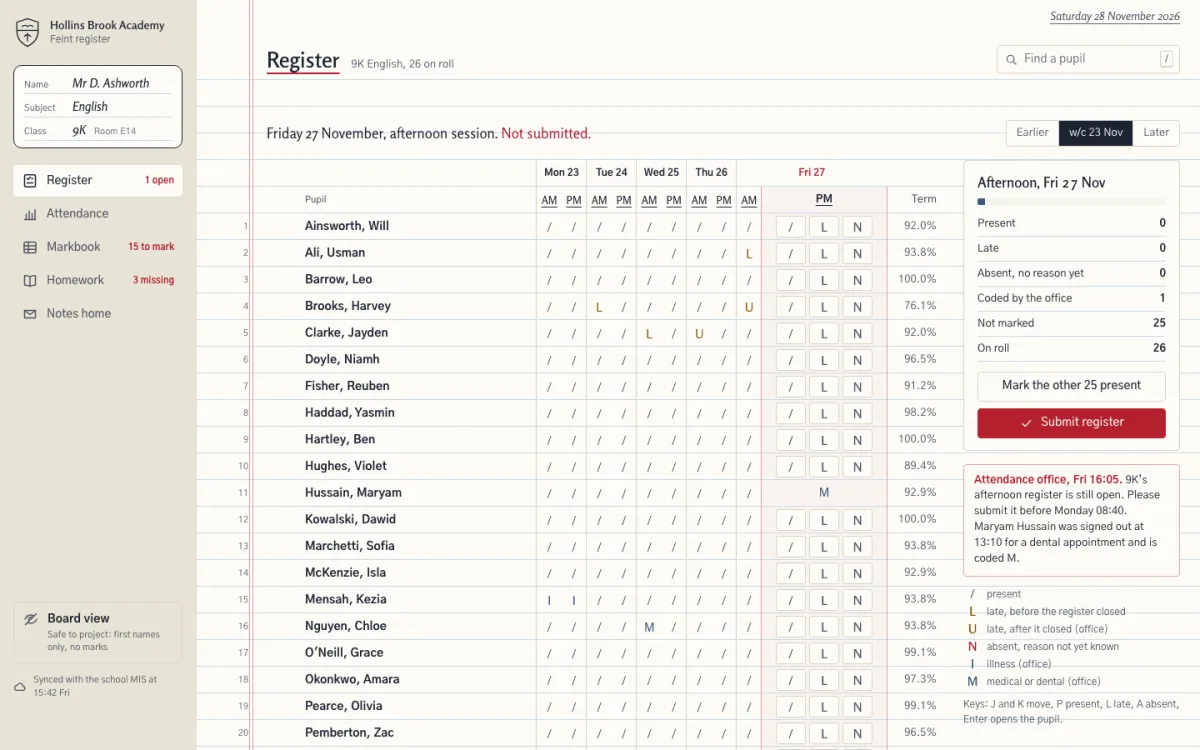
This template is the app itself, filling the viewport. The sidebar is the exercise book cover: the school crest, the printed white label with name, subject and class, the five views and a Board view switch. Every view is a sheet of ruled paper with the pink double margin, and everything on it sits on the 32px ruling: table rows, headings and the sentence that sums up each view. Red is the teacher's pen and only appears for marks, unexplained absences and things that need doing.
The Register shows the whole week, Monday to Friday, morning and afternoon, with each pupil's codes and term attendance. It opens on Friday afternoon's register, still open on Saturday morning, with a note from the attendance office and one pupil already coded M. Mark each pupil /, L or N with the buttons or the keyboard (J and K to move, P, L and A to mark), mark the rest present, and submit: unmarked pupils are named, and the submit draws a red tick and initials. Attendance has a range switch (this week, half term 1, half term 2, term to date) that recomputes the sentence, the week-by-week SVG chart against the 96% target and the sortable, filterable pupil table, all from the same session codes.
The Markbook keeps six pieces of work in red pen with per-pupil and per-column averages; select any mark to change it, Enter saves and moves down, and wrong values are named. Add a column, set homework with a weekly-load warning, and tick off hand-ins, which turn late after the due date. The pupil drawer gathers attendance, a session-by-session term strip, marks, missing homework and notes home. A note home is written from a template, checked so it never names another pupil, and queued for the office to send on Monday at 08:00. On phones the cover becomes a bottom bar and the register keeps only name, the three codes and the term figure.
The brand is fictional: Feint, a register and markbook for secondary teachers, here open on Mr Ashworth's Year 9 English class, 9K, at Hollins Brook Academy. Names, people and figures on the page are invented.
What works
- Views: Register, Attendance, Markbook, Homework and Notes home, from the cover or the phone bottom bar
- Register: mark /, L or N per pupil, toggle off, Mark the others present, Submit with named unmarked pupils, loading and a drawn red Seen tick
- Register keyboard: J and K or arrows move, P present, L late, A or N absent, Enter opens the pupil; / searches; B toggles Board view
- Register: pick any session in the week, Earlier and Later weeks across the term; past registers are read-only
- Attendance: range switch that recomputes the summary sentence, chart and table; sort any column; filter below 90% or 3 or more lates
- Chart: hover or tab to each bar for the readout; screen readers get a data table
- Markbook: edit any mark inline with validation (0 to out of, abs, or clear), Enter moves down, sort by surname or average, Add a column dialog with validation
- Homework: expand a task, tick hand-ins (late after the due date), Set homework dialog with validation and a weekly-load warning, write a homework note from the missing list
- Pupil drawer: attendance for the chosen range, term strip, marks, homework and notes; Escape or backdrop closes
- Note home: pupil, kind and template, length validation, a privacy check against naming other pupils, sending, queued success, offline failure that keeps the draft
- Board view: first names only, marks and attendance hidden, for projecting in class
- Search filters every view by pupil name
States you can link to
script.js reads these from the URL, so you can open the page in a given state to review it, screenshot it or show it to an agent.
| Parameter | What it does |
|---|---|
?view=attendance | opens a view directly: register, attendance, markbook, homework or notes. Open ?view=attendance |
?range=week | sets the attendance range: week, ht1, ht2 or term. Open ?range=week |
?pupil=p07 | opens the pupil drawer (p01 to p26). Open ?pupil=p07 |
?note=open | opens the note home dialog. Open ?note=open |
?board=on | starts in Board view, safe to project. Open ?board=on |
?state=submitted | Friday afternoon's register already submitted. Open ?state=submitted |
?state=loading | skeleton rows while the class list loads. Open ?state=loading |
?state=empty | a class with no pupils on roll, no columns, homework or notes. Open ?state=empty |
?state=error | the school MIS could not be reached, with Try again. Open ?state=error |
?state=offline | offline banner; registers, marks and homework queue on the device and notes fail to send. Open ?state=offline |
Use it
Copy templates/register/ into your project, or download the zip, which has the Screenery badge script already removed. Colours, type, spacing and radii are custom properties at the top of style.css. This template loads no libraries: only its own files and web fonts.
The docs explain the token pattern and how to move a template into React, Vue, Svelte or Astro. The guide has prompts for handing it to a coding agent.