Endpaper
Journaling app page template · App screens
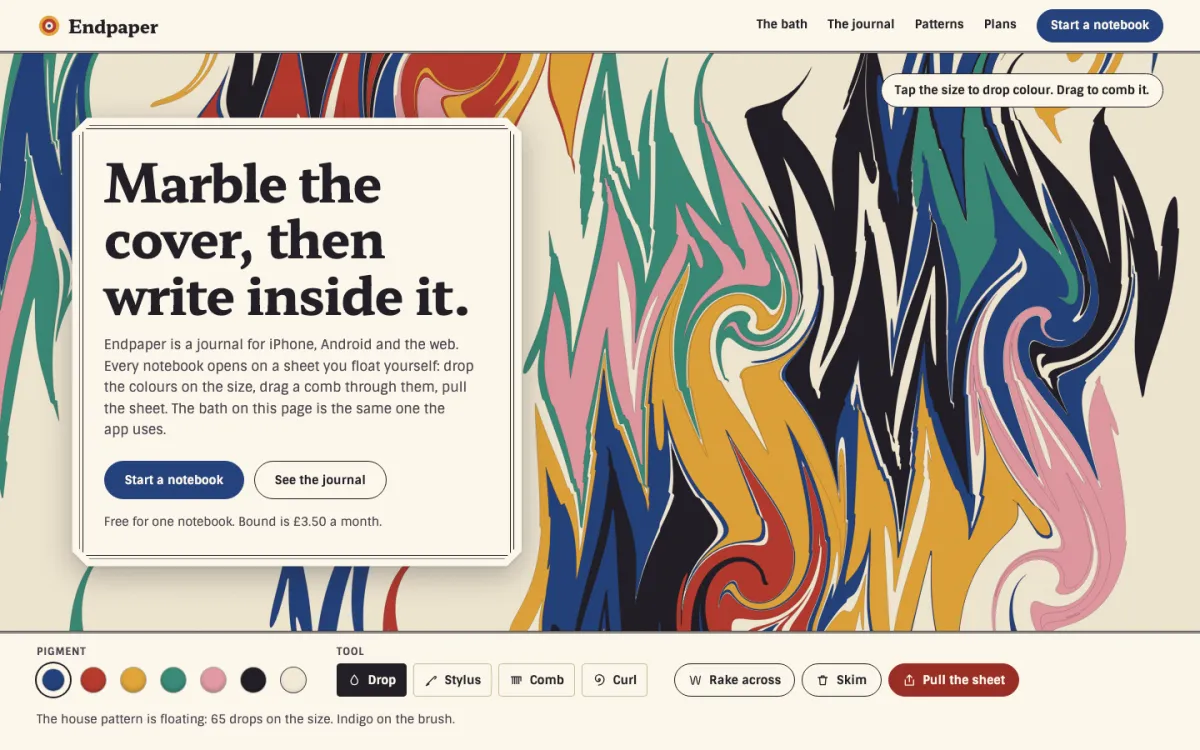
Marbled paper: Turkish ebru and Japanese suminagashi, ink floated on a cream size, raked and combed into the endpapers of old books, bound in indigo cloth with pasted paper labels.
The first screen is a working marbling bath. Pick one of seven pigments (indigo, Turkey red, ochre, verdigris, rose madder, lamp black, gall water), tap the size to drop colour and hold to let it spread, drag a stylus or a nine-tine comb through it, hold the curl to twist snails, or rake the whole bath back and forth for gel-git. Each new drop pushes every older one outward without changing its area, so colours turn into rings rather than mixing. Pull the sheet and a paper lands on the bath, lifts the ink mirrored, and hangs on the drying rack below; the bath is left clean.
Any sheet on the rack becomes the cover of the demo journal, an open notebook on indigo book cloth. Its owner has fourteen entries from 30 October to today: search them with highlighted matches, filter by tag or by a day on the November calendar, write a new entry with inline validation, edit, delete with a second press and undo. Below are the specimen book of six patterns rendered by the same engine (stone, gel-git, nonpareil, French curl, suminagashi, Spanish wave, each floatable into the bath), a red colophon of what the app does, two plans with a monthly or yearly switch, the sign-up with a cover picker, and questions.
Everything is drawn in canvas, SVG and CSS. Without canvas or JavaScript the bath shows an SVG sheet combed by turbulence; with reduced motion every drop, rake and pull lands at once.
The brand is fictional: Endpaper, a journaling app for iPhone, Android and the web from a former bindery in Leeds, where every notebook opens on a sheet you marble yourself. Names, people and figures on the page are invented.
What works
- Marbling bath: seven pigments, drop (hold to spread), stylus, comb and curl tools, rake across, skim
- Keyboard bath: focus the canvas, arrows move a crosshair, Enter uses the tool
- Pull the sheet: mirrored sheet lifted onto the drying rack and bound to the journal
- Drying rack: bind any sheet, take sheets off
- Specimen book: float any of six patterns into the bath
- Journal: search with highlights, tag filters, calendar day filter with arrow keys, month switch
- Journal editor: new, edit, save with validation, word count, delete twice to confirm, undo
- Bind the journal with any house paper or pulled sheet
- Plans: monthly or yearly with the saving worked out
- Sign-up: inline validation, show password, cover and plan pickers, loading, clash, error and success
States you can link to
script.js reads these from the URL, so you can open the page in a given state to review it, screenshot it or show it to an agent.
| Parameter | What it does |
|---|---|
?bath=stone | floats a pattern into the bath on load: stone, gelgit, nonpareil, curl, suminagashi, wave or clear. Open ?bath=stone |
?pulled=1 | pulls a sheet straight away so the rack holds two and the journal is bound with the new one. Open ?pulled=1 |
?journal=empty | an empty notebook with its first-page prompt. Open ?journal=empty |
?q=rain | the journal searched for a word, matches highlighted. Open ?q=rain |
?day=14 | the journal filtered to a day in November 2026. Open ?day=14 |
?entry=new | a blank entry open in the editor. Open ?entry=new |
?entry=invalid | an entry with no body and an unusable tag, showing both errors. Open ?entry=invalid |
?state=invalid | sign-up with four inline errors. Open ?state=invalid |
?state=loading | sign-up while binding the notebook. Open ?state=loading |
?state=taken | sign-up with an email that already has an account. Open ?state=taken |
?state=error | sign-up when the server does not answer. Open ?state=error |
?state=success | the bound notebook confirmation. Open ?state=success |
?plan=yearly | plans shown with yearly prices. Open ?plan=yearly |
?canvas=off | the no-canvas fallback sheet and plates. Open ?canvas=off |
Use it
Copy templates/marbled/ into your project, or download the zip, which has the Screenery badge script already removed. Colours, type, spacing and radii are custom properties at the top of style.css. This template loads no libraries: only its own files and web fonts.
The docs explain the token pattern and how to move a template into React, Vue, Svelte or Astro. The guide has prompts for handing it to a coding agent.