Kōma
Focus timer app page template · App screens
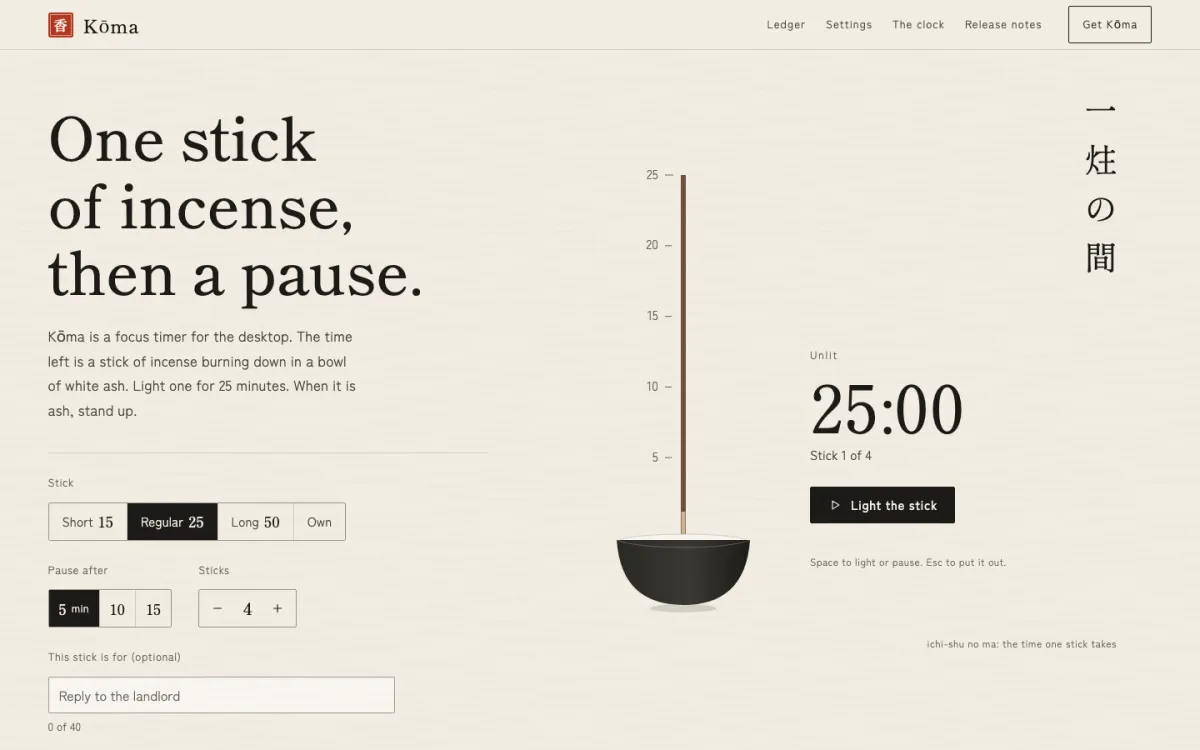
Ma, the meaningful empty space: sumi ink on fibrous washi, hairlines, wide intervals, one vermilion that only means now, and the timer drawn as a stick of incense burning down in a bowl of white ash, with a little vertical type.
The first screen is the app. A stick of incense stands in a bowl of white ash, drawn in SVG, and it is the timer: light it and it burns down from the tip, the ember glows, two strands of smoke drift up, ash grows and breaks off into the bowl about every four minutes, and the notches beside it count the minutes left. Choose a short, regular or long stick (15, 25 or 50 minutes, the burn times of real Japanese incense) or your own length, a pause of 5, 10 or 15 minutes, and how many sticks; the plan below the form adds it all up and says when you will be done.
Every stick and pause is written into today's ledger, with the time it was lit, what it was for, minutes planned and burned and how it ended. The totals for burned, paused, sticks whole and in all add up from the rows, and the day is drawn as one trail from 06:00 to 22:00 with a vermilion line at now. Below it, the app's settings window works for real: the end sound (a synthesised rin bowl, clappers or silence) with a preview, volume, notches every 5 or 10 minutes or none, smoke, a long pause after every nth stick, auto-starting pauses, what the drawn menu bar shows, and when the day starts.
Then a short history of incense clocks with a measured drawing of the three stick lengths and the specifications, dated release notes, and getting the app: a desktop download that shows its progress and a phone waitlist with inline validation, a loading state, a recoverable error and a success that says where you are in line and when you will be let in. The small print covers price, privacy, interruptions and accessibility. Without JavaScript the page reads in full with the stick drawn unlit.
The brand is fictional: Kōma, a focus timer for the desktop made by Tomoe Isshiki alone in a room above a lacquer shop in Kanazawa. Names, people and figures on the page are invented.
What works
- Timer: light, pause and go on, put it out early (written as a short stick), automatic or manual pause, end the pause early, next stick, all burned; Space and Escape shortcuts
- Setup: stick length chips with an own length (5 to 90, validated), pause length, stick count stepper (1 to 8), intention with a character count, a live plan with total and finishing time
- Stick drawing: burn line, ember glow, smoke, ash that falls into the bowl, notches that grey out as they burn
- Ledger: rows added as sticks and pauses end, totals that add up, the day trail, copy as CSV, empty the bowl with a confirm press
- Settings window: eight live settings that change the stick and the plan, sound preview, saved to this browser, back to defaults
- Menu bar preview: shows the stick, minutes left or nothing, following the timer
- Desktop download with a progress bar and a finished state
- Phone waitlist: inline validation with specific messages, loading, error with resend, success with place in line and intake date, use another address
States you can link to
script.js reads these from the URL, so you can open the page in a given state to review it, screenshot it or show it to an agent.
| Parameter | What it does |
|---|---|
?state=burning | stick 2 of 4 burning with about 12 minutes left. Open ?state=burning |
?state=paused | the same stick paused. Open ?state=paused |
?state=ma | in the first pause, about 3 minutes left. Open ?state=ma |
?state=done | four sticks burned this afternoon, added to the ledger. Open ?state=done |
?state=empty | an empty ledger. Open ?state=empty |
?state=invalid | the waitlist sent empty, showing its errors. Open ?state=invalid |
?state=error | the waitlist fails once; sending again succeeds. Open ?state=error |
?state=success | the waitlist accepted, with place in line. Open ?state=success |
?state=download | the desktop download in progress, then finished. Open ?state=download |
?speed=60 | the clock runs sixty times faster, one second per minute. Open ?speed=60 |
?smoke=0 | the stick without smoke. Open ?smoke=0 |
Use it
Copy templates/ma/ into your project, or download the zip, which has the Screenery badge script already removed. Colours, type, spacing and radii are custom properties at the top of style.css. This template loads no libraries: only its own files and web fonts.
The docs explain the token pattern and how to move a template into React, Vue, Svelte or Astro. The guide has prompts for handing it to a coding agent.