Margin
Notes app screens template · App screens
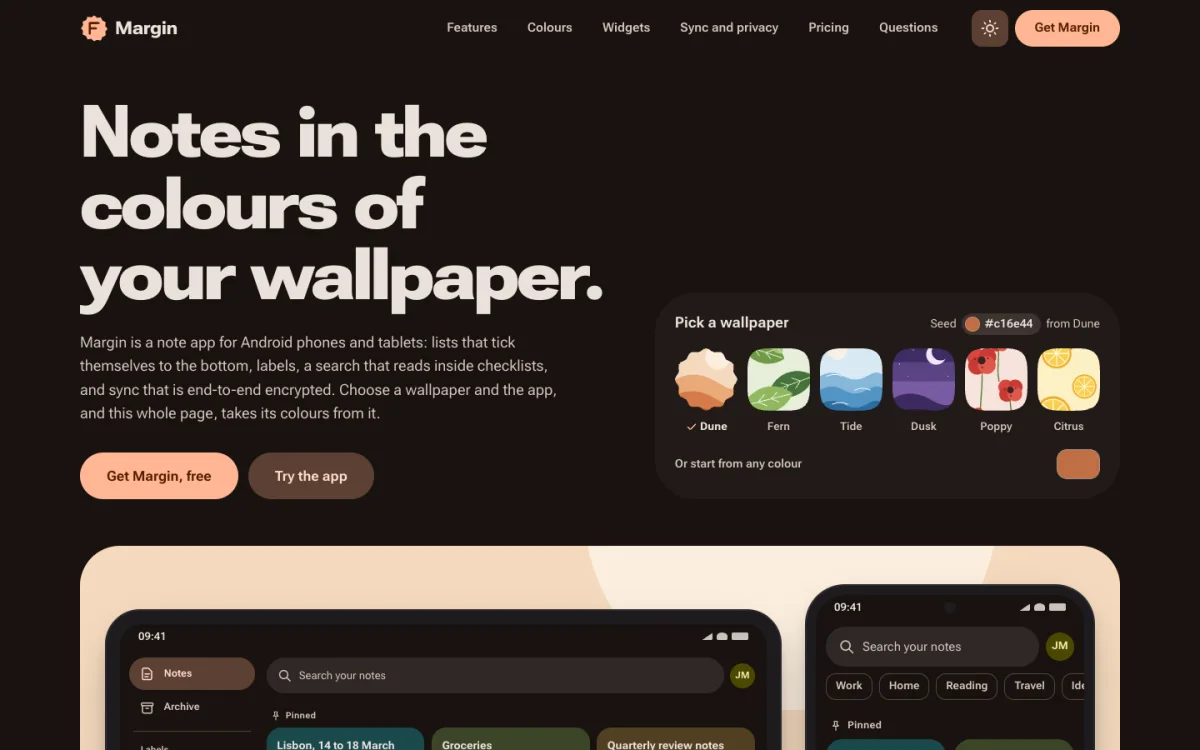
Dynamic colour from a wallpaper: tonal palettes generated live from one seed, scalloped cookie and squircle shapes that morph on springs, big soft containers and a wide, heavy variable sans.
The first screen is a wide, heavy headline beside a wallpaper picker. Six wallpapers are drawn in SVG. Choosing one draws it onto a 64 by 64 canvas, scores the pixels by hue family, coverage and vividness, and turns the winning colour into a seed. From the seed the script builds six tonal palettes of thirteen tones each and gives every colour role a fixed tone, then the whole page and both devices glide to the new scheme, in light or dark.
Below, the app runs twice from one note store: on a tablet in the expanded layout, with labels in the rail and the editor beside the notes, and on a phone in the compact layout with a bottom bar. Notes can be pinned, searched with highlights, filtered by label, archived and deleted with an undo snackbar. The pen FAB morphs from a squircle to a cookie on hover and grows into the editor, which has checklists that sort ticked items to the bottom, labels, seven note colours and a validation message for an empty note.
Then the features with small working demos, an explainer that shows the real sampling, palettes and measured contrast for the current seed, home-screen widgets that read the same store, sync and privacy, pricing with a billing switch, a download form and questions. Text roles sit at tones 10 and 30 on light surfaces and 90 and 80 on dark ones, so contrast holds for any seed. Nothing is a photograph.
The brand is fictional: Margin, a note-taking app for Android phones and tablets, made by a team of six in Ghent. Names, people and figures on the page are invented.
What works
- Wallpaper picker (radio group with arrow keys): samples the drawn wallpaper, picks a seed and re-themes the page, the tablet, the phone and the widgets with a 900ms colour transition
- Seed by colour wheel (live) or by hex with inline validation
- Light and dark scheme toggle; the tones flip and the contrast table updates
- Notes app on tablet and phone, sharing one store: pinned and other notes, label filters, archive view, search with highlighted matches and an empty result state
- FAB that morphs on hover, focus and press, and opens the editor with a container transform
- Editor: title, text, checklist (Enter adds, Backspace on empty removes, ticked items move down), labels, colour swatches that morph to a cookie when chosen, pin, archive, delete; Escape closes
- New note validation: saving an empty note shows a specific error; closing an empty draft discards it
- Delete and archive with an undo snackbar
- Offline banner with a retry that runs the shape-morphing loader
- Widgets: live checklist that ticks items in the app, pinned note, quick buttons that open a new note or list in the app
- Feature demos: a self-sorting checklist and a search over the live notes
- Pricing monthly or yearly switch; download form with validation, loading, error and success; questions accordion; section menu on small screens
States you can link to
script.js reads these from the URL, so you can open the page in a given state to review it, screenshot it or show it to an agent.
| Parameter | What it does |
|---|---|
?wallpaper=3 | opens on the Tide wallpaper and its blue scheme (1 to 6: Dune, Fern, Tide, Dusk, Poppy, Citrus). Open ?wallpaper=3 |
?seed=%23ff8800 | uses any hex colour as the seed instead of the wallpaper's. Open ?seed=%23ff8800 |
?scheme=dark | the dark scheme (?scheme=light forces light). Open ?scheme=dark |
?note=4 | opens note 4, Books Mira recommended, in the tablet editor (on the phone below 760px). Open ?note=4 |
?state=empty | an account with no notes: empty states in the app and the widgets. Open ?state=empty |
?state=offline | offline banner with three changes waiting, a retry with the morphing loader, and a waiting count in the rail. Open ?state=offline |
?send=error | the download form fails once, then succeeds on the second try. Open ?send=error |
Use it
Copy templates/material/ into your project, or download the zip, which has the Screenery badge script already removed. Colours, type, spacing and radii are custom properties at the top of style.css. This template loads no libraries: only its own files and web fonts.
The docs explain the token pattern and how to move a template into React, Vue, Svelte or Astro. The guide has prompts for handing it to a coding agent.
Inspection
Loaded in Chromium 156.0.8078.4 (Playwright, headless) on 27 November 2026 at 1440, 1024, 768, 390 pixels wide and once more with reduced motion requested. Every check passed at every width.
- 1440 px
- Pass
- 1024 px
- Pass
- 768 px
- Pass
- 390 px
- Pass
- Reduced motion
- Pass
- Page weight
- 338 KB, 6 requests
Requests and transferred size were measured at 1440 pixels on a cold cache and include web fonts and any CDN library. The full result is in the viewer: open the Checks panel. How templates are checked.