Plainfare
CRM pricing page template · Software and web
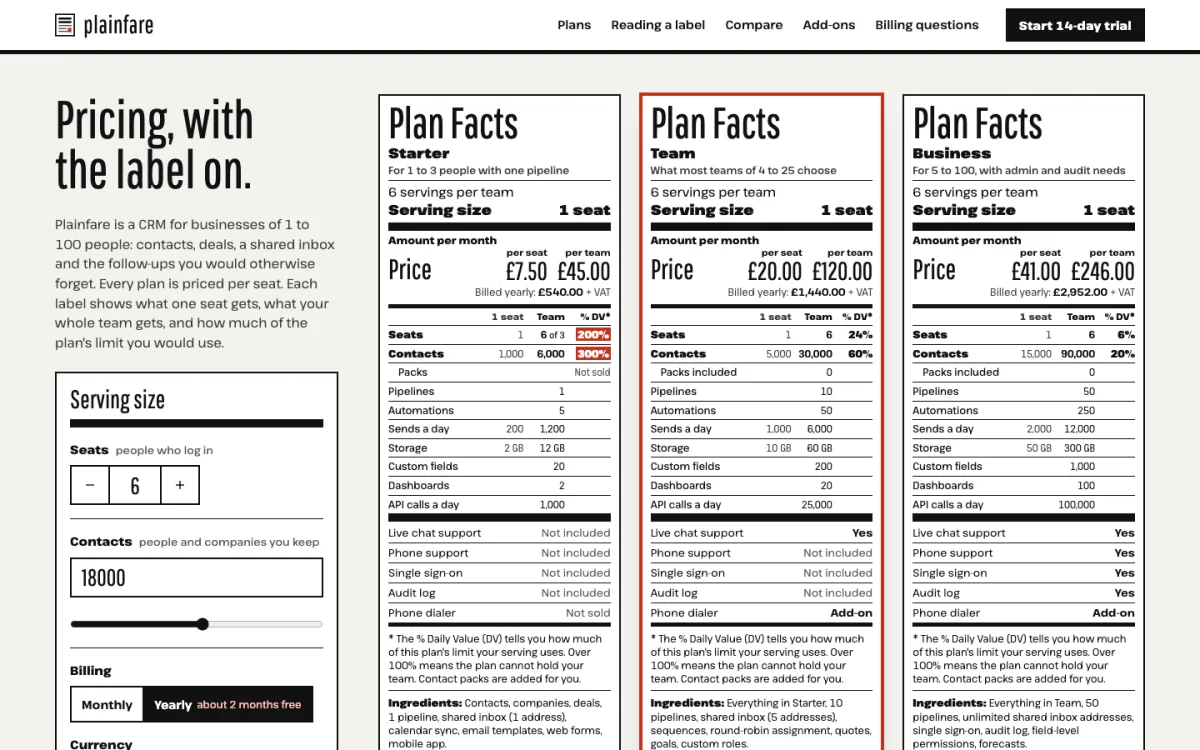
A shelf of nutrition-facts labels, one per plan: heavy rules, bold totals, per-seat and per-team columns and limits printed as % Daily Value.
The pricing page is a shelf of food labels. Each plan gets its own Plan Facts panel set with the three rule weights of a nutrition label: the serving size is one seat, the price sits where calories would in the biggest type, with a per-seat and a per-team column, and the limits for seats and contacts are printed as % Daily Value, the share of the plan's limit your team would use. Over 100% is printed in red and means the plan cannot hold you.
The serving-size panel is the estimator: seats, contacts on a logarithmic slider or typed, monthly or yearly billing and GBP, EUR or USD at stated fixed rates. Every label recalculates, the cheapest plan that fits gets the red outline, and the arithmetic is written out underneath as a linear-format label: seats times unit price, contact packs, add-ons, the yearly total, VAT for the chosen country and the saving against monthly billing. Over 100 seats or 1.5 million contacts it sends you to sales.
Below are an annotated label explaining how to read it, the full declaration of every limit per plan (one plan at a time on phones), add-ons as single-item labels that join the serving when ticked, tax and currency stated in two fact tables, billing questions, and a checkout with an order label, inline validation and loading, error, offline, success and sales states. Black and white with one red; everything is type and rules, no images.
The brand is fictional: Plainfare, a CRM for businesses of 1 to 100 people, made in Leeds. Names, people and figures on the page are invented.
What works
- Serving size: seats stepper and field, contacts field and logarithmic slider, with inline validation
- Monthly or yearly billing and GBP, EUR or USD: all labels, the arithmetic, the comparison and checkout follow
- Three plan labels recalculate; cheapest fit is outlined in red; plans that cannot hold the serving say why
- Linear-format label writes out the arithmetic, VAT and the yearly saving
- Add-ons (phone dialer, sandbox, onboarding) join the serving and can rule plans out
- Plan tabs for the labels and the comparison table on narrow screens, with arrow-key support
- Choose any plan for checkout, or go back to the cheapest fit
- Checkout: country sets VAT, EU VAT number gives reverse charge, validation, loading, error with retry, offline, success, and a sales form for enterprise servings
- Billing questions accordion
States you can link to
script.js reads these from the URL, so you can open the page in a given state to review it, screenshot it or show it to an agent.
| Parameter | What it does |
|---|---|
?seats=2&contacts=1500 | a two-person shop: Starter becomes the cheapest fit. Open ?seats=2&contacts=1500 |
?seats=40&contacts=300000 | Team cannot hold 40 seats; Business is the only fit, with contact packs. Open ?seats=40&contacts=300000 |
?billing=monthly&cur=usd | monthly billing in US dollars, with the yearly saving stated. Open ?billing=monthly&cur=usd |
?addons=dialer,sandbox | add-ons in the serving; only Business sells a sandbox. Open ?addons=dialer,sandbox |
?state=enterprise | 140 seats and 600,000 contacts: no label fits, checkout becomes a sales form. Open ?state=enterprise |
?state=overlimit | Starter chosen for 6 seats: the order label says why it cannot be bought. Open ?state=overlimit |
?state=invalid | checkout with every validation message showing. Open ?state=invalid |
?state=loading | checkout filled and sending. Open ?state=loading |
?state=error | billing could not be reached; nothing charged, try again. Open ?state=error |
?state=offline | the offline notice in checkout. Open ?state=offline |
?state=success | the subscription started confirmation. Open ?state=success |
Use it
Copy templates/factslabel/ into your project, or download the zip, which has the Screenery badge script already removed. Colours, type, spacing and radii are custom properties at the top of style.css. This template loads no libraries: only its own files and web fonts.
The docs explain the token pattern and how to move a template into React, Vue, Svelte or Astro. The guide has prompts for handing it to a coding agent.