Gainstage
Podcast hosting pricing page template · Software and web
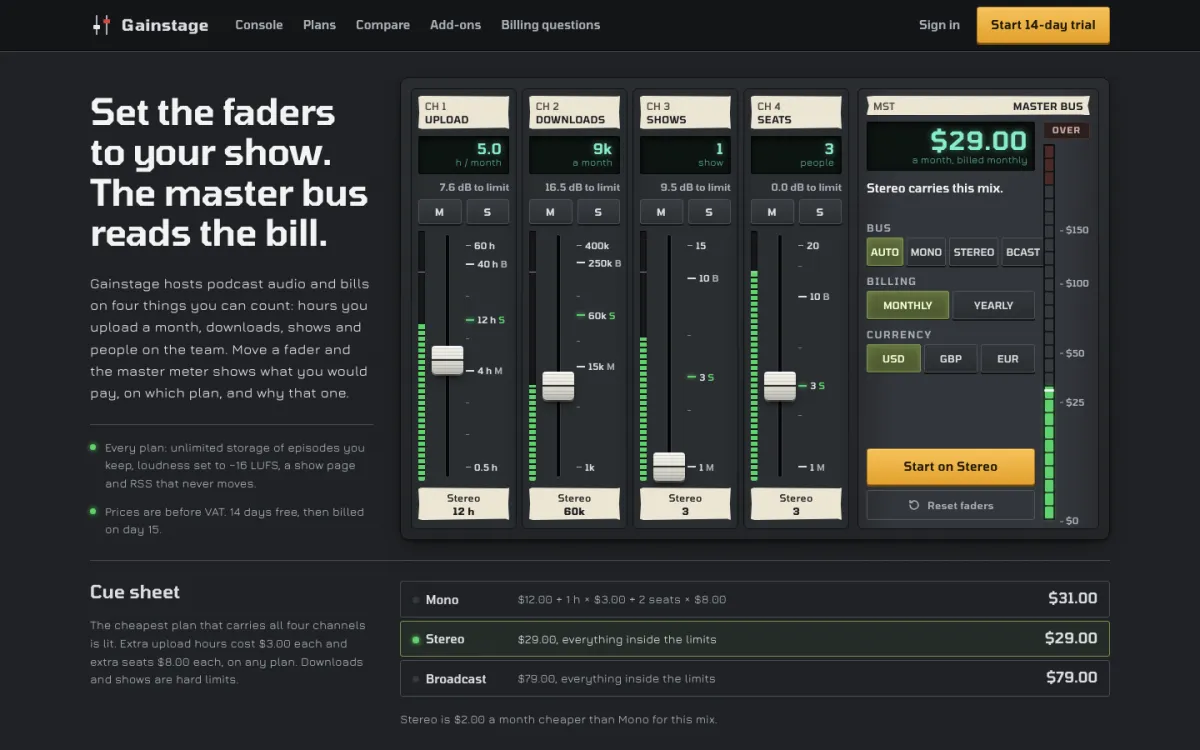
A broadcast mixing desk: anodised charcoal channel strips with cream scribble-strip tape, long-throw faders, LED meters, a VFD readout and a master bus that reads the bill.
The pricing page is a mixing console. Four channel strips stand for the four things Gainstage bills on: upload hours a month, downloads, shows and team seats. Each strip has a long-throw fader with the plan limits marked on its scale, a VFD readout, a meter in dB against the current plan's limit (green inside, amber when an add-on is paying for it, red when the plan cannot carry it), and mute and solo buttons. The master bus shows the monthly bill on an LED ladder: the base price in green, add-ons in amber, and the over lamp and top segments in red when a plan limit is passed.
Below the console the cue sheet writes out the arithmetic for every plan for the current mix and lights the cheapest one. Three plans appear as scenes that can be recalled onto the faders, with the recommended one saying why. A full comparison switches to one plan at a time on phones, add-ons sit in an insert rack, and tax, currency and billing questions are answered plainly. Checkout is a paper track sheet with VAT by country, reverse charge for EU businesses, validation, loading, error and success, and it turns into a note to an engineer when the mix needs a Network plan.
Everything is drawn in CSS and inline SVG. Prices are in US dollars with fixed sample rates for pounds and euros, and every total on the page is the sum of the lines shown.
The brand is fictional: Gainstage, podcast audio hosting from a converted printworks in Cardiff. Names, people and figures on the page are invented.
What works
- Four faders: drag the cap, click the slot to jump, arrows step, Page Up and Page Down jump five steps, Home and End
- Mute drops a channel to its floor; solo prices one channel on its own
- Bus keys: Auto picks the cheapest plan that carries the mix, or pin Mono, Stereo or Broadcast to see where it breaks
- Monthly or yearly billing (ten months for twelve) and USD, GBP or EUR, shared by every price on the page
- Recall a plan scene onto the console; reset faders
- Cue sheet with each plan's sum and the saving against the next plan
- Comparison with a plan switcher on phones (arrow keys move between plans)
- Track sheet checkout: plan, billing, country VAT, EU VAT number check, inline validation, loading, error with retry, success; Network contact form
States you can link to
script.js reads these from the URL, so you can open the page in a given state to review it, screenshot it or show it to an agent.
| Parameter | What it does |
|---|---|
?state=network | a mix past Broadcast: the meter peaks into red and the checkout becomes a note to an engineer. Open ?state=network |
?state=over | the bus pinned to Mono with 24,000 downloads: Mono cannot carry it, red over lamp, Stereo suggested. Open ?state=over |
?billing=yearly | yearly billing everywhere, with per-month equivalents and annual totals. Open ?billing=yearly |
?currency=gbp | prices in pounds at the fixed sample rate (also eur). Open ?currency=gbp |
?plan=broadcast | recalls the Broadcast scene onto the faders (also mono, stereo). Open ?plan=broadcast |
?solo=downloads | solos the downloads channel (any channel id: hours, downloads, shows, seats). Open ?solo=downloads |
?mute=seats | mutes the seats channel. Open ?mute=seats |
?compare=broadcast | shows the Broadcast column in the phone comparison. Open ?compare=broadcast |
?state=loading | a filled track sheet mid-send. Open ?state=loading |
?state=error | a filled track sheet with the payment processor timeout error and retry. Open ?state=error |
?state=success | the trial started: sign-in link, first charge date and invoice number. Open ?state=success |
?state=sales | the Network contact form, filled in. Open ?state=sales |
Use it
Copy templates/faders/ into your project, or download the zip, which has the Screenery badge script already removed. Colours, type, spacing and radii are custom properties at the top of style.css. This template loads no libraries: only its own files and web fonts.
The docs explain the token pattern and how to move a template into React, Vue, Svelte or Astro. The guide has prompts for handing it to a coding agent.