Valence
GPU cloud pricing page template · Software and web
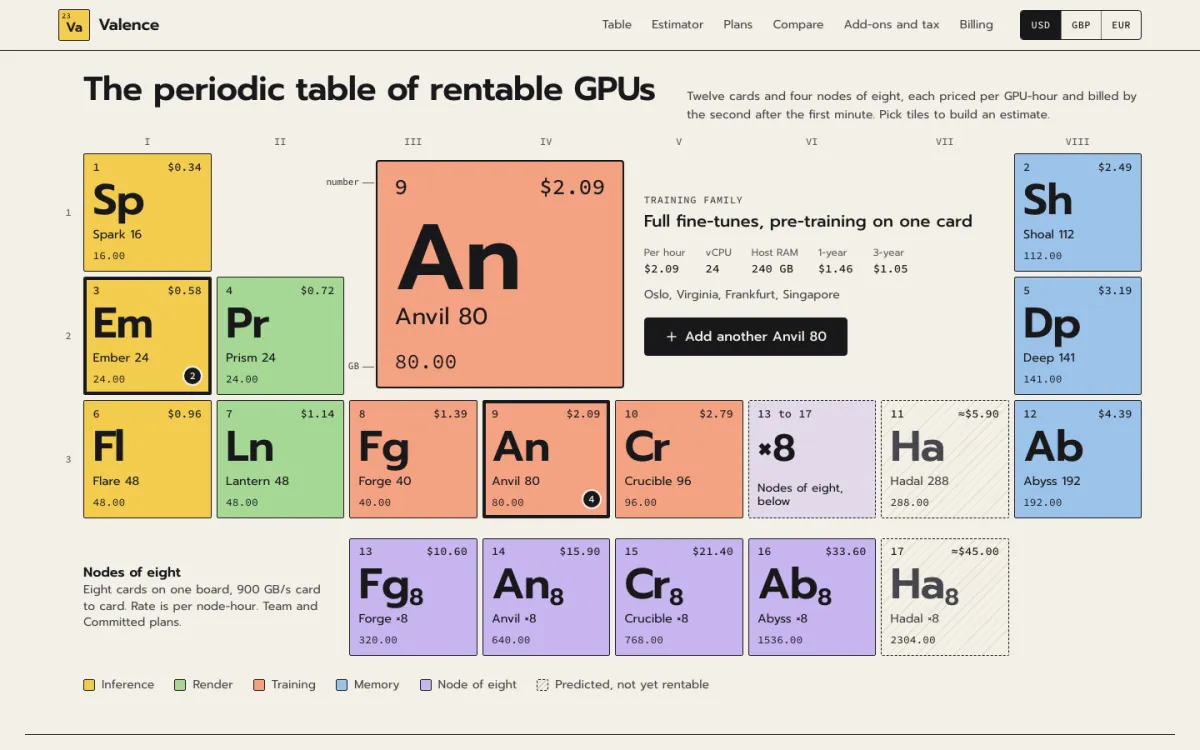
A printed classroom periodic table: chart paper, ink rules, flat family colours, every rentable GPU an element tile with its number, symbol, hourly rate and memory as atomic mass.
The first screen is the rate card printed as a periodic table. Twelve single cards sit in four colour families (inference, render, training, memory), each tile with its catalogue number, symbol, price per GPU-hour and memory in gigabytes where the atomic mass would be. The nodes of eight hang below in a detached row, reached from a pointer cell the way the lanthanides are, and two predicted cards are printed as hatched gaps with estimated rates. The empty block in the middle of the table is the key: hover or focus a tile and it is drawn large there with its use, vCPU, host RAM, 1 and 3-year rates and regions.
Picking a tile drops it into the estimator, where the selection is written as a compound formula (Em2An4, or (An8)2 for nodes) with its card count, molar mass in GB and GPU-hours. Hours a month, region multiplier, commitment and block storage feed a bill sheet that prints every line's arithmetic, compares on demand with 1 and 3-year reservations billed for all 730 hours, names the break-even hour, and prices the same month on each plan. It recommends the cheapest plan that fits and warns at the edges: over 8 cards or nodes on pay as you go, a card not offered in the chosen region, the Committed minimum, reservations sitting idle, or past 512 cards where a contract takes over.
Below are the three plans with a monthly or yearly switch (the yearly Team fee is shown per month and per year with the saving), a full comparison that becomes a one-plan-at-a-time switcher on phones, add-ons, VAT and the fixed sample exchange rates behind the USD, GBP and EUR switch, billing questions, and an account or capacity request form whose summary carries the same numbers through to tax. Everything is drawn in HTML and CSS; there are no images.
The brand is fictional: Valence, a GPU cloud from Leith that rents cards by the hour in Oslo, Virginia, Frankfurt and Singapore. Names, people and figures on the page are invented.
What works
- Periodic table: hover or focus a tile to draw it in the key, click to add or remove it from the estimate
- Estimator: per-card steppers, remove, empty-state presets, hours slider and number field with presets, region, commitment and storage
- Bill sheet: compound formula, per-line arithmetic, on demand against reserved bars with break-even, plan totals, cheapest plan and edge warnings
- Currency switch (USD, GBP, EUR at fixed sample rates) that reprices every number on the page
- Monthly and yearly billing switch for the Team fee
- Comparison table with a plan switcher on phones
- Account form: plan choice that follows the estimate, inline validation (workspace, email, country, VAT number, cards, terms), loading, error with retry, success
- Order summary with tax by country and EU reverse charge
- Phone dock showing the compound and its monthly total
States you can link to
script.js reads these from the URL, so you can open the page in a given state to review it, screenshot it or show it to an agent.
| Parameter | What it does |
|---|---|
?pick=An4,Em2,An8x2 | sets the compound (symbol plus count, 8x for nodes). Open ?pick=An4,Em2,An8x2 |
?hours=600 | hours a month per card (1 to 730). Open ?hours=600 |
?region=sea | region: nor, use, eu or sea. Open ?region=sea |
?term=1y | commitment: od, 1y or 3y. Open ?term=1y |
?currency=gbp | shows every price in pounds (or eur). Open ?currency=gbp |
?billing=yearly | Team fee on yearly billing. Open ?billing=yearly |
?state=empty | the empty flask with preset compounds. Open ?state=empty |
?state=edge | 12 cards in Singapore on a 1-year term at 220 h: region and idle-reservation warnings, pay as you go ruled out. Open ?state=edge |
?state=enterprise | seventy Anvil nodes (560 cards): no plan fits, capacity contract. Open ?state=enterprise |
?state=loading | account form held in its sending state. Open ?state=loading |
?state=error | account form after a failed send, with retry. Open ?state=error |
?state=success | account opened confirmation. Open ?state=success |
?state=sales | Committed capacity request filled in. Open ?state=sales |
?show=key:Ab | draws a given tile in the key on load. Open ?show=key:Ab |
Use it
Copy templates/elements/ into your project, or download the zip, which has the Screenery badge script already removed. Colours, type, spacing and radii are custom properties at the top of style.css. This template loads no libraries: only its own files and web fonts.
The docs explain the token pattern and how to move a template into React, Vue, Svelte or Astro. The guide has prompts for handing it to a coding agent.