Lockjaw
Password manager landing page template · Software and web
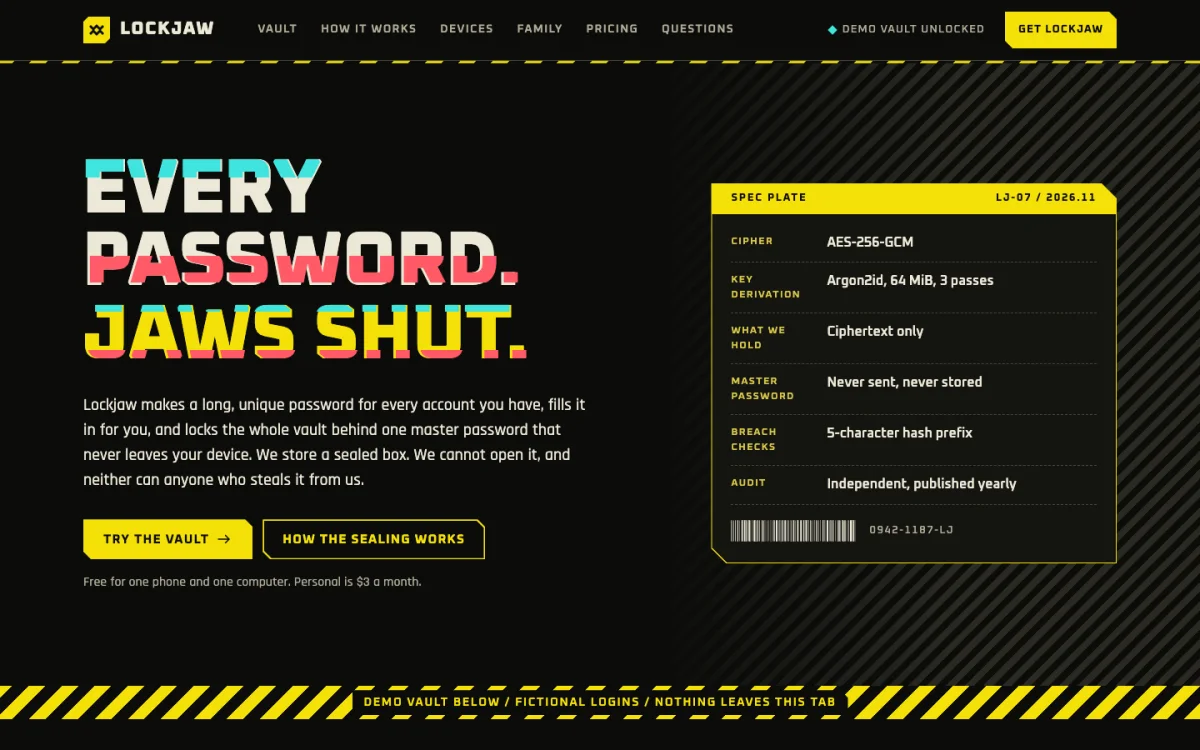
Cyberpunk hazard tape: yellow on near-black, clipped-corner plates, diagonal stripes as structure, barcodes and data plates, and short RGB glitch slices on headings only.
The page is hazard tape and data plates: a slab headline that flickers with a short RGB-split glitch, a spec plate with a barcode, and stripe bands that divide the chapters. Glitch slices live only on headings, happen once as each one comes into view and rarely after that, and are switched off entirely with reduced motion. Body text and controls never glitch.
The signature is the Lockjaw app running in the page with a demo vault of sixteen fictional logins. Search and filter by category, open a login to reveal or copy it, and replace a weak or breached password with one from the generator. The generator makes random passwords or passphrases from a built-in 256-word list and shows its entropy with the sum written out. The strength checker explains why a password is weak (length, character pools, common list, dictionary words, look-alike swaps, runs, repeats, years and the Capital-word-digits shape) and states that nothing leaves the tab. Breach watch counts open alerts, reused and weak passwords from the vault itself. The whole app locks behind a demo master password, shakes on a wrong one and locks out for 30 seconds after five tries.
Below the app, zero-knowledge is drawn as a flow from phone to server to laptop, with a box that seals a note with real AES-256-GCM in the browser. Then the devices with a drawn rig and capability table, family sharing as a permissions matrix you can change, plans with a monthly and yearly toggle whose numbers add up, a sign-up form with live master-password strength, validation, loading, error and success with an emergency kit key, questions and a footer data plate. Everything is drawn in CSS and SVG.
The brand is fictional: Lockjaw, a fictional zero-knowledge password manager from Leeds. Names, people and figures on the page are invented.
What works
- Vault tabs with arrow-key navigation: Logins, Generator, Strength, Breach watch
- Logins: search (press / to focus, Escape to clear), category radios with counts, empty state, detail with reveal, copy and replace
- Generator: length slider, four character sets, leave out look-alikes, passphrase mode with word count, separator, capital and number; copy with a copied state; entropy explained
- Strength checker: live verdict, bits, time to guess and a reasons list, with sample passwords to try
- Breach watch: computed tallies, replace password resolves the alert, open the login in the vault
- Lock and unlock with the demo master password lantern-anvil-harbor; wrong-password shake; lockout countdown after five tries
- Seal a note with real AES-256-GCM in the browser
- Family permissions matrix: choose a person, click cells to cycle None, View, Edit
- Pricing monthly and yearly toggle; choose a plan to fill the sign-up
- Sign-up: inline validation, master-password meter, loading, error with retry, taken-email error (any @taken.example), success with an emergency kit key
- Questions accordion
States you can link to
script.js reads these from the URL, so you can open the page in a given state to review it, screenshot it or show it to an agent.
| Parameter | What it does |
|---|---|
?state=locked | shows the vault locked behind the master password screen. Open ?state=locked |
?state=lockout | shows the lockout after five wrong tries with the 30 second countdown. Open ?state=lockout |
?state=unlocked | scrolls to the unlocked vault. Open ?state=unlocked |
?gen=passphrase | opens the generator in passphrase mode with seven words. Open ?gen=passphrase |
?tab=breach | opens a vault tab: logins, generator, checker or breach. Open ?tab=breach |
?check=demo | opens the strength checker with Summer2024! and its reasons. Open ?check=demo |
?state=error | fills and submits the sign-up and shows the failed-to-create state. Open ?state=error |
?state=success | fills and submits the sign-up and shows the vault created with an emergency kit key. Open ?state=success |
Use it
Copy templates/cyber/ into your project, or download the zip, which has the Screenery badge script already removed. Colours, type, spacing and radii are custom properties at the top of style.css. This template loads no libraries: only its own files and web fonts.
The docs explain the token pattern and how to move a template into React, Vue, Svelte or Astro. The guide has prompts for handing it to a coding agent.
Inspection
Loaded in Chromium 156.0.8078.4 (Playwright, headless) on 27 November 2026 at 1440, 1024, 768, 390 pixels wide and once more with reduced motion requested. Every check passed at every width.
- 1440 px
- Pass
- 1024 px
- Pass
- 768 px
- Pass
- 390 px
- Pass
- Reduced motion
- Pass
- Page weight
- 189 KB, 8 requests
Requests and transferred size were measured at 1440 pixels on a cold cache and include web fonts and any CDN library. The full result is in the viewer: open the Checks panel. How templates are checked.