Matinee
Course platform pricing page template · Culture and learning
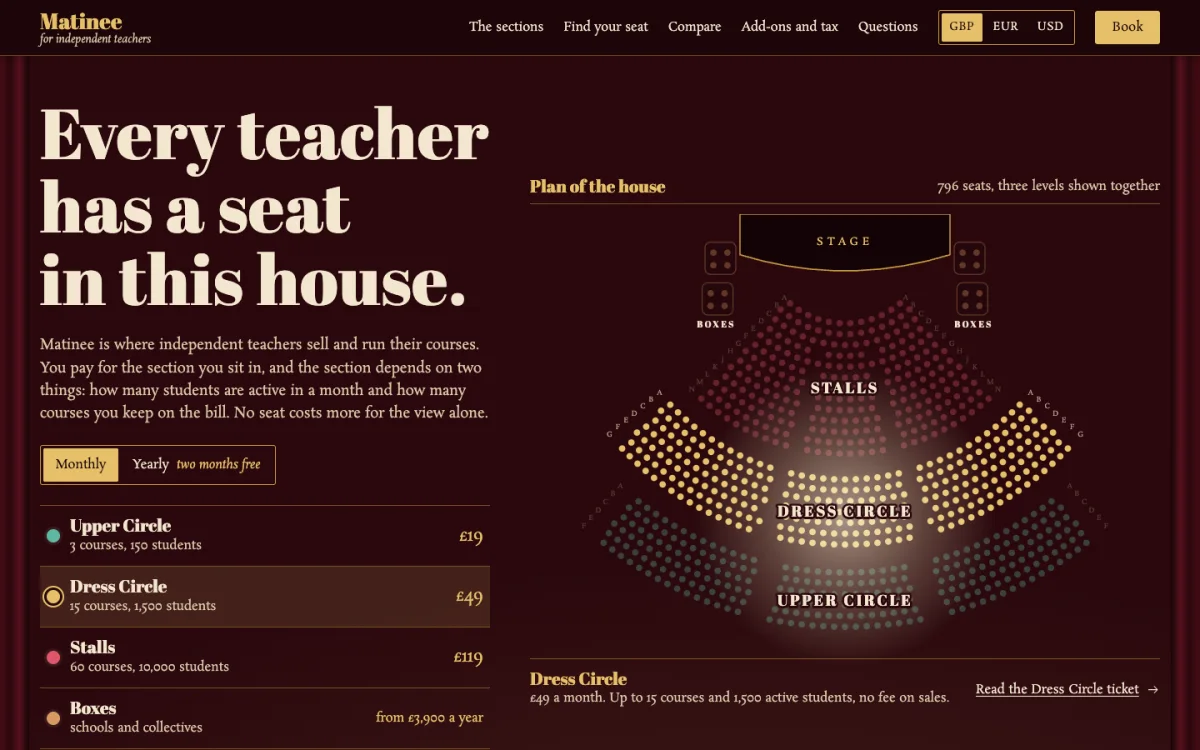
A Victorian playhouse box office: velvet auditorium ground, programme paper, gilt rails, and a seat plan printed in price bands where each section of the house is a plan.
The first screen is the plan of the house. Matinee prices its course platform like a theatre: the Upper Circle (£19 a month, 3 courses, 150 active students, 5% fee on sales), the Dress Circle (£49, 15 courses, 1,500 students, no fee), the Stalls (£119, 60 courses, 10,000 students) and private Boxes for schools from £3,900 a year. The seat plan is drawn in SVG with every seat in its price-band colour; choose a section on the plan or in the price key and a follow spot glides to it while the rest of the house dims.
Each section is then a ticket with its rows, real limits and an honest restricted-view line, and the Dress Circle carries a recommendation that says why: it is the first section without a fee on sales, so above £600 a month in sales it costs less than the Upper Circle. A monthly or yearly switch (ten months for twelve) and a GBP, EUR or USD switch at fixed stated rates reprice the whole page. The estimator takes active students, courses and monthly sales, prints the sum for every section, seats you in the cheapest one that fits with a marker on the plan, adds student packs where they are cheaper than moving up, and warns at the edges.
A full comparison table becomes a one-section-at-a-time switcher on phones. Add-ons, VAT and currency are set out like the interval bar menu, and billing questions cover proration, refunds, cancelling, invoices and the charity and school concession. The box office books a seat with add-on steppers, concession, country VAT or EU reverse charge, inline validation, a loading state, a card-processor error and a booked ticket, or switches to an enquiry form for Boxes.
The brand is fictional: Matinee, a course platform for independent teachers, run from a former scenery paint frame in Bristol. Names, people and figures on the page are invented.
What works
- Seat plan: click or focus a section (Enter or Space) to select it; the follow spot moves, other levels dim and the readout reprices
- Price key rows select sections and stay in sync with the plan, tickets and the box office
- Billing switch monthly or yearly, with per-month equivalent, yearly total and the saving on every ticket
- Currency switch GBP, EUR, USD at fixed rates of 1.17 and 1.27; every price, add-on and total is recomputed
- Estimator: sliders paired with number fields (validated), the sum for each section, cheapest fitting section with a seat marker on the plan, student packs, edge warnings and a book button that carries the seat to the box office
- Comparison: full table on wide screens, section switcher on phones; sticky column heads
- Questions accordion (native details)
- Box office: section and billing choice, add-on steppers limited per section, concession, VAT by country or EU reverse charge with VAT number check, inline validation, loading, error with retry, booked ticket, box enquiry mode
States you can link to
script.js reads these from the URL, so you can open the page in a given state to review it, screenshot it or show it to an agent.
| Parameter | What it does |
|---|---|
?plan=stalls | opens with the Stalls selected on the plan and at the box office (any of upper, dress, stalls, boxes). Open ?plan=stalls |
?billing=yearly | yearly prices: ten months for twelve, with per-month equivalents. Open ?billing=yearly |
?cur=eur | all prices in euros at the stated rate (also usd). Open ?cur=eur |
?students=2800&courses=9&sales=3400 | the estimator seats you in the Dress Circle with three student packs and warns it is the last pack. Open ?students=2800&courses=9&sales=3400 |
?students=12000&courses=20 | no public section fits: the estimator sends you to the box office for a box. Open ?students=12000&courses=20 |
?compare=upper | the comparison switcher on phones opens on the Upper Circle. Open ?compare=upper |
?state=success | fills a Dress Circle booking with a student pack and UK VAT, submits and shows the booked ticket. Open ?state=success |
?state=error | fills and submits, the card processor does not answer; booking again succeeds. Open ?state=error |
?state=loading | fills and submits, holding in the loading state. Open ?state=loading |
?state=invalid | submits the empty form to show every inline error. Open ?state=invalid |
?state=boxes | the box office switches to a Boxes enquiry, filled in. Open ?state=boxes |
Use it
Copy templates/theatre/ into your project, or download the zip, which has the Screenery badge script already removed. Colours, type, spacing and radii are custom properties at the top of style.css. This template loads no libraries: only its own files and web fonts.
The docs explain the token pattern and how to move a template into React, Vue, Svelte or Astro. The guide has prompts for handing it to a coding agent.