Farestage
Shipping API pricing page template · Travel and outdoors
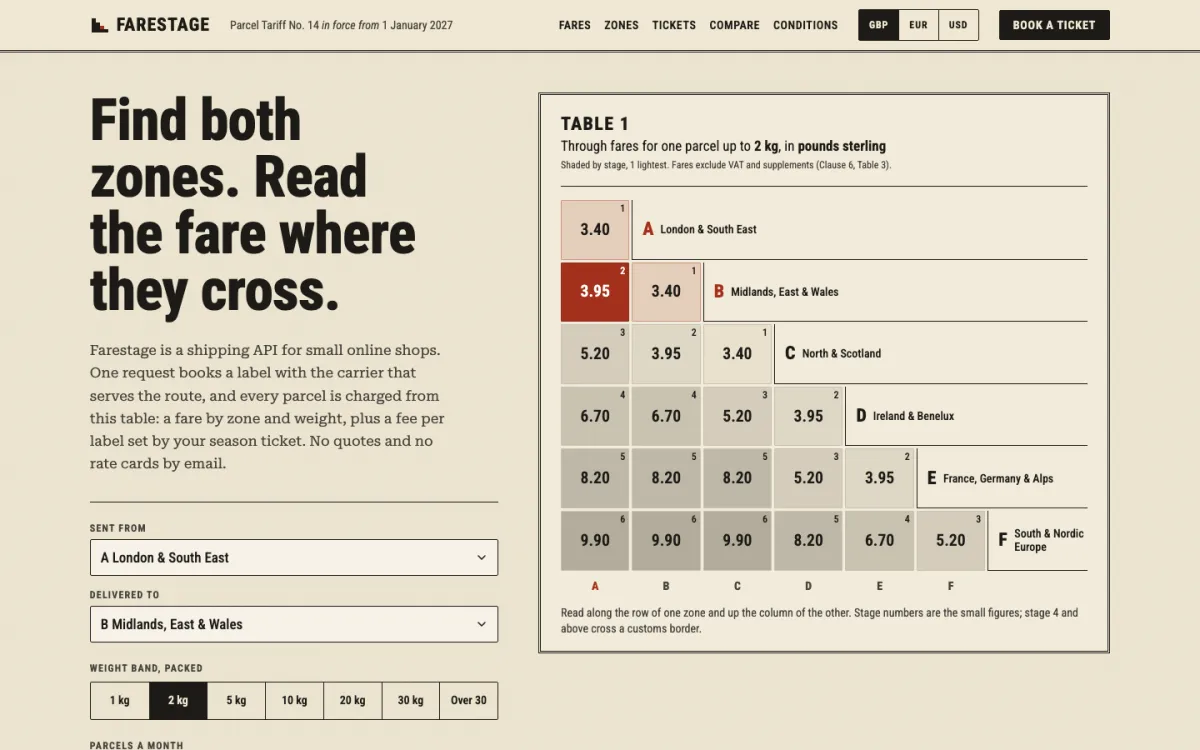
A printed railway tariff booklet: cream paper, letterpress black, double rules, a triangular staircase fare table, numbered clauses and one signal red that only marks your route and the recommended ticket.
The page is a railway tariff booklet for a shipping API. The first screen is Table 1, a triangular staircase fare table: six zones step down the diagonal and the fare for a parcel sits where the row of one zone meets the column of the other, shaded darker as the stage rises. Picking two zones, a weight band and parcels a month lights the route along the row and up the column, cell by cell, into the crossing.
Under the table the fare is worked out in full for each of the three season tickets: ticket fee, label fees beyond those included, fares less the ticket's discount, the monthly total and the all-in cost per parcel. The cheapest ticket that can carry the volume is recommended with the saving against the runner-up and the volume at which the next ticket overtakes it; customs, caps, the Highlands supplement, parcels over 30 kg and volumes past every cap get their own warnings. A folded specimen shows what the API returns for that parcel.
Below are the zones as a strip map, Table 2 season tickets with a monthly or yearly switch (ten months for twelve), Table 3 supplements with the VAT and currency rules, Table 4 the full comparison (one ticket at a time on phones), the billing conditions as numbered clauses, and the booking office: a ticket and details form with inline validation, a perforated summary ticket with VAT, loading, error and a green Edmondson card ticket on success. There are no photographs.
The brand is fictional: Farestage, a parcel shipping API for small online shops, run from a goods yard office in Leeds. Names, people and figures on the page are invented.
What works
- Table 1: tap any cell to set both zones; arrow keys move around the staircase
- Route, weight band (1 kg to over 30 kg) and parcels a month (slider and number, validated)
- Worked arithmetic for Single, Season and Through with the cheapest ticket recommended, saving, crossover volume and warnings
- API response specimen that follows the chosen parcel
- Zone strip map: choose your warehouse zone, see its stage to every zone
- GBP / EUR / USD switch across every figure on the page
- Monthly / yearly switch with the per-month equivalent and the saving
- Ticket columns state where each is cheapest at your fare
- Comparison table with a ticket switcher on phones
- Conditions accordion
- Booking office: ticket choice, VAT rules by country, inline validation, loading, error, success, book another
States you can link to
script.js reads these from the URL, so you can open the page in a given state to review it, screenshot it or show it to an agent.
| Parameter | What it does |
|---|---|
?from=A&to=E&w=3&n=900 | sets route, weight band (0 to 5, or over) and parcels a month. Open ?from=A&to=E&w=3&n=900 |
?w=over | a parcel over 30 kg: no fare, Goods office. Open ?w=over |
?n=18000 | past every ticket's cap: Goods office. Open ?n=18000 |
?n=80&from=C&to=C | Single recommended, with the Highlands warning. Open ?n=80&from=C&to=C |
?period=yearly | yearly billing everywhere. Open ?period=yearly |
?cur=eur | prices in euros (or usd). Open ?cur=eur |
?plan=goods | picks a ticket in the booking office (single, season, through, goods). Open ?plan=goods |
?view=2 | shows Through in the phone comparison (0, 1, 2). Open ?view=2 |
?state=loading | booking form filled and sending. Open ?state=loading |
?state=error | booking fails once with the could-not-reach-the-line notice. Open ?state=error |
?state=success | booking succeeds and shows the issued card ticket. Open ?state=success |
Use it
Copy templates/tariff/ into your project, or download the zip, which has the Screenery badge script already removed. Colours, type, spacing and radii are custom properties at the top of style.css. This template loads no libraries: only its own files and web fonts.
The docs explain the token pattern and how to move a template into React, Vue, Svelte or Astro. The guide has prompts for handing it to a coding agent.