Portvane Ferries
Ferry timetable and booking template · Travel and outdoors
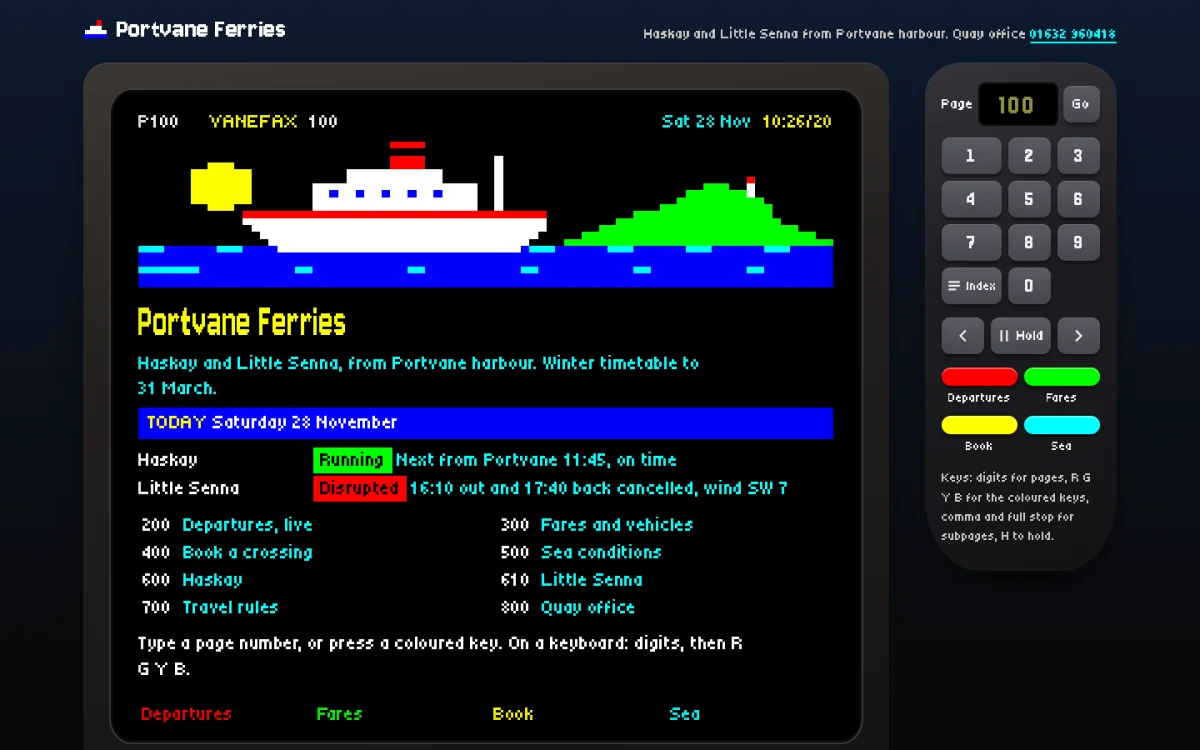
A 1980s broadcast teletext service on a drawn television: black screen, the eight teletext colours, double-height headings, sixel mosaic graphics, a ticking header row and four fastext keys on a remote.
The page is a teletext service called VANEFAX, shown on a drawn television with a remote beside it. The header row carries the page you asked for, the service name, the page being broadcast, the date in cyan and a ticking yellow clock. Type three digits on the remote, the keypad or the keyboard and the header counts through the pages going past until yours comes round; the four coloured fastext keys (or R, G, Y and B) jump to the pages each screen links to. Every page is a real section with its own heading, and screen readers hear which page has arrived.
Page 100 opens on a mosaic of the Curlew crossing to Haskay, built from 2 by 3 sixel blocks, with today's running status for both routes. Page 200 is the departures board, worked out from the visitor's clock: sailed, boarding (flashing, as teletext did), expected late, on time and a weather cancellation on the Little Senna route. It has two subpages that rotate unless you press HOLD. Fares are on 300, sea conditions with a mosaic wind compass and an hourly wind-force chart on 500, the two islands with mosaic maps on 600 and 610, travel rules with Curlew's car deck on 700 and the quay office on 800.
Page 400 books a crossing in three subpages: route, ticket, date and sailing (gone and cancelled sailings are disabled with the reason); passengers and vehicle length; then name, mobile and the price written out line by line, with the total in words. Each step validates inline with specific messages. Sending shows a waiting screen while the header counts towards 401, can fail with a retry that keeps your details, and lands on page 401 with the booking reference. Without JavaScript every page is listed in order and the fastext links still jump between them.
The brand is fictional: Portvane Ferries, two boats from Portvane harbour: MV Curlew to Haskay and MV Tern to Little Senna. Names, people and figures on the page are invented.
What works
- Page entry: three digits from the remote field, the keypad or the keyboard; the header shows P2-- while typing and rolls through page numbers until the page arrives
- Fastext: four coloured links on the screen's last row and four keys on the remote, relabelled per page; R G Y B (or C) on the keyboard
- Subpages: previous and next keys (comma and full stop), automatic rotation on departures and fares, HOLD (H) stops it; rotation also pauses on hover and focus
- Departures: statuses from the visitor's clock every 20 seconds, the next sailing pointed out, boarding rows flash
- Booking step 1: route, single or return, date within 60 days, sailing list that disables gone and cancelled sailings
- Booking step 2: passenger steppers, vehicle on or off, length with per-route maximum (6.0 m on Tern, 10.0 m on Curlew)
- Booking step 3: name and UK mobile validation, price lines with per-half-metre vehicle charge, total in words, send with loading, error and success
- Page 401 booking reference with a summary; make another booking resets the form
- Unknown page numbers search for a moment, then say the page is not in service
- Browser back and forward move between pages; ?page= opens any page
States you can link to
script.js reads these from the URL, so you can open the page in a given state to review it, screenshot it or show it to an agent.
| Parameter | What it does |
|---|---|
?page=200 | opens on the departures board (any page number: 100, 300, 400, 500, 600, 610, 700, 800). Open ?page=200 |
?page=200&sub=2 | departures, Little Senna subpage with the weather cancellation. Open ?page=200&sub=2 |
?time=16:12&page=200 | runs the clock from 16:12: the 16:15 to Haskay, running 10 min late, is boarding and flashing. Open ?time=16:12&page=200 |
?state=invalid | booking step 1 with no date or sailing chosen, showing both inline errors. Open ?state=invalid |
?state=loading | a filled booking sent and held on the waiting screen. Open ?state=loading |
?state=error | a filled booking sent; the booking computer does not answer, send again succeeds. Open ?state=error |
?state=success | a filled booking sent and confirmed on page 401 with reference PVH 4827. Open ?state=success |
?page=345 | a page that is not in service. Open ?page=345 |
Use it
Copy templates/teletext/ into your project, or download the zip, which has the Screenery badge script already removed. Colours, type, spacing and radii are custom properties at the top of style.css. This template loads no libraries: only its own files and web fonts.
The docs explain the token pattern and how to move a template into React, Vue, Svelte or Astro. The guide has prompts for handing it to a coding agent.
Inspection
Loaded in Chromium 156.0.8078.4 (Playwright, headless) on 28 November 2026 at 1440, 1024, 768, 390 pixels wide and once more with reduced motion requested. Every check passed at every width.
- 1440 px
- Pass
- 1024 px
- Pass
- 768 px
- Pass
- 390 px
- Pass
- Reduced motion
- Pass
- Page weight
- 113 KB, 7 requests
Requests and transferred size were measured at 1440 pixels on a cold cache and include web fonts and any CDN library. The full result is in the viewer: open the Checks panel. How templates are checked.