Satz
Phrase translator app page template · App screens
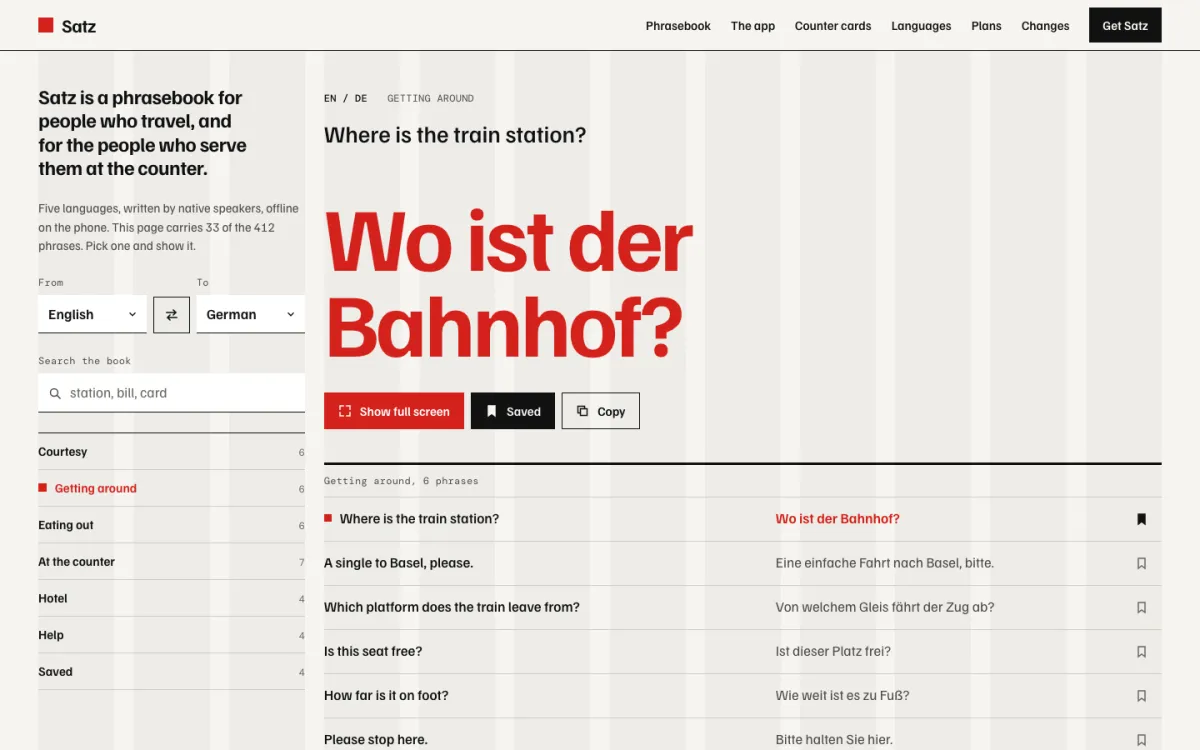
The International Typographic Style of 1950s Basel and Zurich posters: a visible twelve-field grid, flush-left ragged-right grotesque, black on white paper and one red that only ever means the other language.
The page is a Swiss poster laid on a grid you can see: twelve pale fields, everything flush left, black type on white paper and a single red. The first screen is the working phrasebook. Pick a language pair, swap it, search in either language without caring about accents, or walk the six categories. The chosen sentence is set small in your language and very large in red in theirs, hyphenated by that language's rules, and that red sentence is the picture on the page.
Save phrases to keep them on the device, then see them set as a printable A6 counter card for the till. Show full screen turns the whole screen red with the sentence in white, for holding up across a counter; Escape closes it. A search with no result says so plainly and offers words that do exist. Below are the app drawn on a phone that mirrors your phrase, the five language packs with sizes and revision dates, how a phrase is written and checked, the three plans with a signup form that validates inline and has loading, error and success states, and dated release notes.
Every figure is drawn in CSS. The phrases are real and in the polite form: Sie, vous, Lei, usted. There are no photographs.
The brand is fictional: Satz, an offline phrasebook app for travellers and small shops, from a team in bilingual Biel/Bienne. Names, people and figures on the page are invented.
What works
- Phrasebook: language pair selects, swap button, categories with counts, saved list
- Search across both languages and English, ignoring accents and case, with highlighted matches and a no-match state with suggestions
- Save and unsave phrases from the stage or any row; saved phrases persist on the device
- Copy the translated phrase
- Show mode: full-screen red dialog with the phrase in white; Escape or Close returns focus
- Phone drawing mirrors the current pair and phrase
- Counter card: rename it, it fills from saved phrases in the current pair, Print prints only the card
- Signup: plan switch lights the plan column, tills stepper with per-plan limits, live monthly total, language chips, inline validation with specific messages, loading, error with retry, success summary
States you can link to
script.js reads these from the URL, so you can open the page in a given state to review it, screenshot it or show it to an agent.
| Parameter | What it does |
|---|---|
?from=fr&to=it | sets the language pair (en, de, fr, it, es). Open ?from=fr&to=it |
?cat=till | opens a category: greet, move, eat, till, stay, help or saved. Open ?cat=till |
?q=karte | searches the book. Open ?q=karte |
?state=nomatch | a search with no result and suggested words. Open ?state=nomatch |
?saved=demo | six counter phrases saved, filling the counter card. Open ?saved=demo |
?phrase=nuts | puts one phrase on the stage by id. Open ?phrase=nuts |
?show=1 | opens Show mode. Open ?show=1 |
?plan=counter | selects a plan: traveller, counter or street. Open ?plan=counter |
?state=invalid | submits the signup with a bad email and missing fields to show the errors. Open ?state=invalid |
?state=loading | the signup in its sending state. Open ?state=loading |
?state=error | the signup after the server failed to answer, with retry. Open ?state=error |
?state=success | the signup sent, with the plan summary and first bill date. Open ?state=success |
Use it
Copy templates/swiss/ into your project, or download the zip, which has the Screenery badge script already removed. Colours, type, spacing and radii are custom properties at the top of style.css. This template loads no libraries: only its own files and web fonts.
The docs explain the token pattern and how to move a template into React, Vue, Svelte or Astro. The guide has prompts for handing it to a coding agent.