Stride
Running app landing page template · App screens
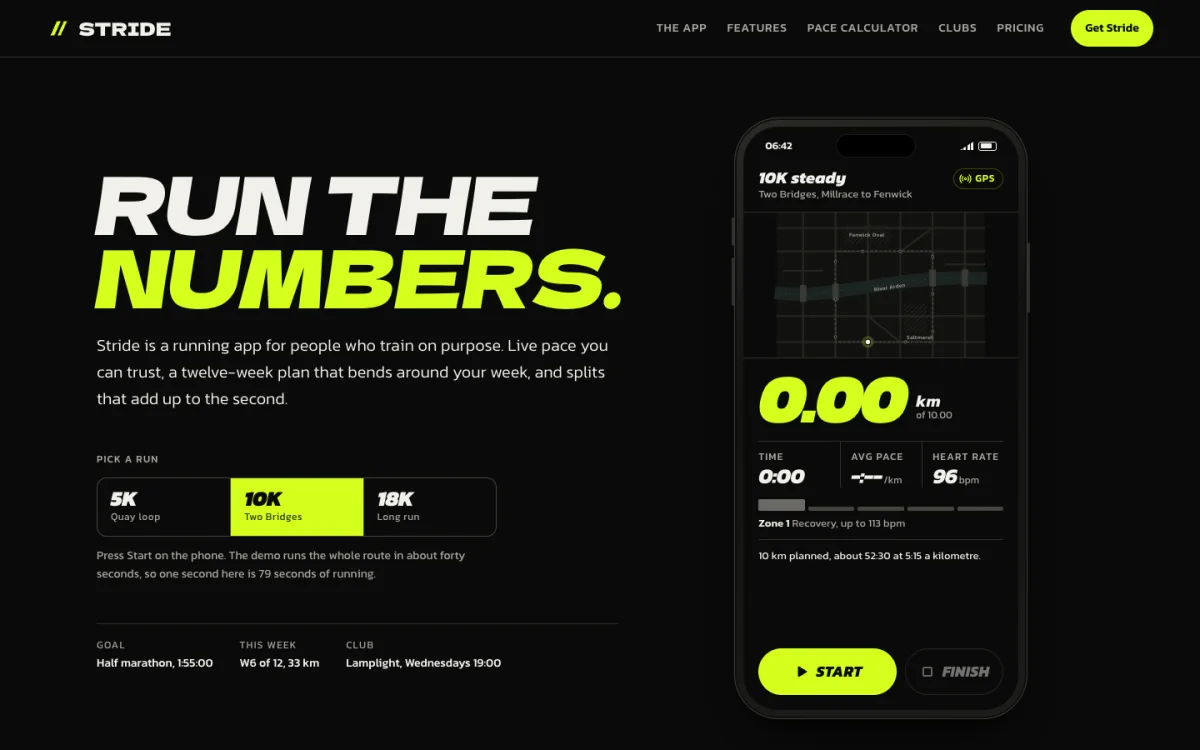
Premium sportswear after dark: jet black, one acid volt, huge italic numerals and speed streaks that answer the scroll, with the running app itself working in CSS-drawn phones.
The first screen is the app. A phone drawn in CSS shows the live run screen: pick a 5K on the Quay loop, a 10K over the Two Bridges or an 18K long run around the whole city, press Start, and after a 3, 2, 1 the route draws itself on a drawn street map while distance, time, average pace, heart rate and its zone tick up. Every number comes from one model of per-kilometre splits, so time divided by distance is always the pace shown. Pause, resume or finish at any point.
Finishing turns the phone into a post-run summary: finish time, average pace and heart rate, time in each zone, and a bar per kilometre with the fastest marked. Stop early and the last split is shown as a partial; the splits always add up to the finish time. The summary in the app section follows the run, next to a twelve-week half marathon plan where each week opens to its sessions with pace and duration.
Below are a features spec sheet, a pace calculator with inline validation, five Port Arden run clubs to filter and join, Free and Pro pricing with a monthly or yearly toggle whose sums add up, and a send-the-link form with loading, error and success. Scroll speed skews the display type and brightens the streaks behind the hero; reduced motion keeps everything still.
The brand is fictional: Stride, a fictional running and training app from Port Arden, a fictional harbour city. Names, people and figures on the page are invented.
What works
- Run picker (5K, 10K, 18K long run) as an arrow-key radio group
- Start with a 3, 2, 1 countdown, Pause, Resume, Finish; the run auto-finishes at the end of the route
- Live route drawing with kilometre ticks, a moving runner and a phone clock that follows the run
- GPS lost banner with Retry and a searching state; distance marked as estimated meanwhile
- Post-run summary with splits chart, partial last split and time in zone; New run resets
- Training plan: tap a week to open its sessions, one week open at a time
- Pace calculator: distance chips or a custom distance, h:m:s target, specific inline errors, pace per km and mile, speed and halfway
- Club pace filter and join or leave with live member counts
- Pricing monthly or yearly toggle
- Send-the-link form with validation, loading, error with retry, and success
States you can link to
script.js reads these from the URL, so you can open the page in a given state to review it, screenshot it or show it to an agent.
| Parameter | What it does |
|---|---|
?run=5k | selects the 5K tempo on the Quay loop (also 10k, long). Open ?run=5k |
?state=paused | the run paused at 60 percent of the distance. Open ?state=paused |
?state=finished | the post-run summary for the chosen run. Open ?state=finished |
?state=gpslost | a run in progress with the GPS lost banner and estimated distance. Open ?state=gpslost |
?plan=10 | opens week 10 of the training plan. Open ?plan=10 |
?calc=error | the pace calculator with a minutes error. Open ?calc=error |
?billing=monthly | pricing switched to monthly. Open ?billing=monthly |
?send=success | the send-the-link form after a successful send. Open ?send=success |
?send=error | the send-the-link form after a failed send, with retry. Open ?send=error |
Use it
Copy templates/strider/ into your project, or download the zip, which has the Screenery badge script already removed. Colours, type, spacing and radii are custom properties at the top of style.css. This template loads no libraries: only its own files and web fonts.
The docs explain the token pattern and how to move a template into React, Vue, Svelte or Astro. The guide has prompts for handing it to a coding agent.
Inspection
Loaded in Chromium 156.0.8078.4 (Playwright, headless) on 27 November 2026 at 1440, 1024, 768, 390 pixels wide and once more with reduced motion requested. Every check passed at every width.
- 1440 px
- Pass
- 1024 px
- Pass
- 768 px
- Pass
- 390 px
- Pass
- Reduced motion
- Pass
- Page weight
- 283 KB, 15 requests
Requests and transferred size were measured at 1440 pixels on a cold cache and include web fonts and any CDN library. The full result is in the viewer: open the Checks panel. How templates are checked.