Despatch
Online shop back office (orders dashboard) template · App screens
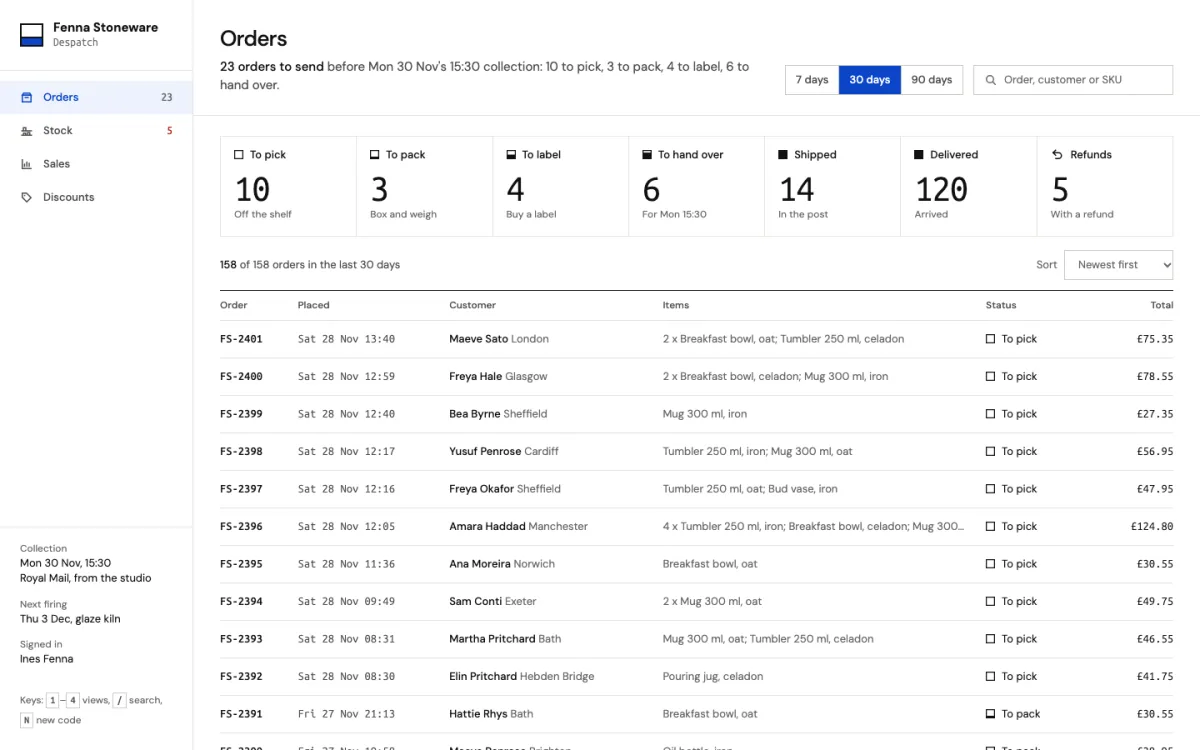
Swiss restraint on white: a 1px hairline grid that cuts every panel, flush-left DM Sans, numbers and ids in Ubuntu Sans Mono, black ink, one cobalt blue that only marks an action or a choice, and red only for low stock and errors.
This template is the app itself, filling the viewport. The sidebar holds the shop, four views with live counts (open orders, pieces low on stock) and the next Royal Mail collection, Monday 30 November at 15:30. The header carries the view title, a one-line summary written from the data, the 7, 30 and 90 day switch and search. Orders opens on a seven-cell hairline strip, to pick, to pack, to label, to hand over, shipped, delivered and refunds, each a filter, above a sortable list of 402 orders generated from a seed. Today is Saturday 28 November, the day after the SALTWEEK20 code started, so the morning's queue is long.
Opening an order slides in a drawer with the fulfilment steps: tick each piece off the shelf, choose a box and type the scale weight (checked against the pieces alone), buy a Royal Mail or DPD label with a loading state and an offline failure, then mark it handed over, which takes the pieces off the shelf. The same drawer holds the refund form: steppers for each piece, postage, a reason, a note, restock, and an amount you can lower for a partial refund, validated against what is left on the order, with loading, a card-provider error and a confirmation.
Stock shows on hand, committed to open orders and available for 17 pieces, with low and out warnings and an inline recount. Sales has six totals that add up, net sales by day as an SVG bar chart with the discount start days marked, a readout on hover or arrow keys and a table version, and sales by product with shares rounded to exactly 100%. Discounts lists four codes with uses counted from the orders and a create drawer with live preview and validation. On phones the sidebar becomes a bottom bar, rows stack and drawers are full sheets.
The brand is fictional: Despatch, the back office of Fenna Stoneware, a two-person pottery in Bristol selling tableware online. Names, people and figures on the page are invented.
What works
- Views by sidebar, bottom bar or keys 1 to 4; / focuses search; N opens a new discount; Escape closes drawers
- Date range 7, 30 or 90 days recomputes the strip, list, totals, chart and product table (with a brief skeleton)
- Status strip cells filter the order list; sort by date or total; search by order, customer, city, code or SKU; show more
- Order drawer: pick checklist, box and weight with validation, buy label (loading, offline error), mark handed over; newer and older; copy tracking
- Refund: per-piece steppers, postage, reason, note required for Other, restock, editable partial amount, loading, error and success
- Stock: all or low only, sortable columns, inline recount with validation
- Sales chart: hover or arrow keys, Home and End, readout line, table version in a disclosure
- New discount: code with suggest and uniqueness check, percent, amount or free postage, minimum basket, chosen pieces, dates, use limit, live checkout preview, saving and offline failure
- Offline banner with queued changes and Reconnect
States you can link to
script.js reads these from the URL, so you can open the page in a given state to review it, screenshot it or show it to an agent.
| Parameter | What it does |
|---|---|
?view=stock | opens a view: orders, stock, sales or discounts. Open ?view=stock |
?range=7 | sets the date range: 7, 30 or 90. Open ?range=7 |
?order=FS-2389 | opens an order waiting to be packed (FS-2395 to pick, FS-2386 to label, FS-2380 to hand over). Open ?order=FS-2389 |
?refund=FS-2364 | opens the refund form on a delivered two-line order. Open ?refund=FS-2364 |
?discount=new | opens the new discount drawer. Open ?discount=new |
?state=loading | the skeleton while orders load. Open ?state=loading |
?state=empty | a shop with no orders yet. Open ?state=empty |
?state=error | the orders failed to load, with Try again. Open ?state=error |
?state=offline | offline banner; labels, refunds and new codes fail with the draft kept. Open ?state=offline |
?state=refund-error | the first refund attempt is declined by the card provider. Open ?state=refund-error |
Use it
Copy templates/orders/ into your project, or download the zip, which has the Screenery badge script already removed. Colours, type, spacing and radii are custom properties at the top of style.css. This template loads no libraries: only its own files and web fonts.
The docs explain the token pattern and how to move a template into React, Vue, Svelte or Astro. The guide has prompts for handing it to a coding agent.