Hissbox
Podcast app page template · App screens
A 1980s blank-tape J-card: cream label card, horizontal bias stripes in chrome red, tape orange, normal-bias yellow, pink and teal, wide mono spine lettering, ballpoint track lists and foil tape-type stickers.
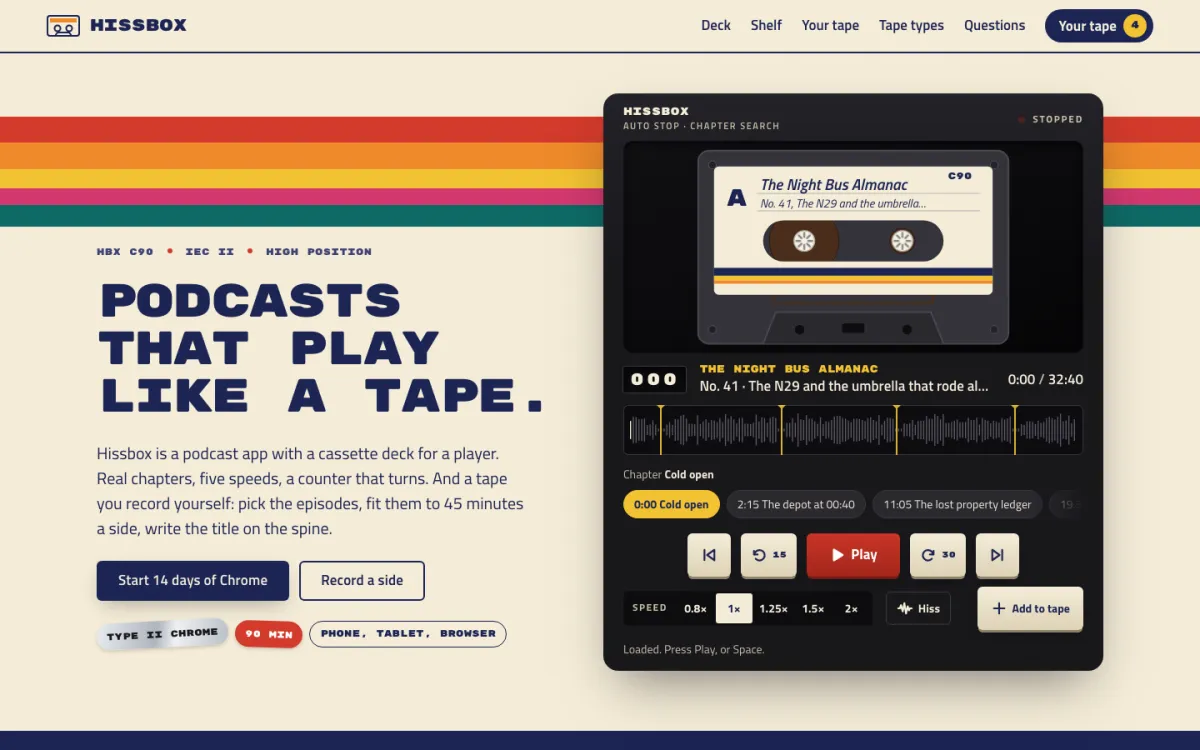
The page is the cover of a blank tape. Bias stripes run across the first screen and under a working deck: a cassette in a smoked window whose reels turn and whose tape packs pass from one hub to the other as the episode plays, a three-digit counter, a waveform scrubber with chapter ticks, five speeds, 15 and 30 second skips, and an optional hiss generated in the browser.
Below, five fictional shows stand on a shelf as tape spines. Pull one to see its episodes, play them on the deck or record them onto your own tape. The tape fills side A, then side B, of a C60, C90 or C120, warns when an episode will not fit, and is drawn as a J-card with a spine title you write yourself. Fold it open to read the track list in ballpoint. Plans are tape types (Normal, Chrome, Metal) with a sign-up form that validates inline and shows loading, error and success.
Everything is drawn in SVG, CSS and canvas from eight colours taken off a 1980s tape shelf. There are no photographs and no audio recordings.
The brand is fictional: Hissbox, a podcast app that plays like a tape deck, made at Spool Yard in Brackwell. Names, people and figures on the page are invented.
What works
- Deck: play, pause, back 15 s, forward 30 s, previous and next, five speeds, Space to play and pause
- Waveform scrubber (a native range input) with chapter ticks, a chapter list that winds to each chapter, live counter and reels
- Optional hiss made with Web Audio at about -38 dB
- Shelf: five shows as spines, a keyboard tablist, Play and Tape on every episode
- Your tape: add, reorder, remove, rename the spine, switch C60, C90 or C120, side meters and a will-not-fit warning
- J-card that folds open to show the track lists for side A and side B
- Play your tape: the deck plays a side in order and stops at its end, then offers Flip to side B
- Sign-up: tape-type stickers as radios, inline validation, taken-address error, loading, network error and success
States you can link to
script.js reads these from the URL, so you can open the page in a given state to review it, screenshot it or show it to an agent.
| Parameter | What it does |
|---|---|
?state=playing | the deck playing Night Bus No. 41 from 11:40. Open ?state=playing |
?state=queue | your tape with four episodes and the J-card folded open. Open ?state=queue |
?state=over | two more episodes than a C90 can hold, struck through on the card with a warning. Open ?state=over |
?state=empty | a blank tape and the empty recording sheet. Open ?state=empty |
?open=card | opens the J-card fold. Open ?open=card |
?show=pocketmoon | pulls a given spine on the shelf (nightbus, smallclaims, pocketmoon, secondhelpings, allotment). Open ?show=pocketmoon |
?state=loading | a filled sign-up form held in its loading state. Open ?state=loading |
?state=error | a filled sign-up form that fails to save once, with the retry message. Open ?state=error |
?state=success | the recorded account confirmation. Open ?state=success |
Use it
Copy templates/jcard/ into your project, or download the zip, which has the Screenery badge script already removed. Colours, type, spacing and radii are custom properties at the top of style.css. This template loads no libraries: only its own files and web fonts.
The docs explain the token pattern and how to move a template into React, Vue, Svelte or Astro. The guide has prompts for handing it to a coding agent.