Daybook
Time tracking and invoicing dashboard template · App screens
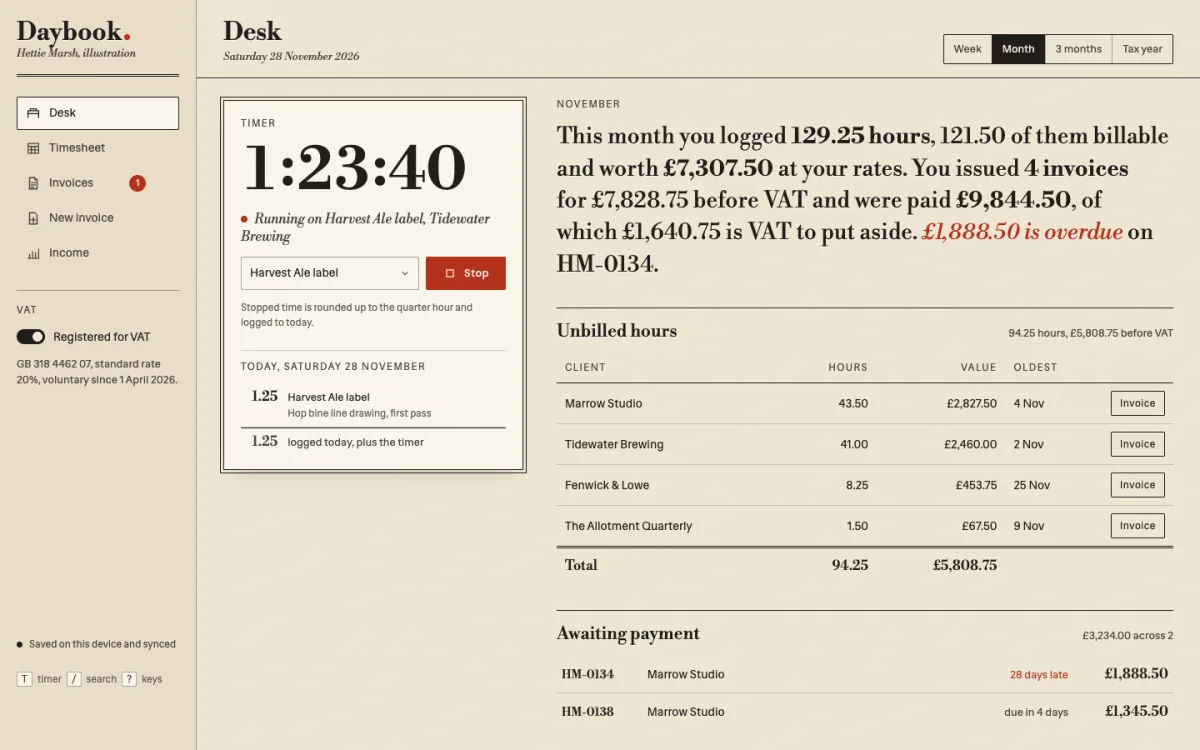
Letterpress stationery: cream laid stock with a faint grain, warm black ink in Libre Bodoni with a light lip under the type, printer's double rules and crop marks, and one vermilion kept for what needs attention: the running timer, overdue money, VAT set aside and the total due.
This template is the app itself, filling the viewport. A cream sidebar holds the Daybook wordmark, five views (Desk, Timesheet, Invoices, New invoice, Income) with an overdue count, the VAT registration switch and the sync status; on phones the same views move to a bottom bar. The header carries the view title, a date range switch (week, month, three months, tax year) that recomputes the Desk and Income, and a vermilion chip while the timer runs.
The Desk is set like a printed statement: a timer in large Bodoni figures with today's entries, one typeset sentence that reports hours, value, invoices issued and money received for the range, unbilled hours by client with an Invoice button each, invoices awaiting payment with days late, and a chart of money in per period with the VAT inside each bar hatched in vermilion and the value of hours worked marked as a dashed line. The Timesheet is a week grid by project and day with totals and value (day tabs on phones), and any cell opens a Log time dialog. Invoices can be filtered by status, searched and sorted, and each opens a drawer with the printable sheet, payment recording and overdue reminders.
The builder turns unbilled hours into one line per project, adds fixed fees such as usage licences, checks the client's purchase order rule, the tax point date and the payment terms, and previews the sheet live. With VAT on it is a VAT invoice with the VAT number, 20% per line and net, VAT and total; with VAT off it is a plain invoice with the not-registered line. Drafts carry no number until issued so the sequence has no gaps. Every figure comes from 285 seeded time entries between 6 April and Saturday 28 November 2026, so the timesheet, unbilled table, invoices, chart and income table always agree.
The brand is fictional: Daybook, the time and invoice book of Hettie Marsh, a freelance illustrator in Margate, Kent working for a publisher, a brewery, a gardening quarterly, a design studio and a lantern festival. Names, people and figures on the page are invented.
What works
- Timer: start, stop or switch project; stopped time is rounded up to the quarter hour and logged to today; T toggles it from anywhere
- Date range switch (week, month, three months, tax year) recomputes the statement, chart and income tables; arrow keys move between options
- Timesheet: step weeks, jump back to this week, open any cell to see its entries, remove unbilled ones, or log more time; day tabs and a list on phones
- Log time dialog: reads 1.5, 1:30 or 90m; validates empty, unreadable, out of range, future days and days over 16 hours
- Invoice list: status tabs with counts, search by client, number or project, four sorts, a designed no-match state
- Invoice drawer: printable sheet, record a payment with date validation and a stamp that presses onto the sheet, send a reminder with the statutory compensation figure, edit or discard a draft, print
- Builder: client picker with unbilled hours, include hours up to a date, tick lines on and off, add and remove fixed fees, live preview, save draft or issue with a loading state
- Builder validation: purchase order required and formatted for Fenwick & Lowe, tax point not in the future or before the last numbered invoice, terms between 7 and 60 days, at least one line
- VAT switch: every invoice, total, chart and the threshold note switch between VAT registered and not registered
- Chart: hover or tab to a bar for its figures; the same figures open as a table
- Offline: banner with reconnect, issuing and reminders fail with the draft kept and no number used
- Keys: 1 to 4 views, N new invoice, L log time, / search, [ and ] weeks, ? key sheet, Esc closes
States you can link to
script.js reads these from the URL, so you can open the page in a given state to review it, screenshot it or show it to an agent.
| Parameter | What it does |
|---|---|
?view=timesheet | opens a view: desk, timesheet, invoices, builder or income. Open ?view=timesheet |
?range=year | starts on a date range: week, month, quarter or year. Open ?range=year |
?invoice=HM-0134 | opens the overdue Marrow Studio invoice in the drawer (any number from HM-0118 to HM-0139). Open ?invoice=HM-0134 |
?print=HM-0137 | opens a paid invoice full width, as it prints. Open ?print=HM-0137 |
?vat=off | the books as they look when not registered for VAT. Open ?vat=off |
?view=builder&builder=invalid | the builder after a failed issue: a malformed purchase order for Fenwick & Lowe. Open ?view=builder&builder=invalid |
?entry=open | opens the Log time dialog on today's Harvest Ale label cell. Open ?entry=open |
?tab=overdue&view=invoices | the invoice list filtered to one status. Open ?tab=overdue&view=invoices |
?state=loading | skeleton rules while the books load; the timer keeps running. Open ?state=loading |
?state=empty | a new book with no hours or invoices and the designed empty states. Open ?state=empty |
?state=error | the books could not be reached, with a working Try again. Open ?state=error |
?state=offline | offline banner; issuing an invoice or sending a reminder fails and keeps the draft. Open ?state=offline |
?state=senderror&view=builder | the mail server does not answer when issuing; the invoice is kept as a draft. Open ?state=senderror&view=builder |
?keys=open | opens the keyboard sheet. Open ?keys=open |
Use it
Copy templates/invoices/ into your project, or download the zip, which has the Screenery badge script already removed. Colours, type, spacing and radii are custom properties at the top of style.css. This template loads no libraries: only its own files and web fonts.
The docs explain the token pattern and how to move a template into React, Vue, Svelte or Astro. The guide has prompts for handing it to a coding agent.