Cloche
Glasshouse sensor dashboard template · App screens
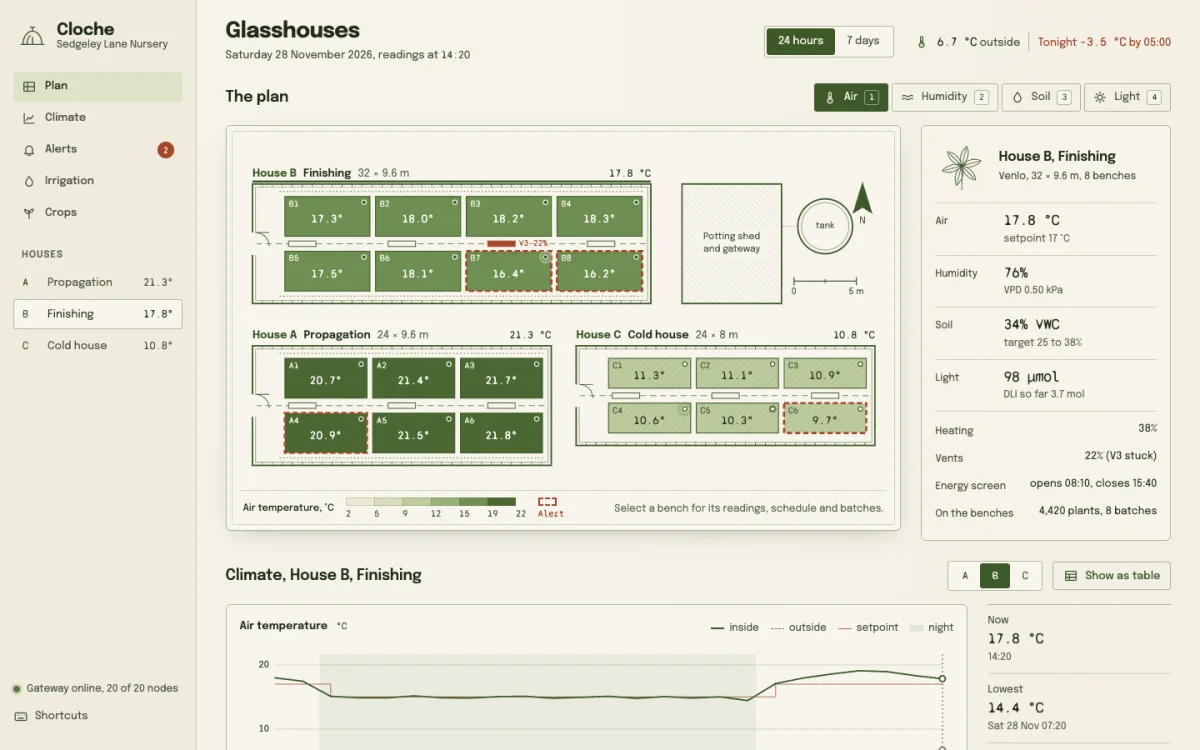
A botanical plate on pale laid paper: the nursery drawn as a moss-green ink site plan with hatched benches, glazing bars, door swings and a north arrow, line-drawn sprigs beside each house, Syne Mono for every measurement and one terracotta kept for alerts.
This template is the app itself. The sidebar lists the sections, the three houses with their air temperature now and the gateway status; the header carries the date, a 24 hours or 7 days switch and the weather outside with tonight's frost. The first view is the plan: the whole site drawn as an ink plate at one scale, House B in the north with the potting shed and rainwater tank beside it, Houses A and C below. Every bench is tinted from paper to moss by the reading you pick (air, humidity, soil moisture or light), shows its value and its sensor node, and benches with an open alert carry a dashed terracotta edge. The stuck ridge vent in House B is drawn in terracotta on the ridge.
Below the plan, a house card gives air, humidity with VPD, soil, light with the day's DLI, heating, vents and what is on the benches. The climate section draws the chosen house and reading as a hand-built SVG chart with night shading, the outside temperature, the stepped setpoint, target bands and irrigation run marks, with a pointer and arrow-key readout, a table view and a by-day table. Alerts (frost tonight, a vent stuck open, a drying bench) can be acknowledged or acted on; closed alerts follow the range. Irrigation shows today's runs by zone, every schedule with its next run, runs and litres in the range, and on/off switches. The crop list has search, house and ready-soon filters and sorting, and turns into cards on phones.
All numbers come from one seeded simulation: outside weather for the week, setpoints, solar gain, and soil moisture that falls between irrigation runs and jumps when a schedule runs, so the plan, charts, tables, totals and alerts agree. The add-schedule dialog checks zone, start hours, run length and days, refuses overlaps in the same zone and pairs of zones that would need more than the 40 L/min main, warns about watering late on a November afternoon, then saves with a loading state, an error state or a queued offline state.
The brand is fictional: Cloche, the sensor dashboard at Sedgeley Lane Nursery near Pershore, Worcestershire: three glasshouses of poinsettias, cyclamen, hellebores and spring cuttings in late November. Names, people and figures on the page are invented.
What works
- Plan: switch the reading with the buttons or keys 1 to 4; select any bench (click, Enter or Space) for its drawer
- House captions on the plan, the sidebar list, the A B C tabs and keys A, B, C pick the house for the card and charts
- 24 hours or 7 days switch (or R) recomputes charts, stats, the by-day table, closed alerts and water used
- Chart readout by pointer, or arrow keys, Shift+arrow, Home and End when the chart has focus; Show as table
- Alerts: acknowledge or reopen, open the affected bench, start a manual run for the drying bench
- Irrigation: pause or resume any schedule; Add schedule (or N) with validation, loading, error, offline queue and success
- Crop batches: search (or /), house and ready-by-5-Dec filters, sort, open a batch drawer
- Drawer and dialogs close with Escape; ? opens the shortcut sheet
States you can link to
script.js reads these from the URL, so you can open the page in a given state to review it, screenshot it or show it to an agent.
| Parameter | What it does |
|---|---|
?range=7d | opens on the 7-day range. Open ?range=7d |
?metric=soil | plan and charts on soil moisture (also temp, rh, par). Open ?metric=soil |
?house=C | selects the cold house (A, B or C). Open ?house=C |
?bench=B7 | opens the drawer for a bench under the stuck vent. Open ?bench=B7 |
?batch=HL-2603 | opens the drawer for the cyclamen batch ready on Monday. Open ?batch=HL-2603 |
?add=open | opens the add-schedule dialog. Open ?add=open |
?keys=open | opens the shortcut sheet. Open ?keys=open |
?state=loading | skeletons while the gateway answers. Open ?state=loading |
?state=empty | no batches, no schedules and no alerts. Open ?state=empty |
?state=error | the sensor gateway is not answering: banner, retry, plan without values. Open ?state=error |
?state=offline | offline banner; new schedules are queued. Open ?state=offline |
?state=saveerror | the first save to the controller fails, the second works. Open ?state=saveerror |
Use it
Copy templates/greenhouse/ into your project, or download the zip, which has the Screenery badge script already removed. Colours, type, spacing and radii are custom properties at the top of style.css. This template loads no libraries: only its own files and web fonts.
The docs explain the token pattern and how to move a template into React, Vue, Svelte or Astro. The guide has prompts for handing it to a coding agent.