Lumen
Smart home app template · App screens
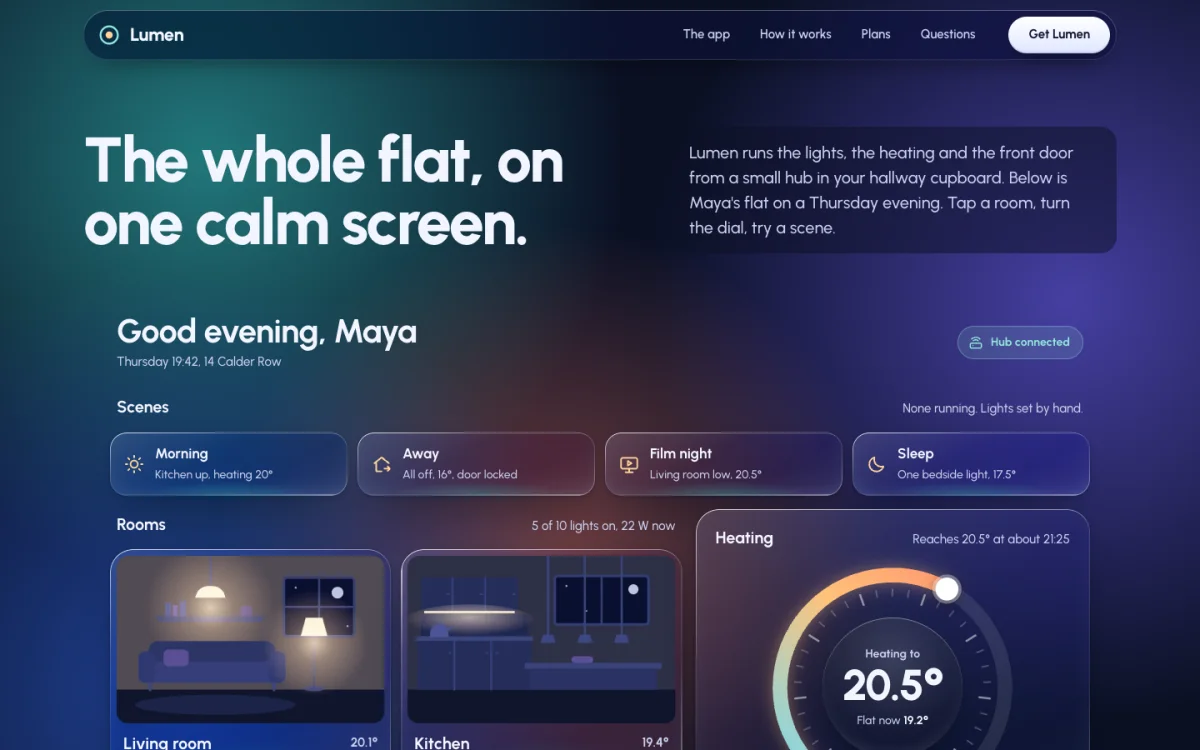
Liquid glass over a slow evening aurora: thick frosted panes with specular rims and pooled inner light, tinted deep enough to read, and an aurora that changes colour with the scene running in the flat.
The first screen is the app itself, working. Maya's flat on a Thursday evening: four scenes, four rooms as glass cards with a drawn picture of each room, the heating dial, the front door and today's energy. Every pane is thick liquid glass with a bright rim where the light catches it and a soft pool of refracted colour at its lower edge, over an aurora that drifts slowly behind the whole page. Text always sits on a tinted body, never on bare blur.
Tap a room and its sheet rises with a larger drawing: switch each light, drag the brightness and watch the lamps, their pools of light and the wash on the wall change. The thermostat is a dial you can drag or turn with the arrow keys. Choose Morning, Away, Film night or Sleep and every light, the brightness, the heating target and the lock glide to the scene together while the aurora takes on the scene's colours. The door asks before it unlocks. The energy chart reads each hour and its parts add up to the day's 11.2 kWh and £2.74.
Below the app: how the hub keeps working without the internet, two plans with a monthly or yearly switch, a text-me-the-link form with UK mobile validation and a drawn phone whose lock-screen widget mirrors the app, questions, and the footer. Without backdrop-filter the glass becomes solid tinted panes; with reduced motion the aurora stands still.
The brand is fictional: Lumen, a smart home app and hub for lights, heating and the front door, shown on Maya's three-bedroom flat at 14 Calder Row. Names, people and figures on the page are invented.
What works
- Scenes: Morning, Away, Film night and Sleep change lights, brightness, heating and the lock in one 1.1 second glide and re-hue the aurora; a later change by hand is noted
- Room cards: one switch turns the room off or back on; the card opens the room sheet
- Room sheet: per-light switches, brightness slider, live wattage, drawn room that lights up; Escape, close button or backdrop closes it
- Thermostat dial: drag the ring, arrow keys, Page Up and Down, Home and End, or the plus and minus buttons (slider role with spoken value); arrival time follows the target
- Front door: unlock asks for confirmation, then shows unlocking and unlocked with the relock time; lock again in one tap
- Energy chart: hover, tap or use the arrow keys to read each hour; totals and cost are computed from the bars
- Hub offline banner with retry: the first retry fails, the second reconnects
- Plans: monthly or yearly radio switch with arrow keys
- Text me the link: inline validation with specific messages (empty, landline, wrong length), loading, error and success with reset
- Questions accordion; toasts for every change
States you can link to
script.js reads these from the URL, so you can open the page in a given state to review it, screenshot it or show it to an agent.
| Parameter | What it does |
|---|---|
?scene=morning | opens with Morning running: kitchen and bedroom up, heating 20°, warm peach aurora. Open ?scene=morning |
?scene=away | every light off, heating 16°, door locked, cold slate aurora. Open ?scene=away |
?scene=film | living room floor lamp and shelf strip at 25%, kitchen strip at 20%, heating 20.5°, crimson and violet aurora. Open ?scene=film |
?scene=sleep | one bedside light at 10%, heating 17.5°, door locked, deep blue aurora. Open ?scene=sleep |
?room=kitchen | opens the kitchen sheet (also living, bedroom, office). Open ?room=kitchen |
?state=offline | the hub cannot be reached: warning banner, frosted inert controls with last known values, retry. Open ?state=offline |
?state=loading | connecting to the hub: panels hold their shape with a light sweep. Open ?state=loading |
?lock=confirm | the front door asking whether to unlock. Open ?lock=confirm |
?lock=unlocked | the door unlocked by Sam, with its relock time. Open ?lock=unlocked |
?send=success | fills a demo number and sends the app link. Open ?send=success |
?send=error | fills a demo number and the text fails to send; sending again succeeds. Open ?send=error |
?plan=yearly | plans priced yearly. Open ?plan=yearly |
Use it
Copy templates/glasshome/ into your project, or download the zip, which has the Screenery badge script already removed. Colours, type, spacing and radii are custom properties at the top of style.css. This template loads no libraries: only its own files and web fonts.
The docs explain the token pattern and how to move a template into React, Vue, Svelte or Astro. The guide has prompts for handing it to a coding agent.
Inspection
Loaded in Chromium 156.0.8078.4 (Playwright, headless) on 27 November 2026 at 1440, 1024, 768, 390 pixels wide and once more with reduced motion requested. Every check passed at every width.
- 1440 px
- Pass
- 1024 px
- Pass
- 768 px
- Pass
- 390 px
- Pass
- Reduced motion
- Pass
- Page weight
- 141 KB, 6 requests
Requests and transferred size were measured at 1440 pixels on a cold cache and include web fonts and any CDN library. The full result is in the viewer: open the Checks panel. How templates are checked.