Lozenge
Group messaging app page template · App screens
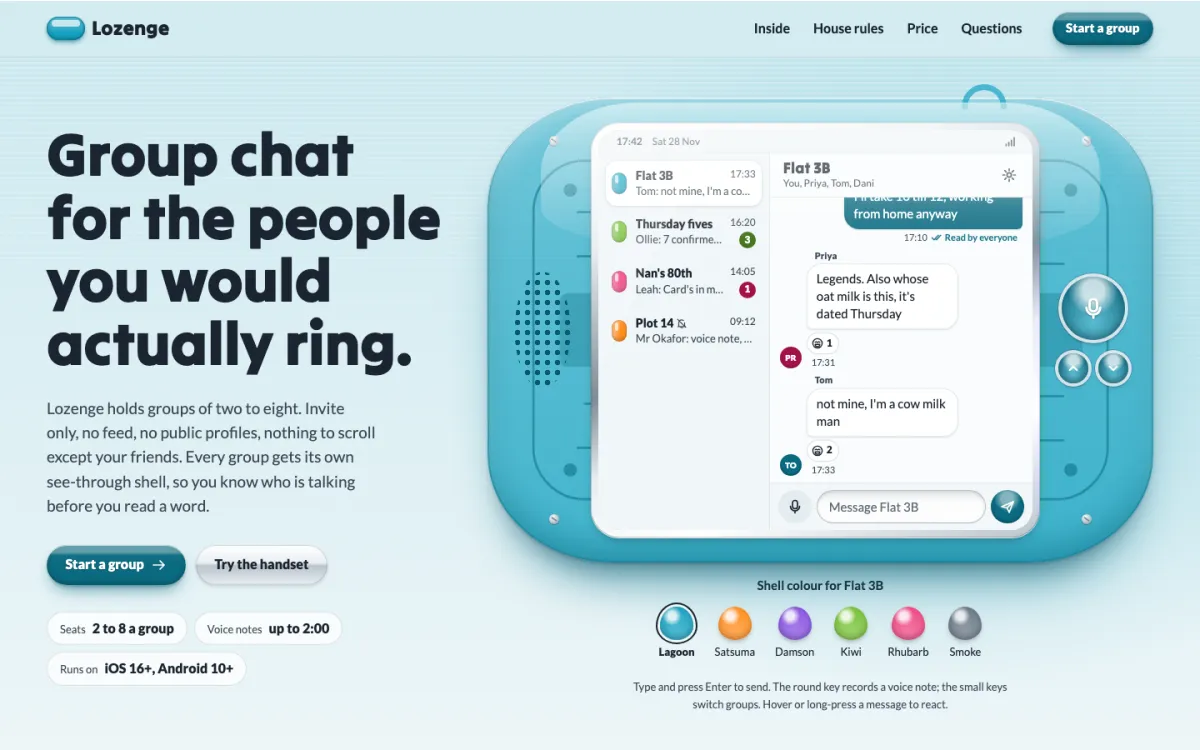
See-through candy plastic around 2000: a frosted ice ground, coloured translucent shells with the circuit board showing through, chrome bezels and screws, gel bubble keys, ribbed mouldings and fruit-gum colours, with the current group's shell colour flowing through the hero.
The first screen is the handset: a capsule of tinted clear plastic with its board, traces and screws visible through the shell, a drilled speaker grille, a chrome bezel around the screen and three gel keys. The screen runs a working chat demo with four groups (a shared flat, a five-a-side team, a family birthday and an allotment). Each group has its own shell colour, so switching groups, with the list or the small keys, recolours the case and the hero ground in one gliding move with a gloss sweep.
In the demo you can send messages and watch a friend read them and type a reply, react with six drawn reactions, record a voice note with the round key (a placeholder, no microphone is used) and play voice notes back along their waveform, mute a group for an hour, until morning or for good, and switch read receipts off, which hides everyone's. A shell picker under the handset recolours the current group. Offline, messages wait with a clock and send themselves when you reconnect. On phones the handset turns portrait and the screen shows one pane at a time.
Below, an X-ray lightbox shows the board with seven parts, each one a product fact you can point at. The house rules sit on a ribbed kiwi moulding. The price section has a bill splitter that divides £2.40 between up to eight people in pence and shows who pays the odd pennies. The start-a-group flow validates names, emails and invitees (no duplicates, not yourself, eight seats at most) with a live shell preview, then shows loading, an error with retry, or an invite ticket that can open the new, empty group in the handset. Questions and a footer close the page.
The brand is fictional: Lozenge, a messaging app for groups of two to eight friends, made by six people in a converted bonded warehouse in Glasgow. Names, people and figures on the page are invented.
What works
- Handset chat: send with Enter, sending then sent, a reply after a typing indicator, read receipts that update
- Group list and the up and down keys switch groups; each switch recolours the case and hero to that group's shell
- Reactions: hover, focus or long-press a message for a tray of six drawn reactions; chips toggle your own reaction
- Voice notes: the round key or the composer mic records a timed placeholder with a live waveform, cancel or send; play and pause along the waveform
- Settings sheet: mute (off, 1 hour, until 08:00, until turned back on) shown in the list and header; read receipts switch that hides everyone's receipts
- Shell picker: six colours recolour the current group's case with a gloss sweep
- Offline: messages wait for signal and send on Reconnect
- Narrow screens: one pane at a time with a back button; Escape closes the tray, the settings sheet or a recording
- X-ray: point at a part or its note to light both
- Bill splitter: 1 to 8 people, pence per person with the remainder paid by the organiser
- Start a group: inline validation, invitee chips with seat lights, live shell preview, loading, error with retry, success ticket with copy link, open the new group in the handset
States you can link to
script.js reads these from the URL, so you can open the page in a given state to review it, screenshot it or show it to an agent.
| Parameter | What it does |
|---|---|
?group=fives | opens on another group (flat, fives, nan, plot), with its shell. Open ?group=fives |
?flavour=damson | recolours the current group's shell (lagoon, satsuma, damson, kiwi, rhubarb, smoke). Open ?flavour=damson |
?panel=settings | opens the group settings sheet. Open ?panel=settings |
?receipts=off | read receipts switched off. Open ?receipts=off |
?view=list | on narrow screens, shows the group list pane. Open ?view=list |
?state=typing | shows Priya typing. Open ?state=typing |
?state=react | opens the reaction tray on the last message. Open ?state=react |
?state=recording | a voice note is recording. Open ?state=recording |
?state=offline | no signal, a message waiting to send, Reconnect in the status bar. Open ?state=offline |
?state=empty | a brand-new group with no messages yet. Open ?state=empty |
?state=invalid | the start-a-group form submitted empty, showing every error. Open ?state=invalid |
?state=error | fills and submits the form; the server cannot be reached; Try again succeeds. Open ?state=error |
?state=success | fills and submits the form, showing the invite ticket. Open ?state=success |
?split=7 | the bill splitter at seven people (six pay 34p, the organiser 36p). Open ?split=7 |
?part=memory | lights a part on the X-ray board. Open ?part=memory |
Use it
Copy templates/y2k/ into your project, or download the zip, which has the Screenery badge script already removed. Colours, type, spacing and radii are custom properties at the top of style.css. This template loads no libraries: only its own files and web fonts.
The docs explain the token pattern and how to move a template into React, Vue, Svelte or Astro. The guide has prompts for handing it to a coding agent.