Calder Moor
Hospital bed management dashboard template · Health and body
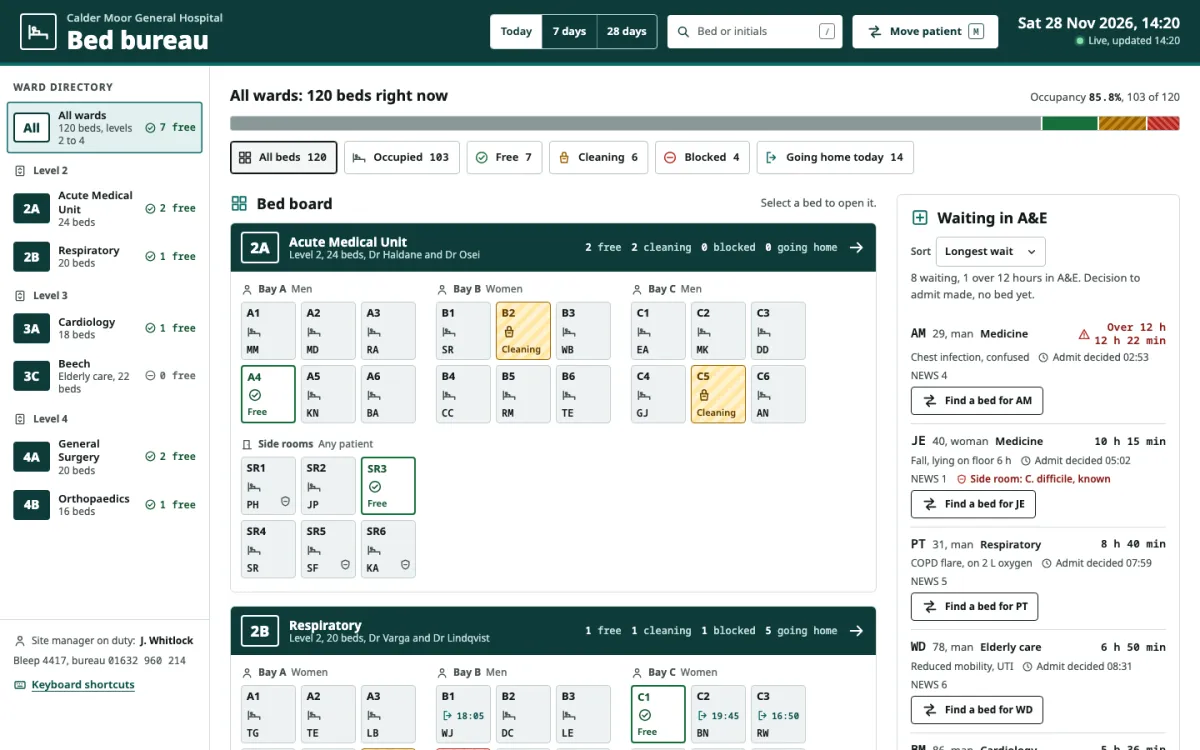
Clinical wayfinding signage: a deep neutral teal sign band, lift-lobby ward plates with square codes, pictograms in one 2px stroke, and a white board where four status colours mean a bed state and never travel without a symbol and a word.
This template is the app itself, set like the hospital's own signs. A deep teal band carries the site name, the clock, a Today, 7 days and 28 days switch, search and Move patient. Down the left is the ward directory, grouped by level like a lift lobby, with each ward's free beds. Below the band, one proportional bar shows all 120 beds as occupied, free, cleaning or blocked, and the key under it filters the board.
The board draws every ward as its real bays and side rooms. Each bed tile has its number, a pictogram and initials or a state word, with a going-home or arriving time where there is one; cleaning beds are striped and blocked beds hatched, so colour is never the only cue. Opening a bed shows its patient by initials, consultant, isolation and discharge plan, or its cleaning progress, or the reason, owner and review time for a block. From there you can mark a patient discharged, mark a clean done (which logs a turnaround), block a bed with validation, or reopen it.
Beside the board are the A&E queue (sortable, with waits over 12 hours flagged) and today's expected discharges. Move patient runs four checks as you pick the patient and the bed: bed ready, same-sex bay, isolation needs a side room, and specialty, where an outlier needs a reason. Below are bed turnaround over the chosen range, drawn by hand in SVG with a keyboard readout and a table, and the shift handover note with site status, an insert-the-numbers button and a saved state. Patients appear only as initials and bed numbers, and every name is invented.
The brand is fictional: The bed bureau at Calder Moor General Hospital: 120 beds on six wards across levels 2 to 4, run by the site manager on duty. Names, people and figures on the page are invented.
What works
- Ward directory: show all wards or one ward; keys 1 to 6, and 0 for all
- Status key: filter the board to occupied, free, cleaning, blocked or going home today, with a designed no-match note per ward
- Search: bed number or initials highlights matches; Enter opens the first bed or the A&E patient's move
- Bed drawer: mark discharged, mark clean and ready (logs a turnaround), block with reason, owner and review time, reopen
- Move patient: patient and free-bed pickers, live checks that pass, stop the move or need a reason, required confirmations, porter time, loading, error and success with Show the bed
- A&E queue: sort by longest wait, highest NEWS or specialty; Find a bed opens the move with the patient set
- Range switch (arrow keys too): Today by hour, 7 days or 28 days recomputes discharges, admissions, median turnaround and the share within 60 minutes
- Turnaround chart: hover or focus and use the arrow keys, Home and End to read each bar; table alternative
- Handover note: site status 1 to 4, insert current numbers, length validation, saving and saved states
- Keyboard: / search, M move, ? shortcut sheet, Esc closes the drawer and dialogs
States you can link to
script.js reads these from the URL, so you can open the page in a given state to review it, screenshot it or show it to an agent.
| Parameter | What it does |
|---|---|
?state=loading | skeleton board, queue, discharges and turnaround while the patient system loads. Open ?state=loading |
?state=empty | no one waiting in A&E and no more discharges expected, with designed empty notes. Open ?state=empty |
?state=error | the board failed to refresh: stale copy banner from 13:52 with Try again. Open ?state=error |
?state=offline | no connection: changes kept on the device with a count to send, Reconnect. Open ?state=offline |
?state=moveerror | opens Move patient; the first confirm fails with nothing changed, the retry succeeds. Open ?state=moveerror |
?move=open | opens Move patient with the longest-waiting patient chosen. Open ?move=open |
?bed=3C-C5 | opens a bed drawer (any id, for example 2A-B2 cleaning, 4A-B6 free, 3A-SR2 occupied). Open ?bed=3C-C5 |
?ward=3C | starts on one ward: 2A, 2B, 3A, 3C, 4A or 4B. Open ?ward=3C |
?filter=free | starts with the board filtered: occupied, free, cleaning, blocked or going. Open ?filter=free |
?range=28d | turnaround and flow over 7d or 28d instead of today. Open ?range=28d |
?time=09:30 | sets the clock (any HH:MM): waits, discharge times and today's turnaround follow. Open ?time=09:30 |
?keys=open | opens the keyboard shortcut sheet. Open ?keys=open |
Use it
Copy templates/wards/ into your project, or download the zip, which has the Screenery badge script already removed. Colours, type, spacing and radii are custom properties at the top of style.css. This template loads no libraries: only its own files and web fonts.
The docs explain the token pattern and how to move a template into React, Vue, Svelte or Astro. The guide has prompts for handing it to a coding agent.