Swellprint
Surf and tide forecast web app template · Software and web
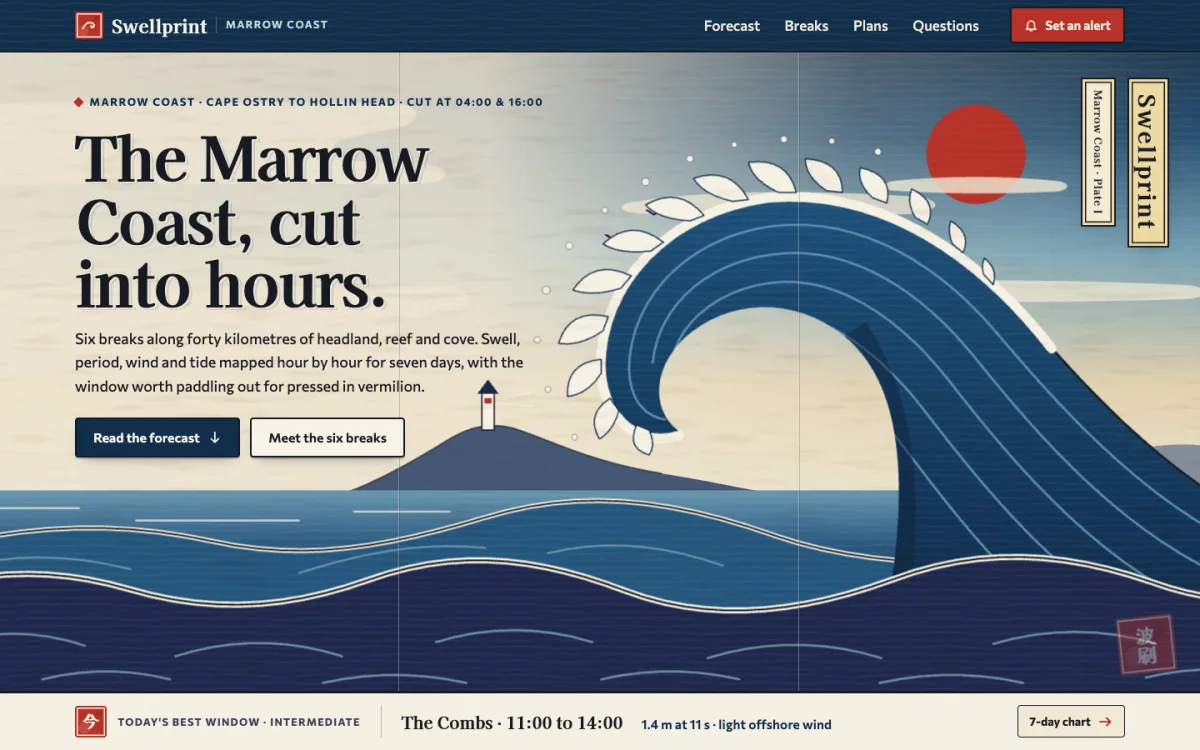
A full-bleed Edo ukiyo-e woodblock triptych print meets a precision surf forecast ledger: warm fibrous washi paper, panoramic layered Prussian-blue and indigo woodblock waves, bokashi sky bands, vermilion sun disc, distant Cape Ostry lighthouse headland, vertical title cartouches and crimson hanko seals.
The first viewport opens as a full-bleed Edo woodblock triptych print across three joined panels: an indigo bokashi sky with suyari-gasumi mist bands, a vermilion sun disc, the distant Cape Ostry headland and lighthouse, and sweeping layered Prussian-blue and indigo waves with carved claw foam. Vertical title cartouches and a crimson hanko seal anchor the right edge while the monumental serif headline rests in the open mist on the left. Across the base sits a woodblock-ruled live forecast ledger naming today's best window on the coast with a direct jump to the seven-day chart.
The forecast is the centre of the page. Choose one of six breaks, one of seven days and a level, and the hours from 05:00 to 21:00 are cut into an SVG chart: swell height as four flat woodblock bands under a foam crest, period in circles, wind arrows coloured offshore, cross-shore or onshore for that break, a row of small seals for the hours that fit, and the tide curve with its high and low times over the break's preferred tide band. Every hour is checked against four stated rules, and the longest passing run of two or more hours is pressed in red. When there is no window, the panel says which rule failed most and offers the next day or another break that works.
Below the tool, six drawn break guides give each spot's type, level, tide, wind and hazards, and open its forecast. The alert form saves a break with a minimum height, days, timing and a clean-wind option, with inline validation, a plan rule, loading, a retryable error and a stamped success slip. Plans are set as a printed comparison sheet with a monthly or yearly toggle that feeds the form, followed by questions and a colophon footer.
The brand is fictional: Swellprint, a surf and tide forecast for six breaks on the invented Marrow Coast between Cape Ostry and Hollin Head. Names, people and figures on the page are invented.
What works
- Break picker (six radio tabs, arrow keys, Home and End); breaks above your level are marked and explained
- Day strip for seven days with each day's peak height and a red mark on days that have a window
- Level switch (beginner, intermediate, advanced) that changes the rule, the window and the day marks
- Chart: hover, click or focus and use the arrow keys to step through hours; the readout shows each value and whether it passes each rule
- Best window computed from the data, with the four rules written out; empty state names the main reason and offers another day or break
- Break guide buttons open that break's forecast
- Woodblock-ruled live forecast ledger at the base of the hero jumps directly to the forecast
- Alerts form: email, break, minimum height, days, timing, clean-wind option; inline validation with specific messages, plan check, loading, error with retry, stamped success with reference, set another
- Plans: monthly or yearly prices; choosing a plan carries it into the alerts form
- Questions accordion
States you can link to
script.js reads these from the URL, so you can open the page in a given state to review it, screenshot it or show it to an agent.
| Parameter | What it does |
|---|---|
?break=ironhead | opens the forecast on a break (ironhead, combs, sandlace, gull, heron, lantern). Open ?break=ironhead |
?day=3 | opens on a day, 0 is today and 6 is six days ahead. Open ?day=3 |
?skill=advanced | sets the level (beginner, intermediate, advanced). Open ?skill=advanced |
?hour=12 | puts the chart cursor and readout on an hour from 5 to 20. Open ?hour=12 |
?break=ironhead&skill=beginner | a break above your level: no window, with suitable breaks offered. Open ?break=ironhead&skill=beginner |
?state=nowindow | finds the first break and day with no window and shows the empty state. Open ?state=nowindow |
?state=invalid | submits the alert form with a broken email, no days and a break outside the free plan. Open ?state=invalid |
?state=loading | the alert form filled in and saving. Open ?state=loading |
?state=error | the save fails and shows a retryable error; saving again succeeds. Open ?state=error |
?state=success | the alert saved, with the stamped slip and reference. Open ?state=success |
?plan=crew-yearly | chooses a plan (shore, swell, crew) and optionally yearly billing. Open ?plan=crew-yearly |
Use it
Copy templates/ukiyo/ into your project, or download the zip, which has the Screenery badge script already removed. Colours, type, spacing and radii are custom properties at the top of style.css. This template loads no libraries: only its own files and web fonts.
The docs explain the token pattern and how to move a template into React, Vue, Svelte or Astro. The guide has prompts for handing it to a coding agent.
Inspection
Loaded in Chromium 156.0.8078.4 (Playwright, headless) on 27 November 2026 at 1440, 1024, 768, 390 pixels wide and once more with reduced motion requested. Every check passed at every width.
- 1440 px
- Pass
- 1024 px
- Pass
- 768 px
- Pass
- 390 px
- Pass
- Reduced motion
- Pass
- Page weight
- 402 KB, 12 requests
Requests and transferred size were measured at 1440 pixels on a cold cache and include web fonts and any CDN library. The full result is in the viewer: open the Checks panel. How templates are checked.