Coving
Wall thermostat product page template · Shops and makers
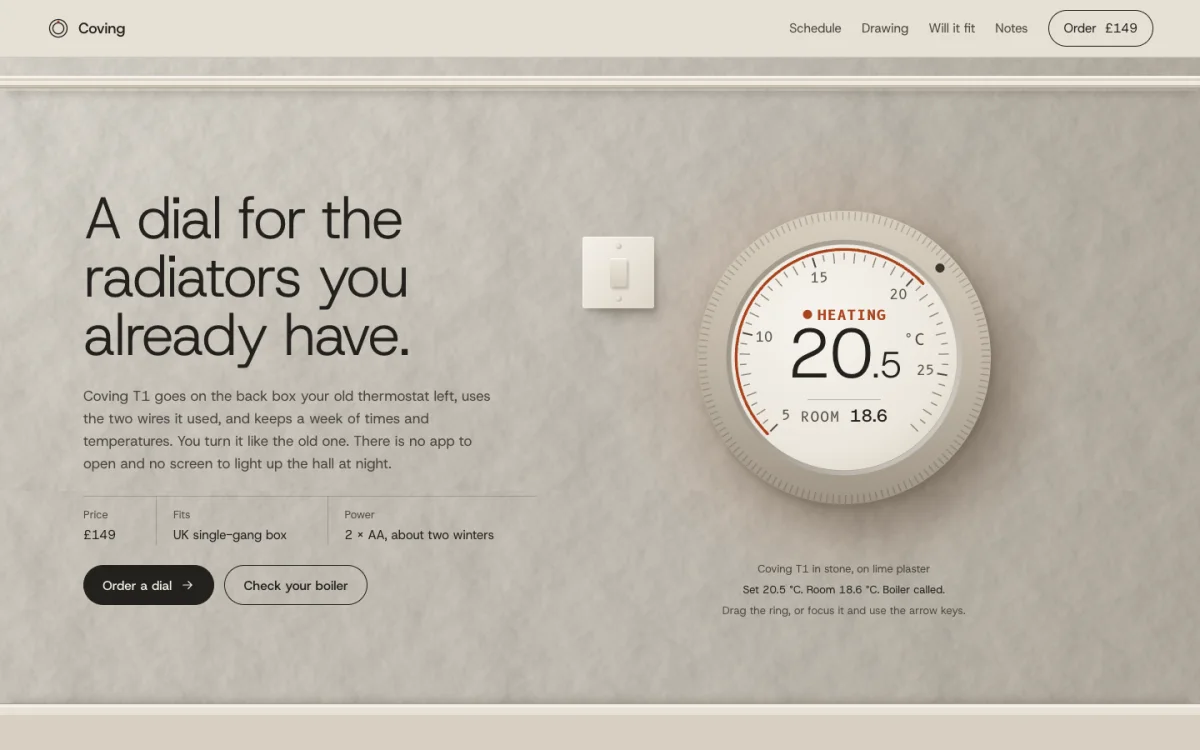
Architectural minimalism in lime plaster, honed stone and board-marked concrete: a plaster wall in raking light with a picture rail and skirting, and a round turned-steel dial on it, drawn in SVG, that you can actually turn.
The first screen is a lime-plaster wall lit low from the left, with a picture rail above and a skirting below, a light switch for scale and the Coving T1 dial on it. The dial is drawn in SVG: a knurled steel ring, a porcelain face with a half-degree scale and a set point in large light figures. Drag the ring round like a real knob, or focus it and use the arrow keys, Page Up and Down, Home and End. A small room model warms toward the set point; while the boiler is being called the ember mark and the scale arc turn rust and a faint warm bloom appears on the plaster.
On board-marked concrete below, the weekly schedule shows seven days as bars of four periods. Choose a day to edit its wake, out, home and night times and temperatures, with validation that keeps the periods in order and 30 minutes apart, and copy it to the weekdays or the whole week. The estimate sums heat loss for every quarter hour of the week from the house, the month's mean outdoor temperature and 2 °C of free gains, divides by the boiler's efficiency, and prices it with the unit rate and standing charge, all of which are shown and editable, then compares it with leaving the heating at 20 °C day and night.
A dimensioned front and side drawing sits next to the specification on honed stone. The compatibility check asks three questions about the boiler, the current control and the radiator valves and answers yes, yes with the receiver, ask us first or no, with reasons, and can carry its kit into the order. The order chooses the ring finish (which repaints both dials), quantity, receiver, fitting and delivery, totals them, validates name, email, address, UK postcode, fitter coverage and a weekday fitting date, and goes through loading, error and success. Firmware notes with dates, questions and the footer close the page.
The brand is fictional: Coving, a small maker in Stroud, Gloucestershire, of one round wall thermostat for older UK homes with radiators. Names, people and figures on the page are invented.
What works
- Dial: drag the ring with relative turning, or arrow keys, Page Up and Down, Home and End (slider role with a spoken set point, state and room temperature)
- Room model: the room warms toward the set point and cools after it; the boiler is called below 0.3 °C under the set point, shown by the ember mark, arc and wall bloom
- Week view: choose any day to edit; bars shade by temperature band
- Day editor: time inputs in 15-minute steps with order and 30-minute spacing validation, temperature steppers 5 to 28 °C, copy to Mon to Fri or every day
- Estimate: weekly gas in kWh and cost with a line-by-line breakdown, editable house, weather, unit rate, standing charge and boiler efficiency, and a comparison with 20 °C all week
- Compatibility check: three required questions with specific errors, a verdict with reasons and kit, and a button that applies the kit to the order
- Order: finish swatches recolour the preview and the hero dial, quantity stepper, receiver, fitting and delivery, live totals
- Checkout: inline validation (email, UK postcode, fitter area, weekday fitting date outside the Christmas closure), loading, error with retry, success with order reference, start again
- Questions accordion
States you can link to
script.js reads these from the URL, so you can open the page in a given state to review it, screenshot it or show it to an agent.
| Parameter | What it does |
|---|---|
?temp=22 | opens with the dial set to 22 °C (any value from 5 to 28). Open ?temp=22 |
?finish=slate | the dials in the slate finish (also lime or stone). Open ?finish=slate |
?day=sat | opens the schedule editor on Saturday (any day). Open ?day=sat |
?home=georgian | the estimate for a Georgian townhouse (also flat, terrace, thirties, edwardian). Open ?home=georgian |
?fit=wired | the compatibility check answered for a combi with a wired dial (also wireless, none, back, heatpump). Open ?fit=wired |
?state=invalid | the order submitted with a bad email and postcode, showing inline errors. Open ?state=invalid |
?state=loading | a filled order held in its loading state. Open ?state=loading |
?state=error | a filled order whose payment page does not answer; submitting again succeeds. Open ?state=error |
?state=success | a filled order with receiver and fitter, placed, with its reference and fitting day. Open ?state=success |
Use it
Copy templates/thermostat/ into your project, or download the zip, which has the Screenery badge script already removed. Colours, type, spacing and radii are custom properties at the top of style.css. This template loads no libraries: only its own files and web fonts.
The docs explain the token pattern and how to move a template into React, Vue, Svelte or Astro. The guide has prompts for handing it to a coding agent.