Iron Anchor Tattoo Parlour
Tattoo studio website with flash picker and booking template · Health and body
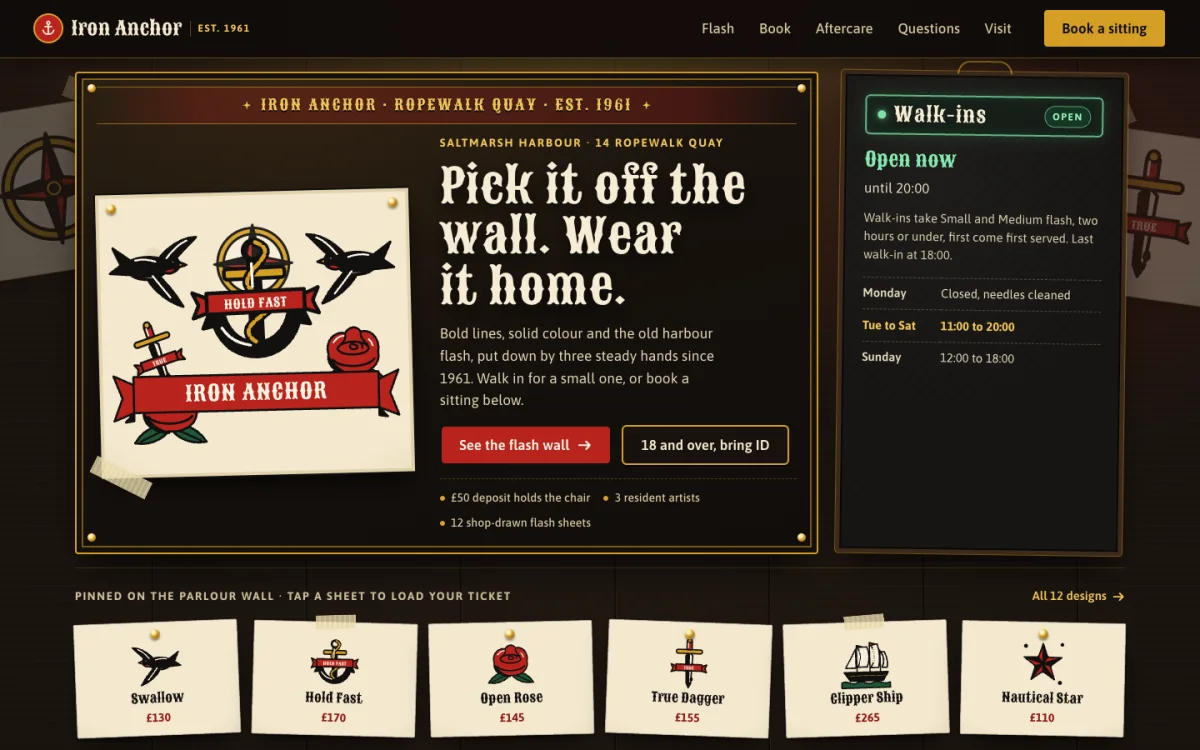
A 1961 harbour tattoo parlour wall: oiled teak planks under warm parlour-lamp light, a gilded hand-painted shop signboard, a chalkboard and neon walk-in sign, and overlapping aged-parchment flash sheets pinned with brass tacks and masking tape.
The page opens on a 1961 harbour parlour wall of oiled teak planks lit by a warm overhead lamp. At the centre sits a hand-painted lacquered shop signboard with antique-gold pinstriping, brass corner rivets and an inlaid parchment crest of swallows, roses, dagger, compass and anchor. Beside it hangs a timber-framed walk-in chalkboard with a glowing neon status sign that reads the visitor's clock. Along the lower rail, six tilted mini flash sheets let visitors tap a design straight onto their ticket from the first screen.
The flash wall is the centre. Twelve designs, all drawn in SVG with bold outlines and solid shading, can be filtered by size, by colour or black and grey, by motif, and by placement on a drawn front and back body chart. Each sheet reprices itself as the filters change, and designs that are not drawn for a size or a spot leave the wall, with an empty state that explains why. Picking one stamps it and puts it on the ticket, where the purple stencil appears first and the ink is laid over it, and the sum is written out line by line: flash price, size, colour, placement, rounding, shop minimum, deposit and balance, plus the session time and whether it is split over two sittings.
The work order chooses an artist (one works black and grey only and is switched off for colour), a day and a start time that respect each artist's days, booked chairs and closing time, then name, email, date of birth checked against 18 on the day, a photo ID promise and a £50 deposit card with checksum, expiry and code checks. Submitting shows an error summary, a loading needle, a declined-card error or a stamped appointment card. Aftercare by the day, the counter questions on age and ID, a drawn map of the quay and the footer close the page.
The brand is fictional: Iron Anchor Tattoo Parlour, a walk-in and appointment tattoo shop on Ropewalk Quay in the invented harbour town of Saltmarsh, open since 1961. Names, people and figures on the page are invented.
What works
- Hero pinned flash-wall preview strip: tap any of six mini flash sheets to load it directly onto the ticket
- Flash wall filters: size, colour or black and grey, motif, and placement by radio chips or by clicking the drawn body chart
- Flash sheets reprice live and leave the wall when not drawn for the chosen size or spot; empty state with a clear-filters button
- Pick a design: stamp on the sheet, stencil-then-ink preview on the ticket and the price maths written out
- Artist picker that disables the black and grey artist for colour work
- Day and start-time picker that strikes out booked chairs and starts that would run past closing
- Inline validation on blur and on submit with an error summary linking to each problem; 18-plus check on the day of the sitting
- Card number grouping, expiry slash, checksum check; loading, declined and success states; book another resets
- Chalkboard and neon walk-in sign that follows the clock: open, walk-ins stopped, closed for the night, Monday closed
- Aftercare card and counter questions accordion
States you can link to
script.js reads these from the URL, so you can open the page in a given state to review it, screenshot it or show it to an agent.
| Parameter | What it does |
|---|---|
?state=filled | a Large colour Hold Fast anchor on the chest with Dolly, first free 11:00 and every field filled, ready to pay. Open ?state=filled |
?state=invalid | submits a half-filled order: error summary, a 16-year-old date of birth, a bad card number. Open ?state=invalid |
?state=loading | submits the filled order and stays on the loading needle. Open ?state=loading |
?state=error | submits the filled order and the bank declines the deposit. Open ?state=error |
?state=success | submits the filled order and shows the stamped appointment card. Open ?state=success |
?state=empty | Large on the ankle: nothing on the wall fits, with the reason. Open ?state=empty |
?design=ship | puts any design (by id) on the ticket. Open ?design=ship |
?mode=bw | starts the wall in black and grey; also ?size=S|M|L and ?place=ribs. Open ?mode=bw |
?time=21:30 | sets the walk-in clock; ?time=19:00 shows walk-ins stopped. Open ?time=21:30 |
?day=mon | the Monday closed walk-in card. Open ?day=mon |
Use it
Copy templates/tattoo/ into your project, or download the zip, which has the Screenery badge script already removed. Colours, type, spacing and radii are custom properties at the top of style.css. This template loads no libraries: only its own files and web fonts.
The docs explain the token pattern and how to move a template into React, Vue, Svelte or Astro. The guide has prompts for handing it to a coding agent.
Inspection
Loaded in Chromium 156.0.8078.4 (Playwright, headless) on 27 November 2026 at 1440, 1024, 768, 390 pixels wide and once more with reduced motion requested. Every check passed at every width.
- 1440 px
- Pass
- 1024 px
- Pass
- 768 px
- Pass
- 390 px
- Pass
- Reduced motion
- Pass
- Page weight
- 193 KB, 7 requests
Requests and transferred size were measured at 1440 pixels on a cold cache and include web fonts and any CDN library. The full result is in the viewer: open the Checks panel. How templates are checked.