Eaves
Home energy dashboard template · App screens
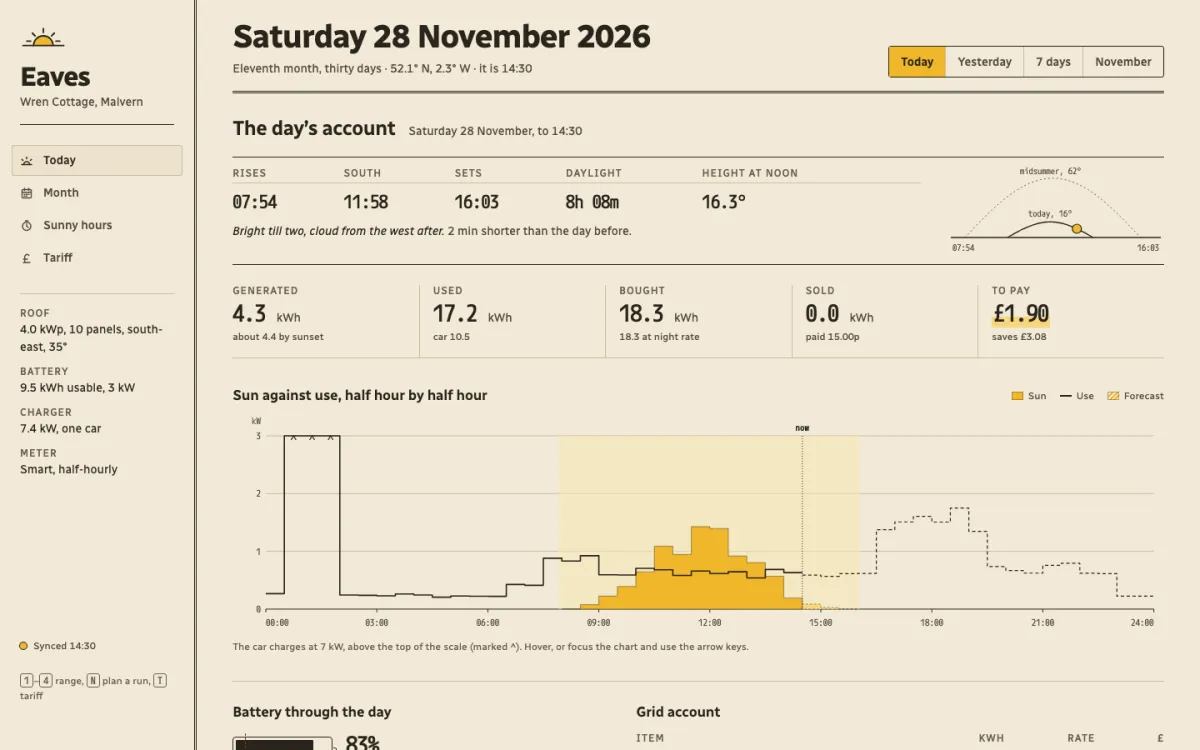
A printed almanac page: warm paper, one ink, hairline and double rules instead of cards, a sun table set in M PLUS 1 Code, weather lines in italic Radio Canada, and one sun yellow that only ever marks the sun and what it makes.
This template is the app itself, laid out like a calendar page from a printed almanac. The sidebar carries the masthead, the house, the four sections and the kit on the roof and in the garage; on phones it folds into a header and a bottom bar. The header gives the date, Saturday 28 November 2026 at 14:30, and the range switch: today, yesterday, seven days or November to date. Everything below recomputes from the range.
The day's account opens with the sun table (rises, due south, sets, daylight and height at noon, worked out for 52.1° N) and a drawing of today's low arc against midsummer's. Then a ruled row of figures, the power chart of sun against use in half hours or days, the battery through the day with its 10% reserve, the grid account in pounds where every line is kWh times rate, and an energy balance where the sun's three destinations and the house's three sources each add up. Late November numbers stay physical: about 3.7 kWh a day, 8.8 on the best clear day, 1.2 on the darkest.
Below, the month calendar shows each day's generation with a weather mark; any day opens a drawer with its curve and its bill. Sunny hours plans appliance runs for Sunday's forecast: pick a dishwasher, washing machine, dryer, bread maker or a car top-up and Eaves searches quarter-hour starts for the most spare sun, with validation, saving, error and offline states. The tariff section shows the rates and a three-step flow to change them; on save the half-hour simulation runs again under the new night hours and the month's cost is restated.
The brand is fictional: Eaves, a home energy app, here running Wren Cottage in Malvern, Worcestershire: a 4 kWp roof, a 9.5 kWh battery, a 7.4 kW car charger and a two-rate tariff. Names, people and figures on the page are invented.
What works
- Range switch (buttons or keys 1 to 4): figures, charts, ledgers, battery note, sun table and calendar highlight recompute
- Power chart: hover or focus and use arrow keys, Home and End for a half-hour or daily readout; forecast drawn hatched and dashed
- Battery chart: state of charge through the day with night-rate bands, or daily low and high bars for longer ranges
- Month calendar: open any day in a drawer with its chart and bill, step to the day before or after, or show it above
- Sunny hours: plan a run (N), choose appliance, day, sunniest start in a window or a set time; live best start and cost; validation for window length, quarter hours and car charge size
- Edit and remove runs with undo; runs drawn on the spare-sun strip
- Tariff flow (T): rates, hours and export, then a check step that re-runs November under the new tariff before saving
- Error, offline and loading states with a retry that recovers; Escape closes drawers and focus returns
States you can link to
script.js reads these from the URL, so you can open the page in a given state to review it, screenshot it or show it to an agent.
| Parameter | What it does |
|---|---|
?range=week | opens on the last seven days (also yesterday, month). Open ?range=week |
?day=12 | opens the drawer for a day of the month (1 to 30; 29 and 30 are forecasts). Open ?day=12 |
?run=new | opens the plan-a-run drawer. Open ?run=new |
?run=edit | opens the dishwasher run for editing. Open ?run=edit |
?run=new&save=error | submits a run and shows the hub-did-not-answer error with the choices kept. Open ?run=new&save=error |
?tariff=1 | opens the tariff flow at step 1 (also 2 and 3). Open ?tariff=1 |
?state=loading | skeleton figures and charts while readings are fetched. Open ?state=loading |
?state=empty | a new install: the inverter joined at 14:02 and no readings have arrived. Open ?state=empty |
?state=error | the inverter is not answering; banner with Try again that recovers. Open ?state=error |
?state=offline | offline banner; plans are kept on the device and tariff saves fail until back online. Open ?state=offline |
Use it
Copy templates/solar/ into your project, or download the zip, which has the Screenery badge script already removed. Colours, type, spacing and radii are custom properties at the top of style.css. This template loads no libraries: only its own files and web fonts.
The docs explain the token pattern and how to move a template into React, Vue, Svelte or Astro. The guide has prompts for handing it to a coding agent.