Lune Modular
Furniture configurator template · Shops and makers
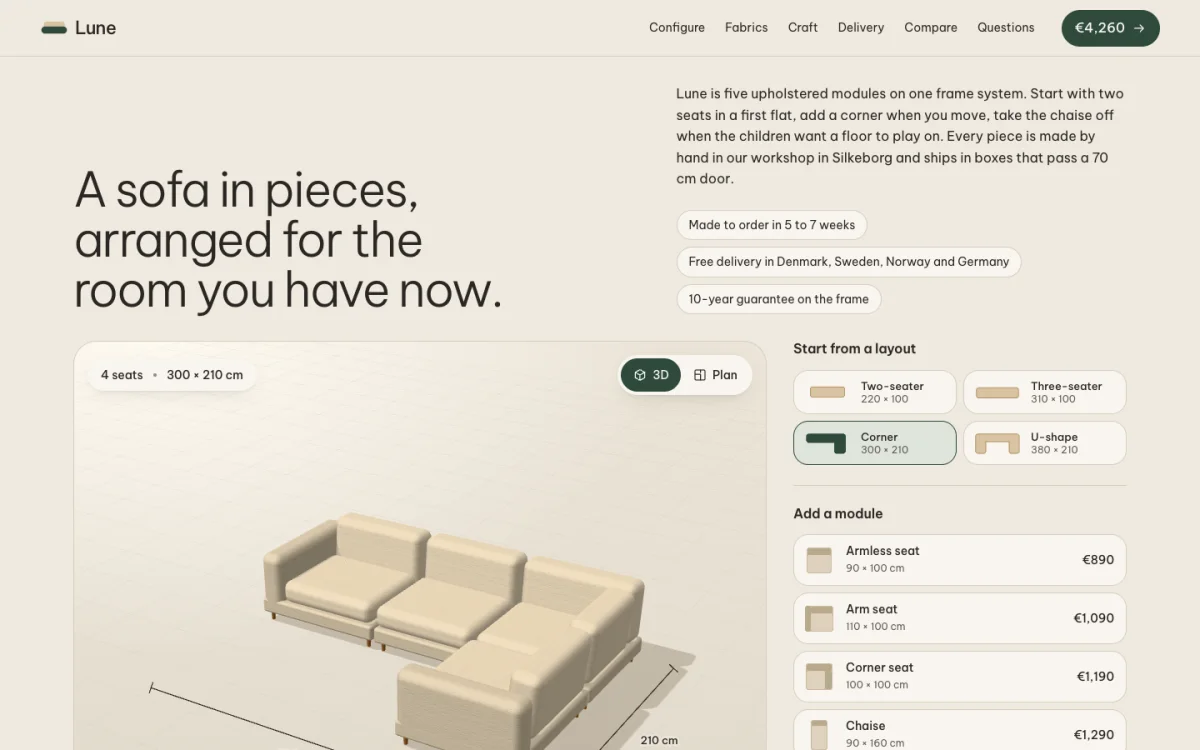
A calm Danish showroom in daylight: oat walls, birch and wool grey, one pine-green accent, rounded generous forms and a live three.js sofa you build module by module on the floor.
The first screen is the configurator. The sofa is built live in three.js from five modules: armless seat, arm seat, corner seat, chaise and ottoman, each a set of rounded, slightly crowned cushions on a fabric-covered base with oak or steel legs, lit like a room by a window and resting on a soft contact shadow. Add modules from the tray, pick a two-seater, three-seater, corner or U-shape, click a module to select it, drag it across the floor on a 10 cm grid, turn it, swap the side of its arm or remove it. Modules drop in and settle; width and depth are drawn on the floor and the seat count and price follow every change.
Every action is also a button, with keyboard shortcuts on the stage, and a numbered text list mirrors the layout piece by piece. A drawn top-down plan does everything the 3D view does: it is one click away, and it replaces the 3D view without WebGL or with reduced motion. A room check takes the wall width and room depth, outlines the room in both views and says whether the sofa fits, how much floor is left and whether it would fit against the other wall.
Below are the five cloths as a fanned swatch book with care notes and a free samples form, a cross-section of a seat with selectable layers, delivery with box sizes and a door check, the cloths compared in a table, and the order summary with a recap plan, delivery by country, deposit, inline validation and loading, error and success states. Everything is drawn in SVG, CSS, canvas or WebGL; there are no photographs.
The brand is fictional: Lune Modular, a modular sofa made by a workshop of eleven in Silkeborg, Denmark. Names, people and figures on the page are invented.
What works
- 3D configurator: add modules, select by click, drag on a 10 cm grid with collision and sliding, drag the floor to orbit, double-click to reset the view
- Presets: two-seater, three-seater, corner and U-shape, dropping in module by module
- Selected module: turn 90°, swap arm side, move 10 cm in four directions, remove
- Stage keyboard: arrows move (Shift for 50 cm), R turns, M swaps the arm, Delete removes, N and P change selection, Escape deselects
- Fabric picker recolours the 3D cushions and textures with a short colour glide; leg finish swaps the legs
- Live seat count, footprint, dimension lines and price per module plus fabric surcharge
- Room fit check with validation, fits, tight or does-not-fit messages and an outline in both views
- Text list of the layout with select and remove buttons; SVG plan with drag to move
- Fabric swatch book tabs with arrow keys, care notes and 'use this cloth'
- Free samples form: up to three cloths, validation, loading and confirmation
- Cross-section layers highlight; door width check against the boxes in your layout
- Order: country-based delivery, deposit, inline validation, loading, error with retry, success with order number
States you can link to
script.js reads these from the URL, so you can open the page in a given state to review it, screenshot it or show it to an agent.
| Parameter | What it does |
|---|---|
?preset=corner | opens on the corner sofa (also ?preset=2, ?preset=3, ?preset=u). Open ?preset=corner |
?fabric=boucle | opens in Skum bouclé (also linen, wool, pine, rust). Open ?fabric=boucle |
?room=320x240 | fills and runs the room check: the three-seater fits with 10 cm to spare along the wall, and the room is outlined. Open ?room=320x240 |
?preset=u&room=320x240 | a layout that does not fit the room. Open ?preset=u&room=320x240 |
?state=success | fills the delivery form, sends it and shows the order on the workshop wall. Open ?state=success |
?state=error | fills and sends, the order desk does not answer; Try again succeeds. Open ?state=error |
?view=plan | opens on the top-down plan. Open ?view=plan |
?nogl | skips WebGL: the plan is the only view and still supports every action. Open ?nogl |
Use it
Copy templates/sofa/ into your project, or download the zip, which has the Screenery badge script already removed. Colours, type, spacing and radii are custom properties at the top of style.css. This template loads no libraries: only its own files and web fonts.
The docs explain the token pattern and how to move a template into React, Vue, Svelte or Astro. The guide has prompts for handing it to a coding agent.
Inspection
Loaded in Chromium 156.0.8078.4 (Playwright, headless) on 27 November 2026 at 1440, 1024, 768, 390 pixels wide and once more with reduced motion requested. Every check passed at every width.
- 1440 px
- Pass
- 1024 px
- Pass
- 768 px
- Pass
- 390 px
- Pass
- Reduced motion
- Pass
- Page weight
- 420 KB, 12 requests
Requests and transferred size were measured at 1440 pixels on a cold cache and include web fonts and any CDN library. The full result is in the viewer: open the Checks panel. How templates are checked.