Grindhouse No. 9
Coffee subscription website template · Food and drink
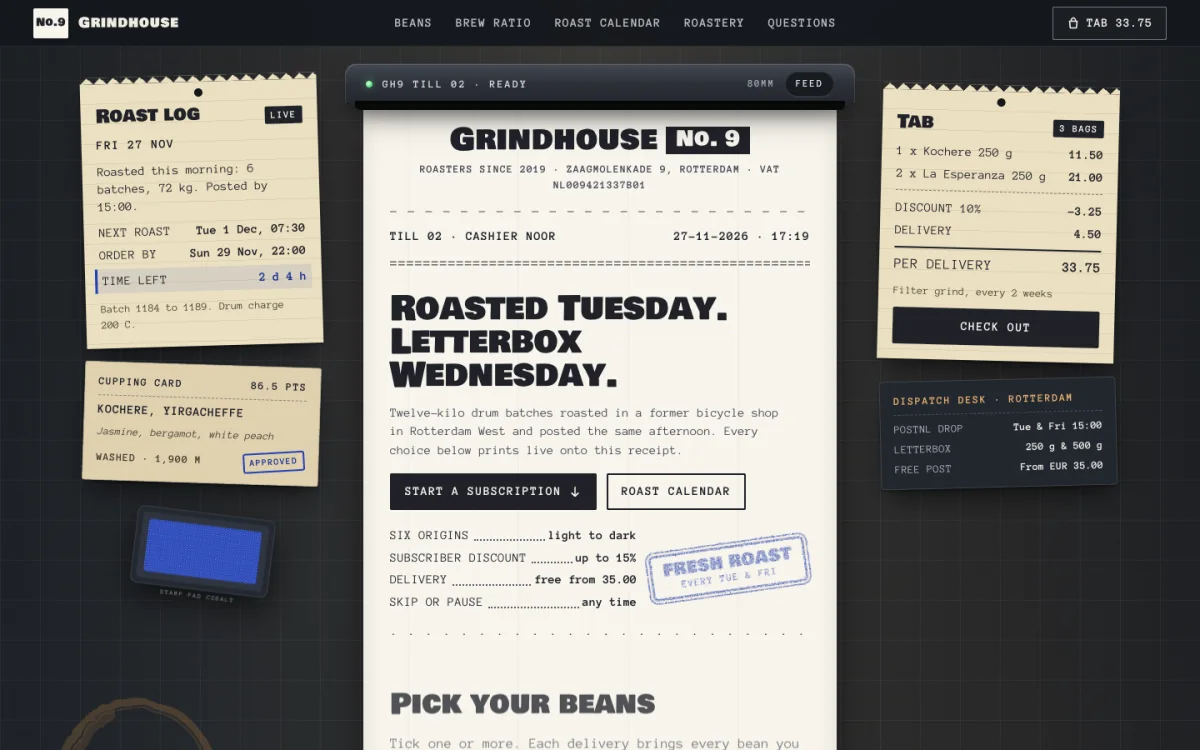
One long thermal till receipt fed out of a machined till printer onto a brushed-slate industrial roastery countertop with cutting-mat hairlines and warm overhead spotlight: monospace print, character rules, double-height totals, barcodes, and cobalt rubber-stamp ink, framed by a perforated roast-log docket, cupping card, cobalt ink pad, live tab slip, and dispatch spec tag.
The whole page is a till receipt coming out of a thermal printer on a dark counter. The header prints line by line as the page opens while the printer's light blinks, and every section below prints itself in as it scrolls into view, pale at first like thermal paper warming up. Headings are stamped in Bowlby One SC, everything else is Anonymous Pro with rules made of printed dashes and equals signs, inverted print for chosen items and double-height numerals for the total.
The centre is a subscription builder printed as line items. Tick any of six origins, each with its farm, process, altitude, tasting notes and a five-step roast level, set how many bags of each, then pick a grind, a bag size and how often. The tab prints the lines and works out subtotal, the subscriber discount for the chosen frequency, delivery (free from 35.00 after discount) and the 9% VAT already inside the prices, so net plus VAT is always the total to the cent, along with what four weeks cost. A brew ratio slip turns coffee into water and back for six brew methods and tells you how many brews a bag makes.
The roast calendar reads the visitor's clock and shows four weeks of Tuesday and Friday roasts with cut-offs, holiday closures and the first-Friday public cupping; pick a day for its batch sheet. The roastery story has a dithered drawing of the roaster and an excerpt of the roast log. Checkout validates inline, including postcodes per country, then prints with a moving print head, can jam with a clear error, and on success feeds out a final receipt with order number, barcode and a blue Subscribed stamp. On wide screens a roast-log docket and a live tab docket sit on the counter beside the paper; on phones the tab is a strip of receipt along the bottom.
The brand is fictional: Grindhouse No. 9, a small coffee roaster in a former bicycle shop at Zaagmolenkade 9 in Rotterdam, selling beans by subscription. Names, people and figures on the page are invented.
What works
- Origins: tick to print a line, bag steppers per origin (1 to 6), prices follow the bag size
- Grind, bag size and frequency options drawn as printed boxes, all with keyboard focus
- The tab: subtotal, subscriber discount, delivery threshold, VAT included, net, deliveries and cost per four weeks, saving stamp
- Brew ratio: six methods as a radiogroup with arrow keys, coffee and water steppers that drive each other, ratio slider, brews per bag
- Roast calendar: four weeks from the visitor's week, roast days open their batch sheet, today and cupping marked
- Roast-log docket with what Ria is roasting right now and the time left to the next cut-off
- Checkout: inline validation per field, country-aware postcode, loading print head, paper-jam error with retry, printed final receipt, edit or start another
- Live tab docket on wide screens and a receipt-strip tab bar on phones that steps aside at checkout
- Questions accordion
States you can link to
script.js reads these from the URL, so you can open the page in a given state to review it, screenshot it or show it to an agent.
| Parameter | What it does |
|---|---|
?state=empty | nothing ticked: the empty tab and zero sums. Open ?state=empty |
?state=full | all six origins, 500 g bags, every week: free delivery and the biggest discount. Open ?state=full |
?state=invalid | submits an empty checkout and shows every field error. Open ?state=invalid |
?state=loading | fills the checkout and holds it in the printing state. Open ?state=loading |
?state=error | fills the checkout and shows the paper-jam error; Print again succeeds. Open ?state=error |
?state=success | fills the checkout and prints the final receipt with order number and stamp. Open ?state=success |
?date=2026-12-04 | sets the visitor's date (09:41 that day): a Friday roast with the public cupping. Open ?date=2026-12-04 |
?date=2026-12-21 | a Christmas week: the Friday 25 December roast is closed. Open ?date=2026-12-21 |
?brew=espresso | opens the brew slip on espresso (also v60, cafetiere, aeropress, moka, cold). Open ?brew=espresso |
?faq=open | opens every question. Open ?faq=open |
Use it
Copy templates/receipt/ into your project, or download the zip, which has the Screenery badge script already removed. Colours, type, spacing and radii are custom properties at the top of style.css. This template loads no libraries: only its own files and web fonts.
The docs explain the token pattern and how to move a template into React, Vue, Svelte or Astro. The guide has prompts for handing it to a coding agent.
Inspection
Loaded in Chromium 156.0.8078.4 (Playwright, headless) on 27 November 2026 at 1440, 1024, 768, 390 pixels wide and once more with reduced motion requested. Every check passed at every width.
- 1440 px
- Pass
- 1024 px
- Pass
- 768 px
- Pass
- 390 px
- Pass
- Reduced motion
- Pass
- Page weight
- 178 KB, 9 requests
Requests and transferred size were measured at 1440 pixels on a cold cache and include web fonts and any CDN library. The full result is in the viewer: open the Checks panel. How templates are checked.