Dotkin
Instant camera product page template · Shops and makers
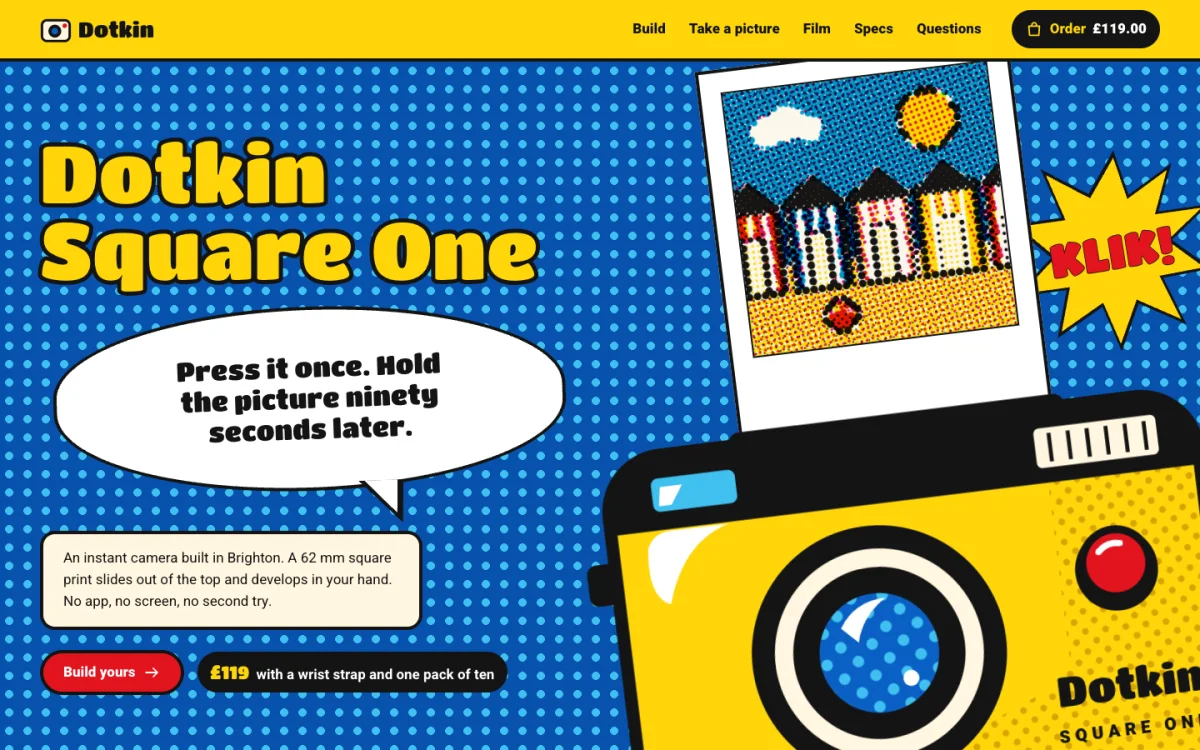
A 1960s pop art print of a product: flat process primaries, plate-black outlines, Ben-Day dot fields for every tint and shadow, speech balloons and sound-word bursts, and a camera whose prints come out as real CMYK halftones.
The page is a pop art print of the product. A huge Dotkin Square One is cropped by the edge of a blue Ben-Day field, a print stands in its slot with a real halftone picture on it, and the headline sits in a speech balloon. Every tint is laid in equal dots the way the comic process did it, every shape has the same black outline, and there are no gradients or photographs.
The builder redraws one SVG camera as you choose: five body colours with their own dot shading and contrast trim, the standard lens, a pink close-up ring or a ribbed wide hood, a wrist or shoulder strap, and film packs with a ten-pack limit. The take-a-picture toy draws a scene on a canvas through the lens you chose, then prints it as a four-colour halftone that slides out of the top of the camera and develops dot by dot; the pack counts down to an empty state, and finished prints pile up on a table.
The film calculator finds the cheapest mix of single packs and five-packs for a year at your rate, shows every line of the sum, compares it with a 10% off film club and warns when film would outlive its date. A cut-away explains the ninety seconds inside the camera, then specs, an order form with inline validation, loading, error and success states, questions in balloons and the workshop footer.
The brand is fictional: Dotkin Camera Works, six people in a unit off the Lewes Road, Brighton, who build the Square One instant camera and its film packs. Names, people and figures on the page are invented.
What works
- Camera builder: body colour, lens and strap radios redraw the drawn camera everywhere on the page, with a short pop
- Film pack steppers with a ten-pack order limit and warning; running lines, total and shots in the box
- Take a picture: scene and film choice, live viewfinder through the chosen lens, shutter, print eject and halftone develop
- Shots counter, empty pack state with a locked shutter, and Load a new pack
- Print table: newest first, up to eight, clear the table
- Film cost calculator: photos-a-month slider, film type, Film Club comparison, shown arithmetic, edge warnings, add a month of film to the order
- Order form: inline validation with specific messages, UK postcode check, delivery choice that changes the total, loading, error with retry, success with an order number and arrival dates
- Questions accordion
States you can link to
script.js reads these from the URL, so you can open the page in a given state to review it, screenshot it or show it to an agent.
| Parameter | What it does |
|---|---|
?body=red | starts with the Pop Red body (also yellow, blue, pink, black). Open ?body=red |
?lens=wide | fits the 0.8× wide hood (or ?lens=close for the close-up ring). Open ?lens=wide |
?strap=shoulder | draws the shoulder strap. Open ?strap=shoulder |
?scene=cake | points the toy camera at the birthday cake (huts, cake, wheel). Open ?scene=cake |
?film=bw | loads Black & White film in the toy (colour, blue, bw). Open ?film=bw |
?print=demo | three finished prints on the table and seven shots left. Open ?print=demo |
?pack=empty | the finished pack: counter at 0, shutter locked, Load a new pack. Open ?pack=empty |
?photos=4 | sets the calculator to 4 photos a month (shows the film-date warning; 120+ shows the trade warning). Open ?photos=4 |
?state=invalid | the order form with every validation message showing. Open ?state=invalid |
?state=loading | a filled order form while it sends. Open ?state=loading |
?state=error | a filled order form that fails to send, with Try again. Open ?state=error |
?state=success | the confirmation with order number, lines and arrival dates. Open ?state=success |
Use it
Copy templates/popart/ into your project, or download the zip, which has the Screenery badge script already removed. Colours, type, spacing and radii are custom properties at the top of style.css. This template loads no libraries: only its own files and web fonts.
The docs explain the token pattern and how to move a template into React, Vue, Svelte or Astro. The guide has prompts for handing it to a coding agent.