Quarterday
Net worth and budgeting dashboard template · App screens
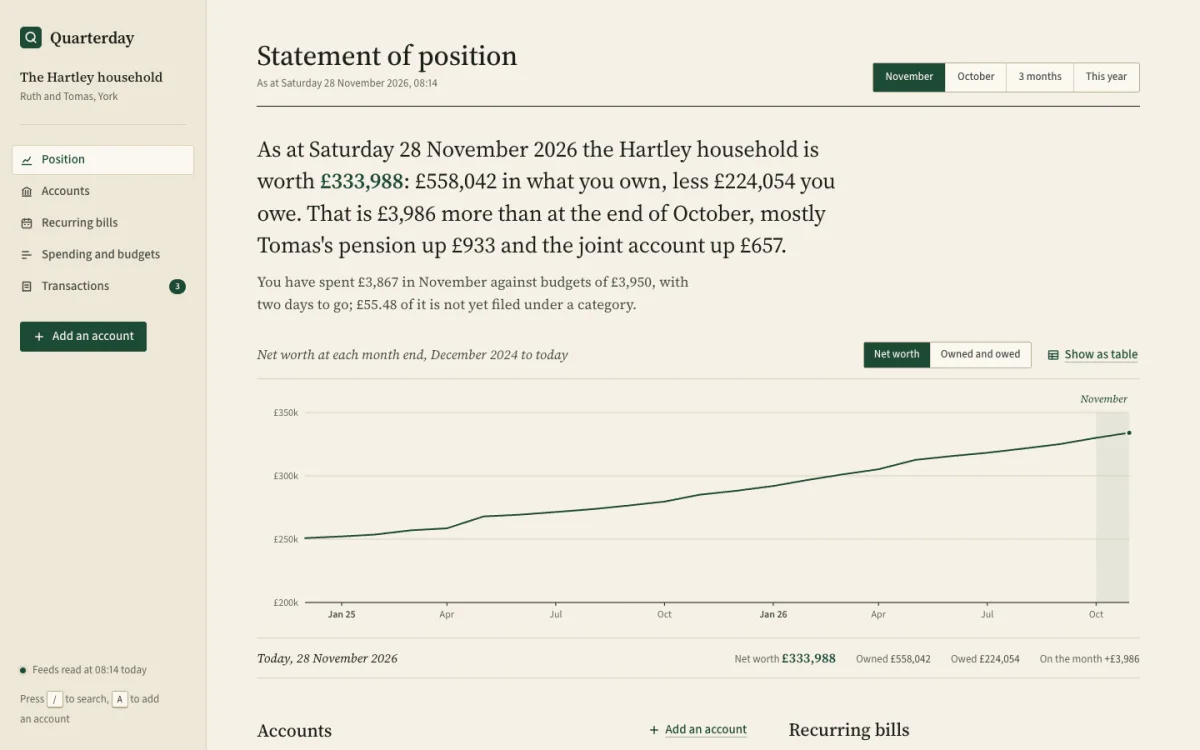
A private bank statement of position on ivory paper: hairline rules, a single and double rule under the totals, debts in brackets, Source Serif 4 for headings and figures, Source Sans 3 for the working labels, and one deep green.
This template is the app itself. Instead of a big number in a box, the top of the page is a written statement of position, set in serif like a private bank letter: what the household is worth today, what it owns and owes, how far that moved since the end of last month and which two accounts moved it most, then what has been spent against the month's budgets. Below it, a hand-drawn line of net worth at 24 month ends, with the chosen period shaded, a readout that follows the pointer or the arrow keys, an owned-and-owed view and a table for screen readers.
The accounts are a proper statement: what you own, what you owe in brackets, a single rule under each subtotal and a double rule under net worth, with the change since the start of the period. Recurring bills show the next 30 days on a day ruler and as a list. Spending by category is a bar table whose shares add up to exactly 100, and each bar opens those transactions. Budgets carry a pace mark for the day of the month and turn oxblood when over; each can be edited inline with validation. The register groups eleven months of transactions by day, with search, category and account filters, sort, and a To categorise filter for three payees nobody has filed yet.
Opening a transaction slides in a drawer to file it under a category, optionally with every other payment to the same payee, and to add a note; budgets and the statement recompute at once. Add an account is a manual flow with ten kinds, inline errors in plain words, a saving state, a failure that keeps your entries, and a success that adds the row and moves net worth. The page makes no recommendations: it shows balances and never suggests buying or selling anything. On phones the sidebar becomes a top bar and a bottom bar, and the statement and register become two-line rows.
The brand is fictional: Quarterday, a household net worth and budgeting app, here keeping the books for the Hartley household in York: Ruth, Tomas and their daughter Maya. Names, people and figures on the page are invented.
What works
- Period switch: November, October, three months or this year; arrow keys move between them and every region recomputes
- Net worth chart: pointer or arrow keys (Home and End too) read each month end; switch to owned and owed; show as a table
- Spending bars: open a category's transactions in the register
- Budgets: edit any monthly budget inline with validation; Escape cancels
- Register: search payee, note or amount; filter by category or account; sort by date or amount; To categorise filter; show more
- Empty search offers to clear it or search the whole year
- Transaction drawer: choose a category (required for spending), file every payment from the same payee, note with a 140-character count, saving state
- Add an account: ten kinds, name, institution, balance or amount owed, balance date; inline errors, saving, failure and success
- Shortcuts: / focuses search, A opens Add an account, Escape closes the drawer and dialogs
- Section index highlights the section in view; bottom bar on phones
States you can link to
script.js reads these from the URL, so you can open the page in a given state to review it, screenshot it or show it to an agent.
| Parameter | What it does |
|---|---|
?period=oct | the closed month of October (also 3m and ytd). Open ?period=oct |
?state=loading | skeleton of every region while the statement loads. Open ?state=loading |
?state=empty | a household with nothing entered yet, with the first-account prompt. Open ?state=empty |
?state=error | the statement failed to load, with Try again. Open ?state=error |
?state=offline | offline banner and status; edits are kept on this device until Reconnect. Open ?state=offline |
?open=add | opens the add-account dialog. Open ?open=add |
?add=error | fills the add-account form and shows the save failure with entries kept. Open ?add=error |
?txn=t-1124-622 | opens the drawer on an uncategorised transaction (t-1114-618 is the birthday dinner). Open ?txn=t-1124-622 |
?filter=uncat | starts the register on the three transactions waiting for a category. Open ?filter=uncat |
Use it
Copy templates/networth/ into your project, or download the zip, which has the Screenery badge script already removed. Colours, type, spacing and radii are custom properties at the top of style.css. This template loads no libraries: only its own files and web fonts.
The docs explain the token pattern and how to move a template into React, Vue, Svelte or Astro. The guide has prompts for handing it to a coding agent.