Nightdrive
VPN app landing page template · Software and web
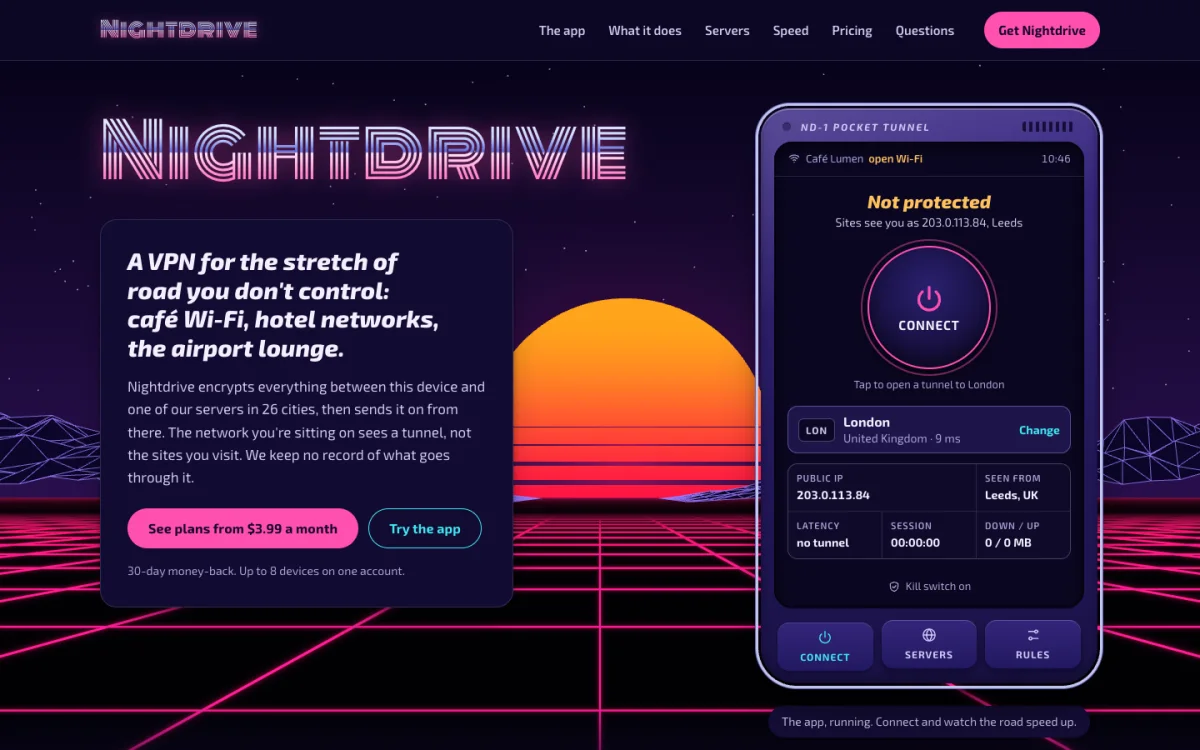
1980s outrun after midnight: a neon perspective grid racing toward a striped setting sun between wireframe mountains, chrome Monoton lettering, magenta, cyan and violet on deep indigo, and a working VPN app on a drawn retro-futurist handheld.
The first screen is a night drive. A Three.js grid scrolls toward a striped sun setting between wireframe mountains, behind the chrome Monoton wordmark, a solid copy panel and the ND-1 Pocket Tunnel, a drawn violet handheld running the Nightdrive app. Press the big connect button and the app walks through finding the server, exchanging keys and assigning an address: the grid speeds up, the sun turns violet and then cyan, and the public IP, location, latency, session timer and data counters change to the server's. A full server or a timed-out handshake shows an error with retry, and the message changes with the kill switch.
The app's hardware keys open the server list, grouped by region with search, latency bars, load and favourites, and the rules screen with the kill switch, three auto-connect rules and a list of trusted Wi-Fi networks you can add to and remove from. Below the hero, the page says plainly what a VPN does and doesn't do, lists everything the servers store and never store, then shows a dotted world map with glowing nodes that zooms per region, draws the route from Leeds to the chosen server and connects from any city.
A simulated speed test on a dashboard gauge measures the direct line or the tunnel through whichever server is connected, with numbers that follow distance and load and add to a table of runs. Pricing offers 1 month at $11.99, 1 year at $5.99 a month ($71.88) and 2 years at $3.99 a month ($95.76) with a 30-day refund, and feeds the sign-up form, which validates inline and shows loading, error and success. Questions and the footer close the page. Without WebGL or with reduced motion the drawn SVG scene stays still and still changes colour with the app.
The brand is fictional: Nightdrive, a fictional VPN app from Nightdrive Networks in Leeds, with diskless WireGuard servers in 26 cities. Names, people and figures on the page are invented.
What works
- Connect button: disconnected, connecting (cancelable), connected, error with retry; scene speed and sun colour follow it
- Live readouts: public IP, location, latency with jitter, session timer, data counters
- Hardware-key tabs with arrow, Home and End keys
- Server list: search by city, country or code, All or Favourites, star servers, pick a server (reconnects if connected)
- Auckland at 97% load refuses the first connection; retry gets in
- Rules: kill switch, auto-connect on untrusted Wi-Fi (connects at once on the café network), on start-up, on mobile data
- Trusted networks: add with validation (empty, duplicate, limit of 6) and remove
- Server map: region tabs zoom the map, hover or focus a city for latency and load, connect from the map, route line from Leeds
- Speed test: ping, download and upload on a gauge; results per route in a table
- Pricing radios update the continue button, the sign-up summary and the submit label
- Sign-up: inline validation, password strength and show toggle, loading, error and success, start over
- Questions accordion; section menu popover on narrow screens
States you can link to
script.js reads these from the URL, so you can open the page in a given state to review it, screenshot it or show it to an agent.
| Parameter | What it does |
|---|---|
?state=connected | the app connected, with a 12-minute session and data used. Open ?state=connected |
?state=connecting | the app mid-connection: violet sun, fast grid, Cancel. Open ?state=connecting |
?state=error | a handshake timeout with retry; red sun, grid nearly stopped. Open ?state=error |
?server=tokyo | selects a server (any city id: london, newyork, auckland...). Open ?server=tokyo |
?plan=2y | preselects a plan (1m, 1y, 2y) in pricing and sign-up. Open ?plan=2y |
?signup=success | fills and submits the sign-up form, showing the success state. Open ?signup=success |
?signup=error | fills and submits, the sign-up server can't be reached; submitting again succeeds. Open ?signup=error |
?tab=servers | opens the app on the server list (or rules). Open ?tab=servers |
?nogl | skips WebGL and shows the drawn SVG scene. Open ?nogl |
Use it
Copy templates/neon/ into your project, or download the zip, which has the Screenery badge script already removed. Colours, type, spacing and radii are custom properties at the top of style.css. This template loads no libraries: only its own files and web fonts.
The docs explain the token pattern and how to move a template into React, Vue, Svelte or Astro. The guide has prompts for handing it to a coding agent.
Inspection
Loaded in Chromium 156.0.8078.4 (Playwright, headless) on 27 November 2026 at 1440, 1024, 768, 390 pixels wide and once more with reduced motion requested. Every check passed at every width.
- 1440 px
- Pass
- 1024 px
- Pass
- 768 px
- Pass
- 390 px
- Pass
- Reduced motion
- Pass
- Page weight
- 433 KB, 9 requests
Requests and transferred size were measured at 1440 pixels on a cold cache and include web fonts and any CDN library. The full result is in the viewer: open the Checks panel. How templates are checked.