Countdown
Launch tracker app template · App screens
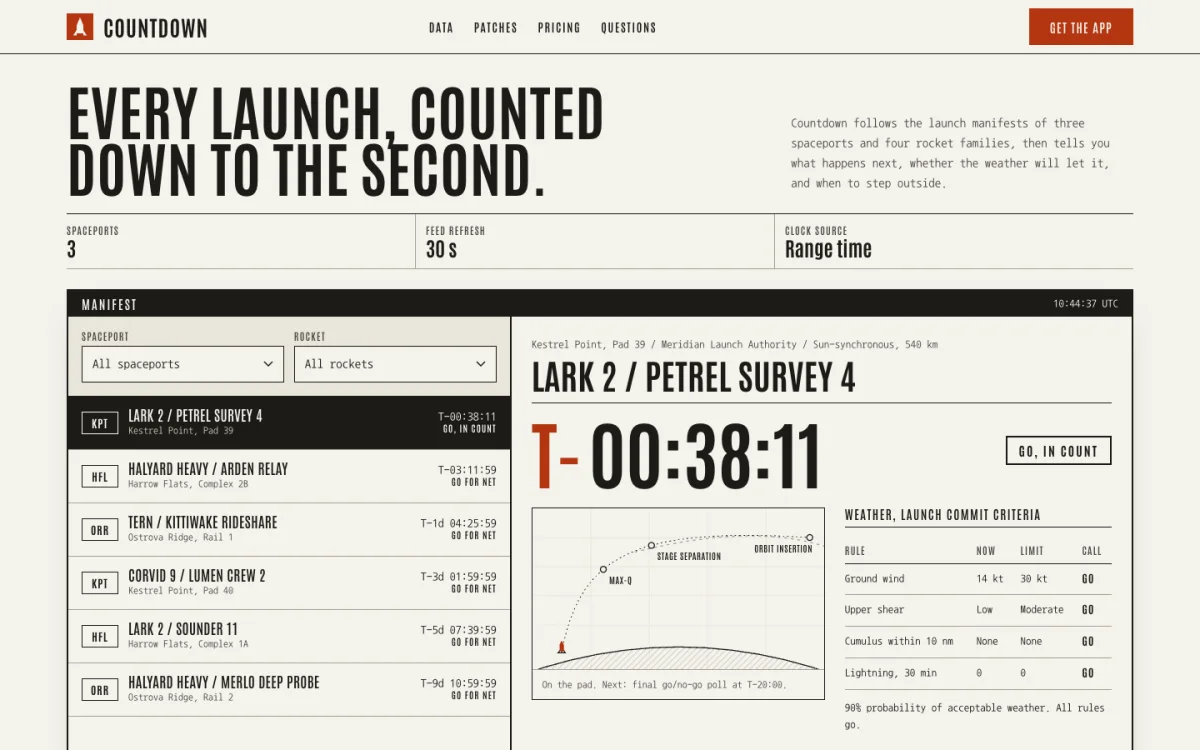
A sheet from a 1970s space-agency graphics standards manual: warm white paper, grey hairlines on a strict modular grid, condensed capitals, one signal red-orange, technical drawings and drawn mission patches.
The page is a sheet from a launch agency's graphics standards manual, and the first screen is the app itself. The manifest lists six upcoming launches from Kestrel Point, Harrow Flats and Ostrova Ridge with live T-minus clocks counted from the moment the page opens, filtered by spaceport and rocket. Picking one opens its detail: a big range clock and status, the weather launch commit criteria as a go/no-go table, and the count from T-60 minutes to orbit insertion with the current phase lit in signal red.
A technical drawing shows the ascent from the pad over the Earth's limb to orbit. After T-0 the vehicle flies along the arc in real time, the flown path fills in red and Max-Q, stage separation and orbit insertion are marked on the curve; with reduced motion it snaps from event to event instead. A remind-me switch with a lead-time choice writes the exact reminder time and warns when the lead is longer than the time left.
Below are a short note on where the data comes from, six mission patches drawn in SVG, Free and Plus compared in one ruled table, a download form with inline validation, loading, success and error, and the questions people ask. Everything is drawn in SVG and CSS. The agencies, spaceports and rockets are fictional.
The brand is fictional: Countdown, an app that tracks rocket launches from three fictional spaceports. Names, people and figures on the page are invented.
What works
- Manifest list with live clocks; select a launch to open its detail
- Spaceport and rocket filters with an empty state and clear button
- Event timeline that marks done, current and upcoming phases every second
- Weather go/no-go table and probability summary per launch
- Trajectory drawing flown along the arc after liftoff (reduced motion: per-event snaps)
- Remind me switch with lead time, per launch, with a too-late warning
- Feed error banner with retry
- Download form: email and phone validation, sending, success and error
- Questions accordion
States you can link to
script.js reads these from the URL, so you can open the page in a given state to review it, screenshot it or show it to an agent.
| Parameter | What it does |
|---|---|
?launch=3 | opens the third launch, Tern / Kittiwake Rideshare from Ostrova Ridge. Open ?launch=3 |
?state=scrubbed | the selected launch is scrubbed for upper-level winds: clock frozen and struck, no-go row, new NET a day later. Open ?state=scrubbed |
?state=liftoff | the selected launch lifted off 25 seconds ago: T+ clock, in-flight status, the vehicle flying the arc. Open ?state=liftoff |
?state=error | the manifest feed is unreachable: stale list and a retry button. Open ?state=error |
?form=success | fills and sends the download form, showing the sent state. Open ?form=success |
?form=error | fills and sends the download form, showing the not-sent error. Open ?form=error |
Use it
Copy templates/mission/ into your project, or download the zip, which has the Screenery badge script already removed. Colours, type, spacing and radii are custom properties at the top of style.css. This template loads no libraries: only its own files and web fonts.
The docs explain the token pattern and how to move a template into React, Vue, Svelte or Astro. The guide has prompts for handing it to a coding agent.
Inspection
Loaded in Chromium 156.0.8078.4 (Playwright, headless) on 27 November 2026 at 1440, 1024, 768, 390 pixels wide and once more with reduced motion requested. Every check passed at every width.
- 1440 px
- Pass
- 1024 px
- Pass
- 768 px
- Pass
- 390 px
- Pass
- Reduced motion
- Pass
- Page weight
- 150 KB, 10 requests
Requests and transferred size were measured at 1440 pixels on a cold cache and include web fonts and any CDN library. The full result is in the viewer: open the Checks panel. How templates are checked.