Tactile Seventy
Keyboard configurator template · Shops and makers
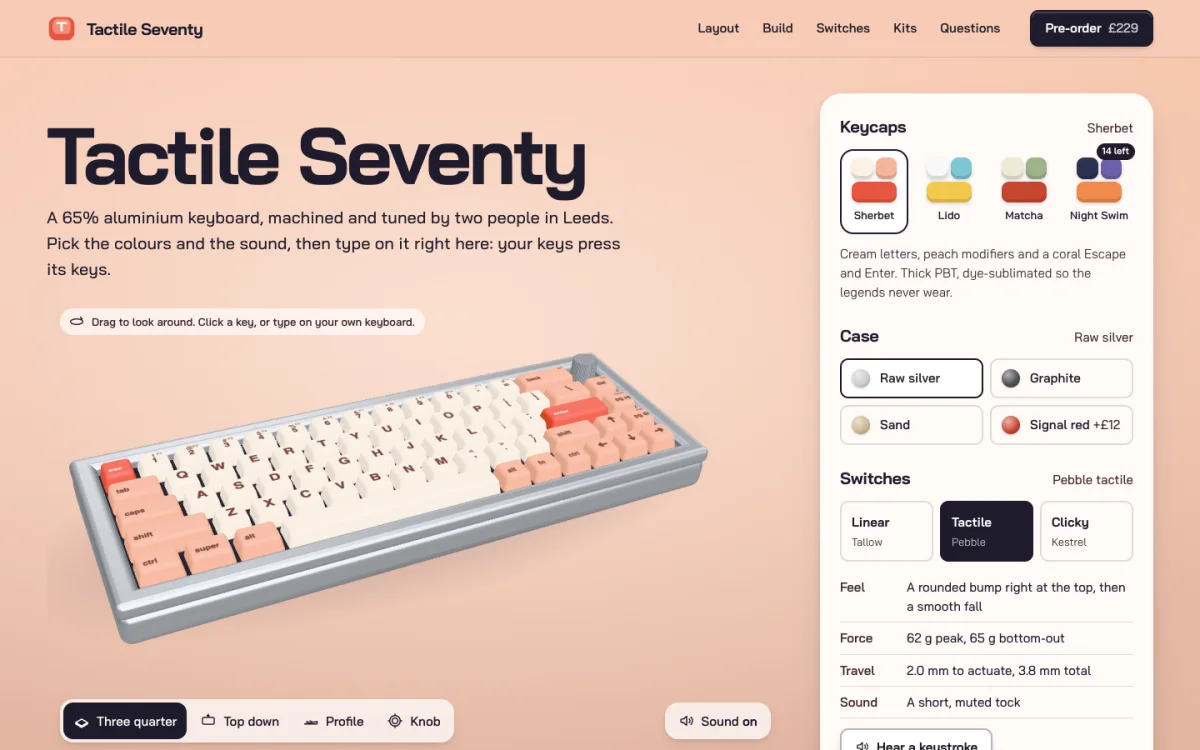
Playful studio product photography in real time: a soft seamless sweep in the chosen colourway, chunky friendly type, toy-like keycaps with premium detail, and a 3D keyboard you can press with your own keys and hear.
The first screen is the keyboard on a studio sweep. It is built live in three.js from primitives: 67 tapered rounded-box keycaps with legends drawn on one canvas atlas, an anodised aluminium case with a raised rim and a dark plate, and a knurled knob whose cap carries your engraving. Drag to look around within limits, or jump to the three-quarter, top-down, profile and knob views. Press keys on your own keyboard and the same keys go down on the board, with a sound synthesized for the chosen switch.
The configurator picks one of four keycap colourways (the sweep, the page and the board all glide to it), one of four case finishes and a linear, tactile or clicky switch, which rewrites the spec and changes the sound. A type test under the board counts words per minute over the last 30 seconds and accuracy against a line to copy. Below, the 65% layout is drawn with highlightable zones, an Fn layer and a to-scale comparison with a full-size board; the gasket mount comes apart as an exploded stack; the three switches are compared with force curves.
Two kits are compared line by line so the prices visibly add up. The buy box summarises your choices, validates the knob engraving as you type and draws it on the knob, works out delivery and the free-delivery threshold, and goes through loading, error with retry and success with a board number. A sold-out colourway turns the box into a notify-me sign-up. Questions and the footer close the page. Without WebGL, or with reduced motion, the board is a drawn SVG that still recolours and presses.
The brand is fictional: Tactile Seventy, a 65% aluminium mechanical keyboard machined and tuned by Ruth Achebe and Tom Varley in a two-person workshop in Leeds. Names, people and figures on the page are invented.
What works
- 3D board: limited orbit by dragging, preset views (three quarter, top down, profile, knob) with eased camera moves, click a keycap to press it
- Physical keys press the matching 3D key (or SVG key in the fallback) and play a synthesized switch sound; sound toggle; audio starts only after a gesture
- Keycap colourway: four sets, recolours the 3D caps and legends, the studio sweep, the drawing and the page accent with an 800ms transition
- Case finish: four anodised colours on the case and knob; Signal red adds £12
- Switch type: linear, tactile or clicky changes the spec text, the sound and the highlighted column in the switch table; Hear a keystroke button
- Type test: live per-character feedback against a line to copy, WPM over the last 30 seconds and accuracy
- Layout diagram: highlight letters, number row, arrows, nav column or knob; show the Fn layer
- Build: take the gasket stack apart and put it back together
- Kits: choose barebones or assembled, which sets the buy box
- Buy box: kit choice with add-ons for barebones, knob engraving with character count, live knob preview and specific errors, delivery country with free-delivery threshold, totals that add up
- Checkout: inline validation, loading, error with retry, success with board number, configure another; sold-out colourway becomes an email sign-up
- Questions accordion
States you can link to
script.js reads these from the URL, so you can open the page in a given state to review it, screenshot it or show it to an agent.
| Parameter | What it does |
|---|---|
?colour=lido | opens on the Lido colourway (also matcha, nightswim). Open ?colour=lido |
?case=graphite | a graphite case (also sand, red). Open ?case=graphite |
?switch=clicky | Kestrel clicky switches: spec, sound and table column. Open ?switch=clicky |
?view=top | the 3D board from directly above (also side, knob). Open ?view=top |
?state=soldout | Night Swim selected and sold out: the buy box becomes a notify-me sign-up. Open ?state=soldout |
?state=error | fills and submits the pre-order, the payment page does not answer; Try again succeeds. Open ?state=error |
?state=success | fills and submits the pre-order and shows the reserved board. Open ?state=success |
?engrave=ADA | engraves the knob in the 3D board and the buy box preview. Open ?engrave=ADA |
?kit=barebones | the barebones kit with its add-ons in the buy box. Open ?kit=barebones |
?nogl | skips WebGL and shows the drawn SVG keyboard. Open ?nogl |
Use it
Copy templates/keyboard/ into your project, or download the zip, which has the Screenery badge script already removed. Colours, type, spacing and radii are custom properties at the top of style.css. This template loads no libraries: only its own files and web fonts.
The docs explain the token pattern and how to move a template into React, Vue, Svelte or Astro. The guide has prompts for handing it to a coding agent.
Inspection
Loaded in Chromium 156.0.8078.4 (Playwright, headless) on 27 November 2026 at 1440, 1024, 768, 390 pixels wide and once more with reduced motion requested. Every check passed at every width.
- 1440 px
- Pass
- 1024 px
- Pass
- 768 px
- Pass
- 390 px
- Pass
- Reduced motion
- Pass
- Page weight
- 474 KB, 13 requests
Requests and transferred size were measured at 1440 pixels on a cold cache and include web fonts and any CDN library. The full result is in the viewer: open the Checks panel. How templates are checked.