Spike
Kitchen display system template · Food and drink
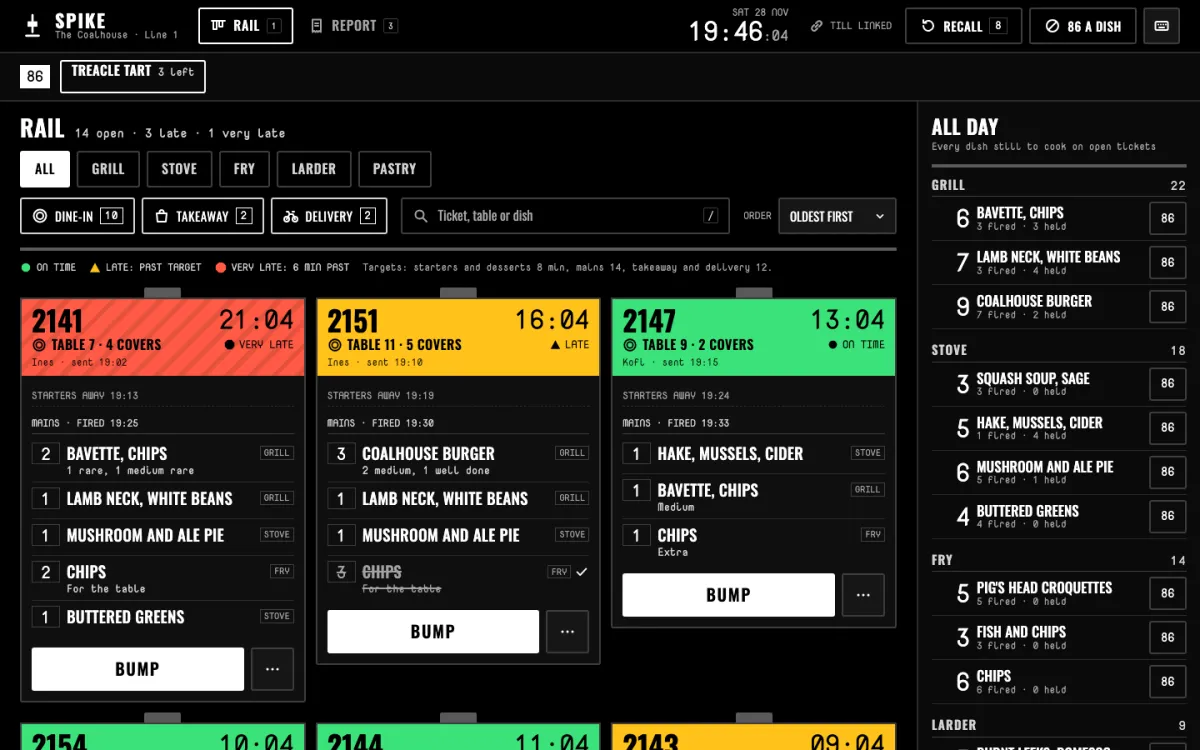
A kitchen ticket rail at full contrast: black ground, white condensed Oswald you can read from the pass, Nova Mono clocks and counts, steel clips holding each ticket, and colour kept for one job only, the timer: green on time, amber late, red very late, each with a word and a shape.
This template is the screen above the pass. The top bar carries the views (Rail, All day, Report), the service clock for Saturday 28 November, the till link, Recall with a count and 86 a dish. Under it a strip lists every dish that is 86 or running low. The toolbar switches station (Grill, Stove, Fry, Larder, Pastry), toggles dine-in, takeaway and delivery with live counts, searches by ticket, table, name or dish, and orders the rail oldest first, most late first or by table.
Each ticket hangs from a steel clip. Its header is the only coloured thing on screen: green, amber or red by how long the live course has been fired against its target (8 minutes for starters and desserts, 14 for mains, 12 for takeaway and delivery), always with the words On time, Late or Very late and a circle, triangle or octagon so nobody has to read colour. Allergies print white on a hatched black and white border with the seat and what to change, and the affected dish modifiers are inverted too. Tap a dish to strike it, Fire a held course to start its clock, Bump the live course or the whole ticket. Bumps can be undone from the toast or recalled from the Recall drawer, last bumped first.
All day counts every dish still to cook, split into fired and held, grouped by station; tap one to fade every ticket without it, or 86 it in a dialog with validation for portions left, a reason and a back-on time, a loading state and a till error. The Report is the end-of-service read: tickets, covers (follow-on dessert tickets are not counted twice), average fire-to-bump time, over-target share and the longest ticket, two hand-drawn SVG charts with a table alternative, channel mix, station load and the slowest five tickets, for tonight, Saturday lunch, Friday dinner or the whole week. Tonight's numbers include every ticket you bump on the rail.
The brand is fictional: Spike, the kitchen display running Line 1 at The Coalhouse, a neighbourhood restaurant on Brindle Road: five stations, four servers, dine-in, takeaway and delivery. Names, people and figures on the page are invented.
What works
- Rail: tap a dish to strike it, Fire a held course, Bump the live course or the whole ticket, open the detail drawer
- Bump and recall: Undo from the toast, the Recall drawer lists the last eight bumps with times, R recalls the last
- Station switch, channel toggles with live counts, search by ticket, table, name or dish, three sort orders, designed no-match state
- Timers tick every second; tickets change colour, word and shape as they pass target and six minutes past
- A new ticket arrives from the floor after about 40 seconds
- All day: counts by station split into fired and held; tap a dish to fade the tickets without it
- 86 a dish: create or edit, out now or portions left (1 to 20), a reason, optional back-on time checked against the clock and last orders, loading, till error and Back on now
- Ticket detail: facts, allergy, every course with state, ticket log, add a note with validation, fire and bump
- Offline: banner with queued bumps, Retry link reconnects and syncs
- Report: four services, totals that match the tables, charts with hover and arrow-key readouts, table alternative, print
- Bump bar keys: arrows or J and K move, B bump, F fire, Enter open, R recall, N 86, / search, 1 2 3 views, ? keys, Esc closes
- Phones: bottom bar for Rail, All day, Recall, 86 and Report; tickets stack full width
States you can link to
script.js reads these from the URL, so you can open the page in a given state to review it, screenshot it or show it to an agent.
| Parameter | What it does |
|---|---|
?state=loading | skeleton tickets and counts while the rail loads from the till. Open ?state=loading |
?state=empty | rail is clear: no open tickets, with the last bump time. Open ?state=empty |
?state=error | the till could not be reached: no tickets, a plain instruction and Try again. Open ?state=error |
?state=offline | the no-link banner with one bump waiting to sync; 86 changes fail with a till offline message. Open ?state=offline |
?state=rush | the clock jumps to 19:58 so most tickets are late or very late. Open ?state=rush |
?time=20:05 | sets the service clock to any HH:MM. Open ?time=20:05 |
?view=allday | opens the All day view (on wide screens it sits beside the rail). Open ?view=allday |
?view=report&range=week | the end-of-service report for the week; range also takes tonight, satl and frid. Open ?view=report&range=week |
?station=grill | starts on one station: grill, stove, fry, larder or pastry. Open ?station=grill |
?ticket=2143 | opens the detail drawer on a ticket (any open number, 2141 to 2155). Open ?ticket=2143 |
?dialog=86 | opens the 86 dialog; ?dialog=86error opens it on Hake and the first save fails. Open ?dialog=86 |
?dialog=note | opens the add note dialog on a ticket. Open ?dialog=note |
?recall=open | opens the Recall drawer. Open ?recall=open |
?keys=open | opens the bump bar keys sheet. Open ?keys=open |
Use it
Copy templates/kds/ into your project, or download the zip, which has the Screenery badge script already removed. Colours, type, spacing and radii are custom properties at the top of style.css. This template loads no libraries: only its own files and web fonts.
The docs explain the token pattern and how to move a template into React, Vue, Svelte or Astro. The guide has prompts for handing it to a coding agent.