Tenon
Support inbox app template · App screens
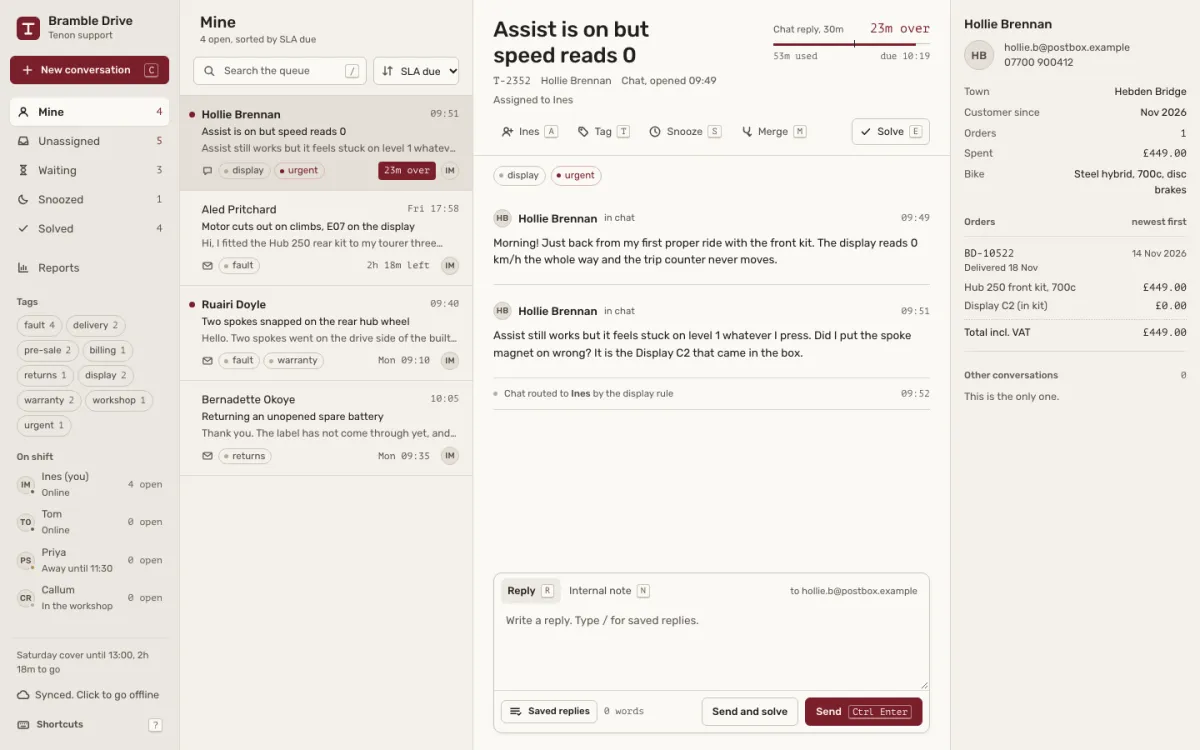
A quiet two-pane tool in warm greys with one oxblood accent: typographic hierarchy, hairline rules, Rubik for words and PT Mono for times, ids and money, and colour spent only on the primary action, unread and time that has run out.
This template is the app itself, filling the viewport on a Saturday morning at 10:42. A quiet rail holds New conversation, the views (Mine, Unassigned, Waiting, Snoozed, Solved) with live counts, Reports, tag filters, who is on shift with each person's open queue, the Saturday cover window and the sync switch. The conversation list is sorted by SLA: every row carries the customer, subject, last line, channel, tags, assignee and a reply clock measured in business hours, quiet while there is time and oxblood once it has run out.
The thread pane shows the subject, an SLA ruler (time used against the target, with the due time), an action bar for assign, tag, snooze, merge and solve, then the messages, internal notes on sand with a dashed edge, and a log of every change. The composer switches between reply and internal note, inserts saved replies with the customer's name and order filled in, validates before sending, and shows sending, sent and offline-failed states. The customer panel lists contact details, the bike, every order with lines and totals, and other conversations from the same person.
Reports recomputes for 7, 14 or 30 days from a seeded history: a typed summary, four figures compared with the previous period, a volume-by-day bar chart and a first-response line against the 4-hour target, both drawn in SVG with hover and arrow-key readouts, and tables by tag and by day that add up to the same totals. On phones the list and thread are separate screens with a bottom bar, and the customer panel is a full sheet. All icons are inline SVG in one stroke weight.
The brand is fictional: Tenon, a support inbox, here running Bramble Drive: four people in Lancaster selling e-bike conversion kits. Names, people and figures on the page are invented.
What works
- Views: Mine, Unassigned, Waiting, Snoozed, Solved, each teammate's queue and Reports, with live counts
- List: search across names, emails, subjects, order numbers and message text; sort by SLA, newest or oldest; filter by tag with a removable chip
- SLA clocks: business-hour targets (4h email and form, 30m chat) that tick in real time, roll over to Monday after Saturday cover and turn oxblood when over
- Assign: popover listbox with filter and keyboard, to a teammate, yourself or nobody, with Undo
- Tag: multi-select with counts, remove from the thread, create a new tag with validation
- Snooze: in two hours, Monday, Tuesday, next week, or a date and time with validation; wake it from Snoozed
- Merge: pick a conversation (same customer listed first), preview what moves, merging state, messages combined in time order
- Solve and reopen with Undo; the row folds away and the next conversation opens
- Composer: reply or internal note, saved replies from a button or by typing /, placeholder check, word count, Send or Send and solve, sending state, offline failure with Send again or Back to draft
- New conversation: email, subject and message validation, existing customer recognised, sending state, created toast with View
- Customer panel: contact, bike, orders with lines and totals, lifetime spend, other conversations that open on click
- Reports: 7, 14 or 30 day range recomputes the summary, figures, both charts and both tables; hover, tap or arrow keys read out each day
- Shortcuts: J and K, R, N, A, T, S, M, E, I, C, /, ?, G then M, U, W, Z, S or R, Ctrl+Enter, Ctrl+Shift+Enter, Esc
States you can link to
script.js reads these from the URL, so you can open the page in a given state to review it, screenshot it or show it to an agent.
| Parameter | What it does |
|---|---|
?state=loading | skeleton list and thread while the inbox loads. Open ?state=loading |
?state=empty | nothing assigned to you, with a pointer to the nine unassigned conversations. Open ?state=empty |
?state=error | the mail sync timed out, with a Try again that reloads the inbox. Open ?state=error |
?state=offline | offline banner and sync status; replies, notes, merges and new conversations fail and keep their text. Open ?state=offline |
?view=reports | opens Reports (also unassigned, waiting, snoozed, solved, agent-tom). Open ?view=reports |
?c=T-2348 | opens a conversation by its number in the view it belongs to. Open ?c=T-2348 |
?merge=open | opens the merge dialog on Saanvi's follow-up, with her first conversation chosen. Open ?merge=open |
?new=open | opens the new conversation dialog. Open ?new=open |
?keys=open | opens the keyboard shortcut sheet. Open ?keys=open |
Use it
Copy templates/helpdesk/ into your project, or download the zip, which has the Screenery badge script already removed. Colours, type, spacing and radii are custom properties at the top of style.css. This template loads no libraries: only its own files and web fonts.
The docs explain the token pattern and how to move a template into React, Vue, Svelte or Astro. The guide has prompts for handing it to a coding agent.