Bevel 2027
Conference website template · Culture and learning
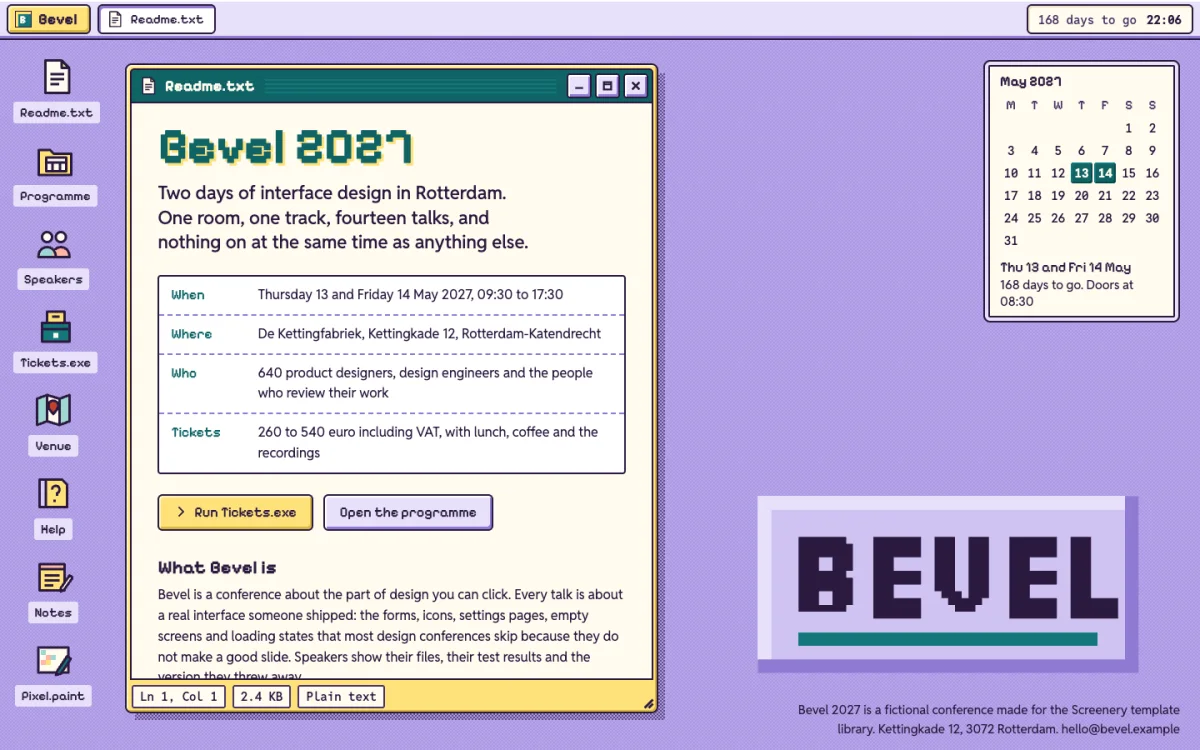
The desktop of BevelOS, an invented late-1990s operating system: lilac dithered wallpaper, butter-yellow window frames with chunky pillow bevels, teal pinstriped title bars and dithered drop shadows.
The site is a desktop. A short boot screen runs on the first visit (skippable, and never under reduced motion), then the shelf shows the Bevel menu, a button for every open window, a countdown and the visitor's own clock. Readme.txt opens on its own with the dates, the venue, what a ticket includes and how to use the desktop.
Every section is a window you can drag by its title bar, resize, minimise to the shelf, maximise or close. The Programme is a file browser with a folder per day, a details pane, stars and an Add to Notes button. Speakers is a grid of drawn pixel portraits, each opening its own .txt window. Tickets.exe is an installer wizard: ticket type, quantity and day, attendee details with a live badge preview and inline validation, a summary, an installing progress log, a failure with retry, and a receipt with VAT. Venue is a drawn map of Katendrecht with a legend that lights up its pins, Help is a searchable set of collapsible topics, Notes saves on this computer, and Pixel.paint is a 16 by 16 drawing toy.
On phones the icons become a home screen and each window opens as a full-screen sheet with a back button. Without JavaScript the windows stack into one plain page with every talk, speaker and answer visible. All art, icons and portraits are drawn in SVG and canvas; there are no photographs.
The brand is fictional: Bevel 2027, a two-day interface design conference at De Kettingfabriek in Rotterdam. Names, people and figures on the page are invented.
What works
- Windows: drag by the title bar, resize from the corner, double-click to maximise, minimise to the shelf, close; focus brings a window to the front
- Keyboard: Enter opens a desktop icon, arrow keys move between icons or move a window when its title has focus, F6 cycles windows, Escape closes the front window
- Bevel menu with every app, Restart (replays the boot) and Shut down
- Programme: day folders, talk selection with details, arrow keys in the list, stars kept in a Starred folder, Add to Notes
- Speakers: open any speaker's .txt window and jump to their talk
- Tickets.exe: ticket type, day, quantity stepper, live total with VAT, attendee details with inline validation and badge preview, summary, installing, error with retry, receipt, copy order number
- Venue: legend buttons light up the pins on the map
- Help: find box with empty state, expand and collapse all
- Notes: autosaves, insert time, clear with confirmation
- Pixel.paint: draw with pointer or arrow keys and Space, nine colours with eraser, saved locally
States you can link to
script.js reads these from the URL, so you can open the page in a given state to review it, screenshot it or show it to an agent.
| Parameter | What it does |
|---|---|
?boot=1 | plays the boot screen even on a return visit. Open ?boot=1 |
?boot=0 | skips the boot screen on a first visit. Open ?boot=0 |
?open=tickets | opens one window on top: readme, programme, speakers, tickets, venue, help, notes or paint. Open ?open=tickets |
?open=speaker | opens Speakers and a speaker's .txt window. Open ?open=speaker |
?open=all | opens every window, stacked. Open ?open=all |
?step=2 | Tickets.exe on the attendee details step. Open ?step=2 |
?state=invalid | the details step with every validation message showing. Open ?state=invalid |
?state=installing | the installer frozen mid-way through its progress log. Open ?state=installing |
?state=error | installs a demo order that fails on the booking server, with Retry. Open ?state=error |
?state=success | a finished install with the receipt. Open ?state=success |
?state=shutdown | the shut down screen. Open ?state=shutdown |
Use it
Copy templates/desktop/ into your project, or download the zip, which has the Screenery badge script already removed. Colours, type, spacing and radii are custom properties at the top of style.css. This template loads no libraries: only its own files and web fonts.
The docs explain the token pattern and how to move a template into React, Vue, Svelte or Astro. The guide has prompts for handing it to a coding agent.
Inspection
Loaded in Chromium 156.0.8078.4 (Playwright, headless) on 27 November 2026 at 1440, 1024, 768, 390 pixels wide and once more with reduced motion requested. Every check passed at every width.
- 1440 px
- Pass
- 1024 px
- Pass
- 768 px
- Pass
- 390 px
- Pass
- Reduced motion
- Pass
- Page weight
- 293 KB, 8 requests
Requests and transferred size were measured at 1440 pixels on a cold cache and include web fonts and any CDN library. The full result is in the viewer: open the Checks panel. How templates are checked.