Halden
Desk lamp product page and configurator template · Shops and makers
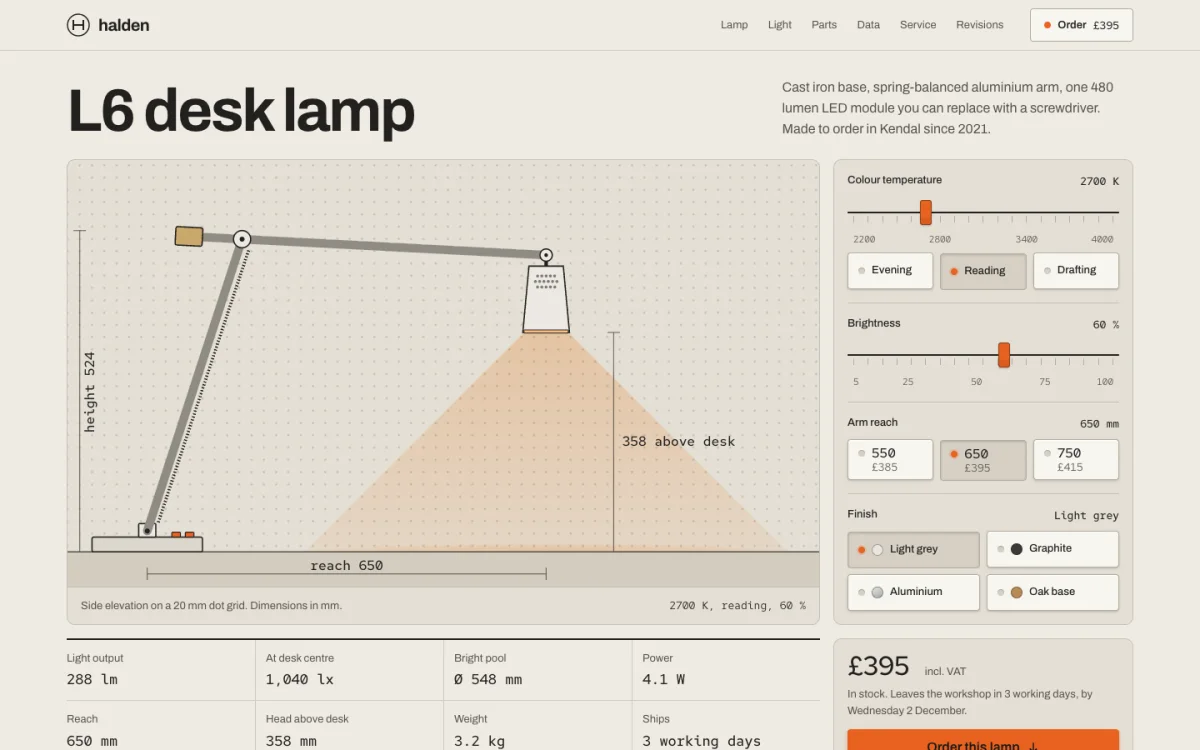
1960s functionalist industrial design: warm off-white lacquer, grey panels ruled with hairlines, a 20 mm dot grid, flush-left grotesk with measurements in mono, and one signal orange that only ever marks a control.
The first screen is the configurator. On the left is a side elevation of the L6 drawn to scale in millimetres on a 20 mm dot grid, with dimension lines for reach, overall height and head height. On the right is a control panel of slide scales and push keys: colour temperature from 2200 to 4000 K with three presets, brightness from 5 to 100 % in 5 % detents, three arm reaches and four finishes. The arm extends and retracts, the finish recolours the parts, and the cone of light changes colour and strength. Signal orange appears only on controls: slider knobs, key indicator lamps, the two knobs on the lamp's base and the order button.
Every number comes from one model. The head height follows from the arm geometry; the illuminance at the desk centre, the bright pool where light falls to half and the lit circle at the 45 degree cut-off follow from 480 lumens and the cosine-cubed law. A spec strip under the drawing shows light output, lux, pool, power, reach, head height, weight and lead time, and the price block gives the price and a ship date in working days. Below, the same lamp is drawn in plan on a 1600 by 800 mm desk with isolux rings; lay an A4 sheet, an A3 sheet or an A2 board under the head and it says what share of the light reaches the corners.
Then the eleven parts on a numbered drawing with materials, fixings and spare prices, a data table for the three reaches with the chosen column marked, the order form with an always-visible summary (inline validation, an error summary with links, loading, error with retry, success with an order number and ship date), the house rules for guarantees and returns, and a dated list of revisions.
The brand is fictional: Halden Lighting, a four-person workshop in Kendal that makes one desk lamp, the L6, to order. Names, people and figures on the page are invented.
What works
- Colour temperature slide scale (2200 to 4000 K) and Evening, Reading, Drafting preset keys: recolour the light in the elevation and the plan
- Brightness slide scale (5 to 100 %): changes cone strength, lumens, lux, power and the isolux rings
- Arm reach keys (550, 650, 750 mm): the arm tweens to the new length, dimensions, head height, price and lead time update; arrow keys move the choice
- Finish keys (light grey, graphite, aluminium, oak base): recolour the drawing, change price, weight and lead time
- Copy link: copies a URL that reopens the exact configuration
- Plan view: A4, A3 or A2 board keys lay the paper under the head and report corner illuminance or how far it falls outside the light
- Data table marks the chosen reach column
- Order: quantity stepper (1 to 4), courier or collection, knob preset checkbox, totals that follow; inline validation with UK postcode formatting, error summary with links to fields, loading, error with retry, success, order another
States you can link to
script.js reads these from the URL, so you can open the page in a given state to review it, screenshot it or show it to an agent.
| Parameter | What it does |
|---|---|
?k=4000&b=100&reach=750&finish=graphite | opens on any configuration (k 2200 to 4000, b 5 to 100, reach 550/650/750, finish grey/graphite/alu/oak). Open ?k=4000&b=100&reach=750&finish=graphite |
?paper=board | lays an A2 board in the plan view (also a4, a3). Open ?paper=board |
?qty=2 | two lamps in the order summary. Open ?qty=2 |
?state=invalid | submits with a bad email, a short postcode and empty fields: inline errors and the error summary. Open ?state=invalid |
?state=loading | fills the form and stays on the sending state. Open ?state=loading |
?state=error | fills and submits, the order book does not answer; sending again succeeds. Open ?state=error |
?state=success | fills and submits, showing the order number and ship date. Open ?state=success |
Use it
Copy templates/desklamp/ into your project, or download the zip, which has the Screenery badge script already removed. Colours, type, spacing and radii are custom properties at the top of style.css. This template loads no libraries: only its own files and web fonts.
The docs explain the token pattern and how to move a template into React, Vue, Svelte or Astro. The guide has prompts for handing it to a coding agent.