Glueberry
Children's picture app page template · App screens
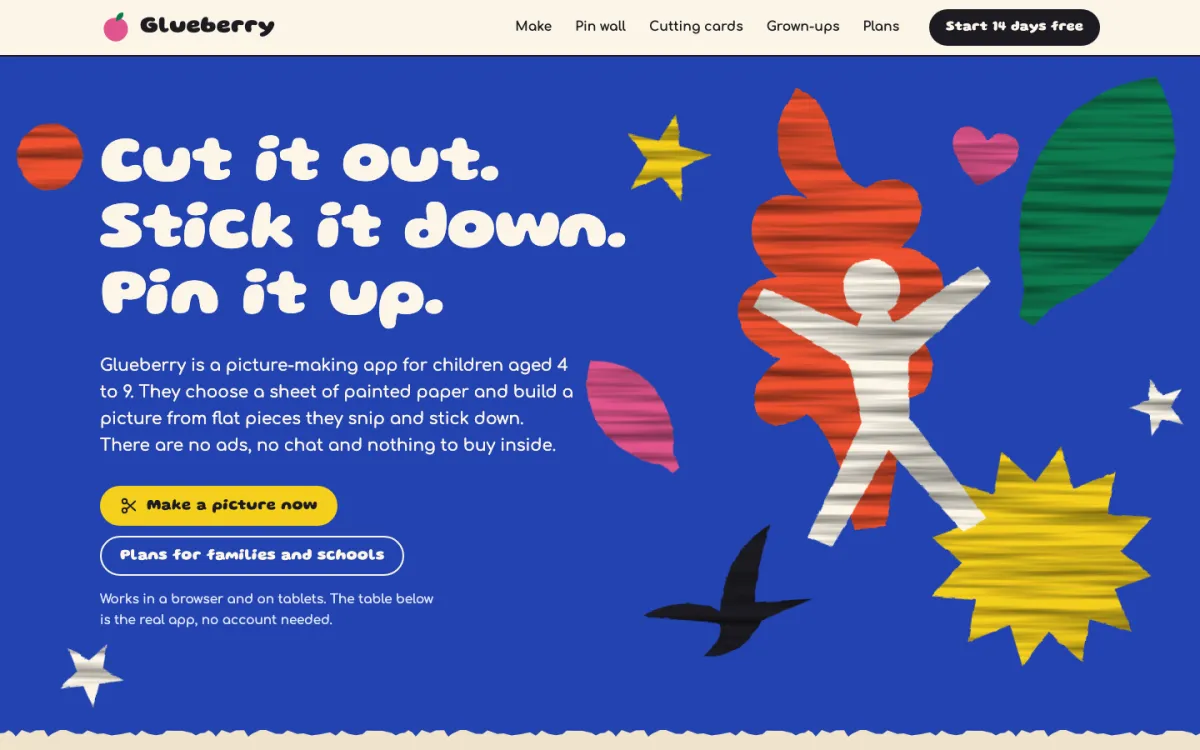
Painted-paper cut-outs: gouache sheets in eight paint-pot colours, cut with scissors into leaves, stars, seaweed and dancers, laid flat and overlapping with deckled edges on ultramarine, lemon, emerald and rose grounds.
The first screen is an ultramarine plate of painted-paper cut-outs in the spirit of gouache collage: a vermilion seaweed, an emerald leaf, a lemon sun and a chalk-white dancer, all with streaky brush marks and slightly torn scissor edges, settling into place as the page opens. The headline is cut-paper lettering in Gluten over the plate.
Below it is the working app, drawn inside an ink tablet. Pick one of eight painted sheets, then tap a shape to stick it down or drag it onto the picture. Grab a piece to move it, turn it with the round handle, size it with the square one, or use the tools to flip it, put it on top or under, and peel it off. The scissors cut a freehand loop into a new piece from the chosen sheet. Undo keeps sixty steps, Clear asks first on a small paper note, and Pin it up saves a thumbnail to the pin wall, where pictures can be reopened or taken down. Keyboard users can pick pieces with N and move, turn and size them with keys.
The rest of the page is the paint pots with what each colour is for, this week's five cutting cards (each one sets up the table), the house rules for grown-ups on children's data, the family and school plans with a working signup and quote form (parent gate, inline validation, loading, error and success), questions, and the footer. No photographs; everything is drawn in SVG, CSS and canvas.
The brand is fictional: Glueberry, a cut-and-stick picture app for children aged 4 to 9, made by a studio of four in Bristol for families and schools. Names, people and figures on the page are invented.
What works
- Picture table: tap or drag shapes from the tray onto the canvas, cut from the chosen painted sheet
- Move pieces by dragging; turn with the round handle (Shift snaps to 15 degrees); size with the square handle
- Tools: turn, bigger, smaller, flip, on top, under, peel off, undo, clear with confirmation, pin it up
- Scissors mode: draw a closed loop on the picture to cut your own shape
- Choosing a sheet with a piece selected repaints that piece; the ground can be any of the eight sheets
- Keyboard: N picks the next piece, arrows move, [ and ] turn, + and - size, F flips, Delete peels off, Ctrl or Cmd Z undoes
- Pin wall: saved pictures with titles from their shapes, reopen on the table or take down; eight pins, full state
- Cutting cards set the ground, sheet, mode and a prompt on the table
- Family signup: yearly or monthly billing, child profile stepper, age bands, parent gate, consent, validation, loading, error, success
- School quote: role, school email, class stepper with live sum and whole-school price, data agreement option
States you can link to
script.js reads these from the URL, so you can open the page in a given state to review it, screenshot it or show it to an agent.
| Parameter | What it does |
|---|---|
?canvas=demo | a finished picture on the table with one piece chosen. Open ?canvas=demo |
?mode=cut | opens the table with the scissors on. Open ?mode=cut |
?open=clear | a demo picture with the clear confirmation note open. Open ?open=clear |
?gallery=demo | three demo pictures on the pin wall (not saved). Open ?gallery=demo |
?gallery=full | all eight pins used, with the wall full message. Open ?gallery=full |
?state=loading | fills the family form and holds it in the sending state. Open ?state=loading |
?state=error | fills the family form and shows the could-not-send error. Open ?state=error |
?state=success | fills the family form and shows the check your inbox state. Open ?state=success |
?plan=school | opens the school plan tab; combine with ?state= for the quote form states. Open ?plan=school |
Use it
Copy templates/cutouts/ into your project, or download the zip, which has the Screenery badge script already removed. Colours, type, spacing and radii are custom properties at the top of style.css. This template loads no libraries: only its own files and web fonts.
The docs explain the token pattern and how to move a template into React, Vue, Svelte or Astro. The guide has prompts for handing it to a coding agent.