Ånde
Breathing app page template · Health and body
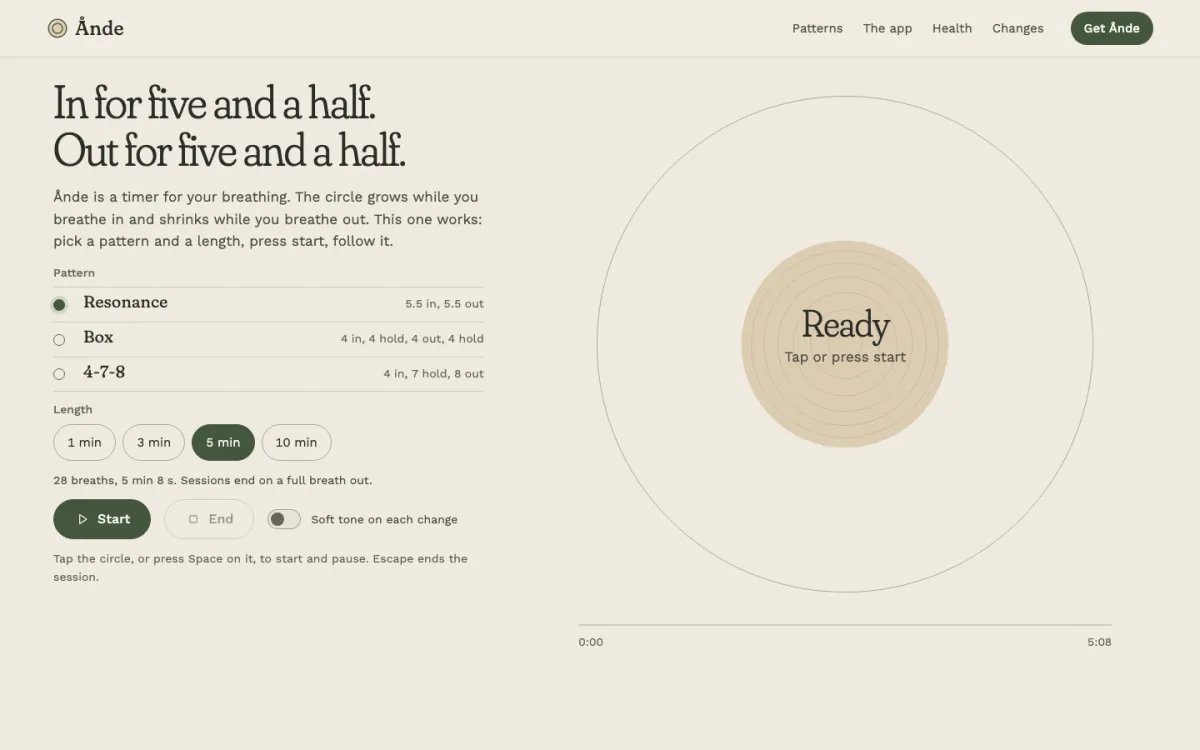
Scandinavian calm on linen: one sand disc with birch-log growth rings that grows and shrinks with your breath, sage only for breathing in, a large soft serif and the slowest motion in the library.
The first screen is the app itself. A sand disc, drawn with fine rings like the end of a birch log, sits between two hairline guides: it grows to the outer one while you breathe in, waits while you hold, and shrinks to the inner one while you breathe out. A bead goes once round per breath, the seconds fill in as dots, and the phase is written large in a soft serif and announced once per phase to screen readers. Resonance at 5.5 seconds each way, box and 4-7-8, from one to ten minutes, always ending on a full breath out.
A finished session shows a short summary, asks how you feel (with plain advice if the answer is lightheaded) and lands in a history kept on the device, with totals for the last seven days. Below are the three patterns drawn to one time scale, the app drawn in CSS with its specs, a plain health note beside a stand of birches, the changelog with dates, and the download form: free or Ånde Hel, phone, email, a required health acknowledgement, a total that shows the trial end date, and loading, error and success states.
With reduced motion the disc keeps still and the pacer still works: the colour follows the phase, the dots count the seconds and the label changes. Everything is drawn in SVG and CSS. There are no photographs.
The brand is fictional: Ånde, a breathing timer made by two people above a bike shop in Trondheim. Names, people and figures on the page are invented.
What works
- Breathing pacer: choose resonance, box or 4-7-8 and 1, 3, 5 or 10 minutes; start, pause, resume and end
- Disc, bead, seconds dots, timeline and a visible phase label that follow the breath
- Text cue for screen readers, announced once per phase; Space starts and pauses, Escape ends
- Optional soft tone at each change (Web Audio)
- Finished summary with an optional feeling, and care advice for lightheaded
- History on this device with seven-day totals and clear with confirmation
- Patterns drawn to one scale, each with a button that loads it into the pacer
- Get Ånde: plan, phone, email validation, health acknowledgement, live total, loading, error, success, resend and change email
States you can link to
script.js reads these from the URL, so you can open the page in a given state to review it, screenshot it or show it to an agent.
| Parameter | What it does |
|---|---|
?pattern=box | loads box breathing into the pacer. Open ?pattern=box |
?pattern=478 | loads 4-7-8, with its sit-down note. Open ?pattern=478 |
?len=1 | sets a one-minute session (also 3, 5, 10). Open ?len=1 |
?state=running | starts a session straight away, a few seconds into the first breath in. Open ?state=running |
?state=done | shows the finished summary for the chosen pattern and length. Open ?state=done |
?history=empty | the empty history state. Open ?history=empty |
?motion=reduced | the reduced-motion pacer: still disc, colour and dots. Open ?motion=reduced |
?plan=free | selects the free plan in the download form (also year, month). Open ?plan=free |
?state=loading | fills the form and holds it in the sending state. Open ?state=loading |
?state=success | fills the form and shows the link-sent panel. Open ?state=success |
?state=error | fills the form and shows the could-not-send error. Open ?state=error |
Use it
Copy templates/breath/ into your project, or download the zip, which has the Screenery badge script already removed. Colours, type, spacing and radii are custom properties at the top of style.css. This template loads no libraries: only its own files and web fonts.
The docs explain the token pattern and how to move a template into React, Vue, Svelte or Astro. The guide has prompts for handing it to a coding agent.