Slotty
Scheduling app template · App screens
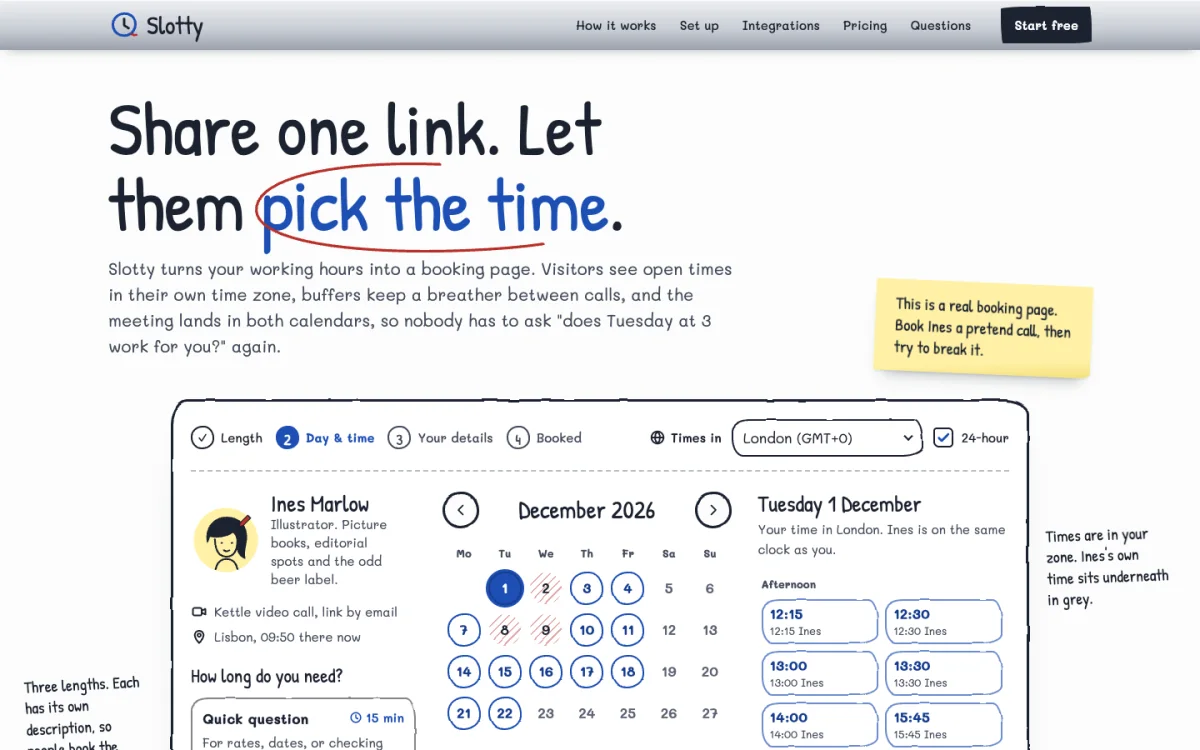
A whiteboard in a small studio: everything drawn in black, blue and red marker with wobbly lines, hatched fills, doodled arrows explaining the UI in the margins, and yellow sticky notes, on an aluminium rail and marker tray.
The page is a whiteboard. A marker headline with a red circle drawn round its last words sits over a real booking page: Ines Marlow's, a freelance illustrator in Lisbon. Margin notes and sticky notes explain each part in handwriting, with arrows that draw themselves in. Every outline is a straight CSS border bent by an SVG turbulence filter, so the drawing wobbles while the text stays crisp.
The booking flow is complete. Choose a 15, 30 or 60 minute call, pick a circled day in a calendar you can drive with the arrow keys, Home, End and Page Up and Down, then a time. Times are computed from Ines's working hours, her existing bookings, a buffer on both sides, a minimum notice and an eight-week window, converted with Intl into the visitor's own zone with Ines's time beside each one. A zone picker and a 24-hour switch change every time on the page. The details form validates inline and can fail and retry; the confirmation shows both clocks, downloads a real .ics file and can be rescheduled (same event, new sequence) or cancelled with a cancellation file. Fully booked days are hatched in red, days off and the Christmas break explain themselves, and an empty month points to the next open day.
Below it, the settings panel is Ines's own: switch days on and off, change hours, the buffer, the notice and the window, and the booking page above is recalculated live while a day line draws the chosen day to scale with bookings, buffers and bookable starts. Then a doodled hub of six fictional integrations, Free and Pro pricing with a yearly toggle, a sign-up form with live link checking, the questions, and a marker tray footer.
The brand is fictional: Slotty, a booking-link app, shown through the booking page of Ines Marlow, a freelance illustrator in Lisbon. Names, people and figures on the page are invented.
What works
- Meeting length: three radio cards; changing length recomputes every day and slot
- Calendar grid: arrow keys, Home and End, Page Up and Down, Enter; aria-selected on the chosen day; open, fully booked, off and away states
- Slots in the visitor's time zone with Ines's time underneath, grouped into morning, afternoon and evening, plus a next-open-day jump for full or closed days
- Time zone picker (common zones plus every Intl zone) and a 24-hour clock switch
- Details form: inline validation with specific messages, character count, loading, error with retry, success
- Confirmation with both clocks, client-side .ics download with a reminder alarm
- Reschedule (keeps the same calendar event, bumps the sequence) and cancel with an optional reason and a cancellation .ics
- Settings panel: day toggles, start and end times with validation, buffer, notice and window; live open-slot count and a drawn day line
- Pricing monthly and yearly toggle; plan buttons preselect the sign-up plan
- Sign-up: link suggested from the name, live availability check, validation, loading, error and success; questions accordion
States you can link to
script.js reads these from the URL, so you can open the page in a given state to review it, screenshot it or show it to an agent.
| Parameter | What it does |
|---|---|
?type=60 | opens with the 60 minute portfolio review chosen (15, 30 or 60). Open ?type=60 |
?date=2026-12-03 | selects a day in the calendar and shows its times (any YYYY-MM-DD). Open ?date=2026-12-03 |
?tz=America/New_York | shows every time in New York time with Ines's Lisbon time underneath (any IANA zone). Open ?tz=America/New_York |
?state=confirmed | books a demo 30 minute call and shows the confirmation with the .ics download. Open ?state=confirmed |
?state=full | selects the next fully booked day. Open ?state=full |
?state=error | fills the details form and the booking fails; Try again succeeds. Open ?state=error |
?state=none | shows the month after the booking window: nothing open, with a jump to the next open day. Open ?state=none |
?state=reschedule | books a demo call, then starts moving it. Open ?state=reschedule |
?state=cancelled | books a demo call, then cancels it. Open ?state=cancelled |
?signup=success | fills and sends the sign-up form: page created. Open ?signup=success |
?signup=error | fills and sends the sign-up form: the server does not answer; sending again succeeds. Open ?signup=error |
Use it
Copy templates/booking/ into your project, or download the zip, which has the Screenery badge script already removed. Colours, type, spacing and radii are custom properties at the top of style.css. This template loads no libraries: only its own files and web fonts.
The docs explain the token pattern and how to move a template into React, Vue, Svelte or Astro. The guide has prompts for handing it to a coding agent.
Inspection
Loaded in Chromium 156.0.8078.4 (Playwright, headless) on 27 November 2026 at 1440, 1024, 768, 390 pixels wide and once more with reduced motion requested. Every check passed at every width.
- 1440 px
- Pass
- 1024 px
- Pass
- 768 px
- Pass
- 390 px
- Pass
- Reduced motion
- Pass
- Page weight
- 228 KB, 10 requests
Requests and transferred size were measured at 1440 pixels on a cold cache and include web fonts and any CDN library. The full result is in the viewer: open the Checks panel. How templates are checked.