Kern & Cut
Conference website template · Culture and learning
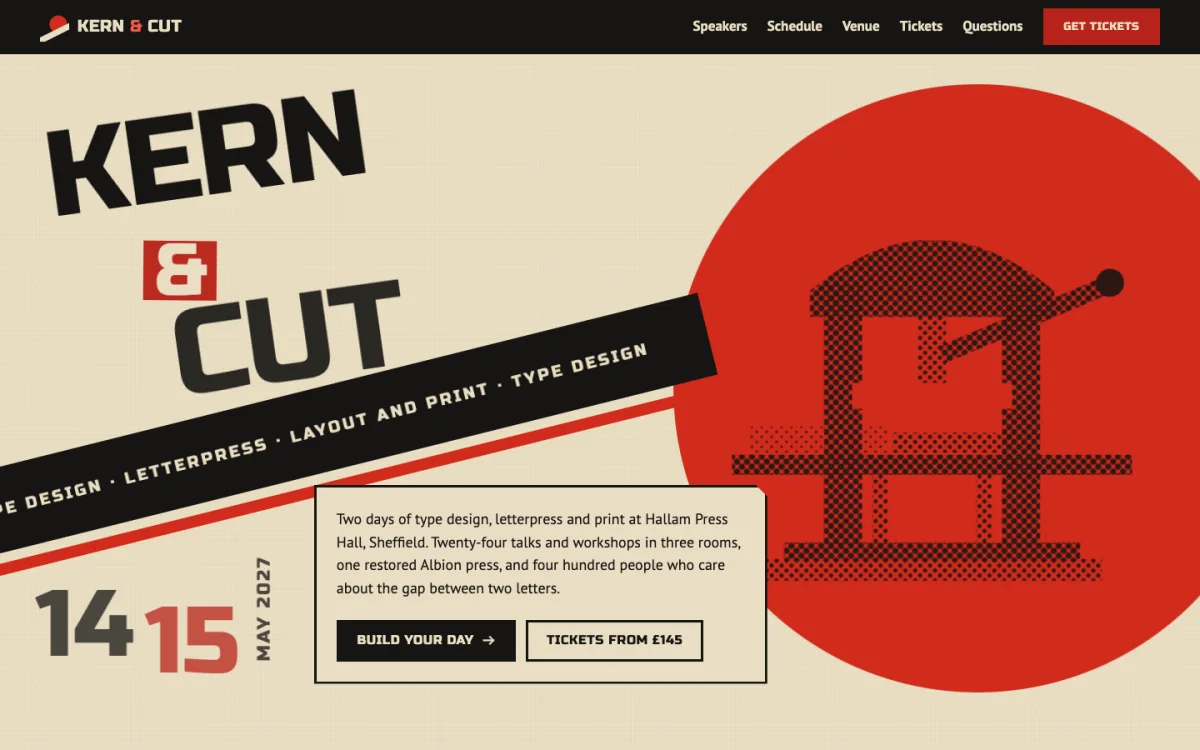
A constructivist poster in red, black and newsprint cream: hard diagonals, heavy sans stacked at an angle, circles, bars and halftone presses printed in dots.
The page is a constructivist poster. The first screen stacks KERN, a red ampersand and CUT at an angle over a red circle, with a hand press printed in halftone dots and a black bar of track names cutting the sheet on the diagonal. The dates are two big numerals. On load the bars slide in along their own angle and the type knocks into place; with reduced motion everything simply sits there.
The centre of the page is a schedule builder for two days and three rooms: type design, letterpress, and layout and print. Pick a day, filter to one track, and add talks and workshops to My day. Anything that overlaps something you already chose is caught on the card, where you can swap, keep both or cancel. Workshops show seats left; full ones offer a waitlist place. My day can be exported as a real .ics file that opens in any calendar, and it is remembered on return.
Eight speakers are drawn as geometric portraits on a stepped diagonal, and each of their talks jumps to its card in the schedule. The venue is a drawn street map with the walking route from the station. Tickets are a checkout with three pass types, a student code that is checked for format, checksum and reuse, totals that add up, workshop seats carried over from the schedule, and loading, error and success states. Questions and a poster footer close the page.
The brand is fictional: Kern & Cut, a two-day typography and print conference at Hallam Press Hall in Sheffield, run by the Hallam Press Trust. Names, people and figures on the page are invented.
What works
- Day tabs with arrow keys, Home and End
- Track filter: all rooms or one track plus the keynotes
- Add to my day, remove from the card or the panel
- Clash detection on overlapping sessions with swap, keep both and cancel
- Workshop seats left, full workshops with a numbered waitlist
- Export my day as a downloadable .ics calendar file
- Speaker talks jump to and highlight their session
- Ticket steppers, student code validation (format, checksum, already used), inline name and email errors
- Checkout loading, error with retry, and a held-tickets confirmation
- Mobile menu with Escape; questions accordion
States you can link to
script.js reads these from the URL, so you can open the page in a given state to review it, screenshot it or show it to an agent.
| Parameter | What it does |
|---|---|
?day=2 | opens Saturday's schedule. Open ?day=2 |
?track=letterpress | filters the schedule to the Composing Room (also type, layout). Open ?track=letterpress |
?state=clash | two sessions already in my day and a third that overlaps, with the clash choice open. Open ?state=clash |
?state=success | fills a demo order with a student code and a workshop seat and shows the held-tickets confirmation. Open ?state=success |
?state=error | the same order, but the box office does not answer; Try again succeeds. Open ?state=error |
Use it
Copy templates/avantgarde/ into your project, or download the zip, which has the Screenery badge script already removed. Colours, type, spacing and radii are custom properties at the top of style.css. This template loads no libraries: only its own files and web fonts.
The docs explain the token pattern and how to move a template into React, Vue, Svelte or Astro. The guide has prompts for handing it to a coding agent.
Inspection
Loaded in Chromium 156.0.8078.4 (Playwright, headless) on 27 November 2026 at 1440, 1024, 768, 390 pixels wide and once more with reduced motion requested. Every check passed at every width.
- 1440 px
- Pass
- 1024 px
- Pass
- 768 px
- Pass
- 390 px
- Pass
- Reduced motion
- Pass
- Page weight
- 179 KB, 10 requests
Requests and transferred size were measured at 1440 pixels on a cold cache and include web fonts and any CDN library. The full result is in the viewer: open the Checks panel. How templates are checked.