Valbrise
Ski area website template · Travel and outdoors
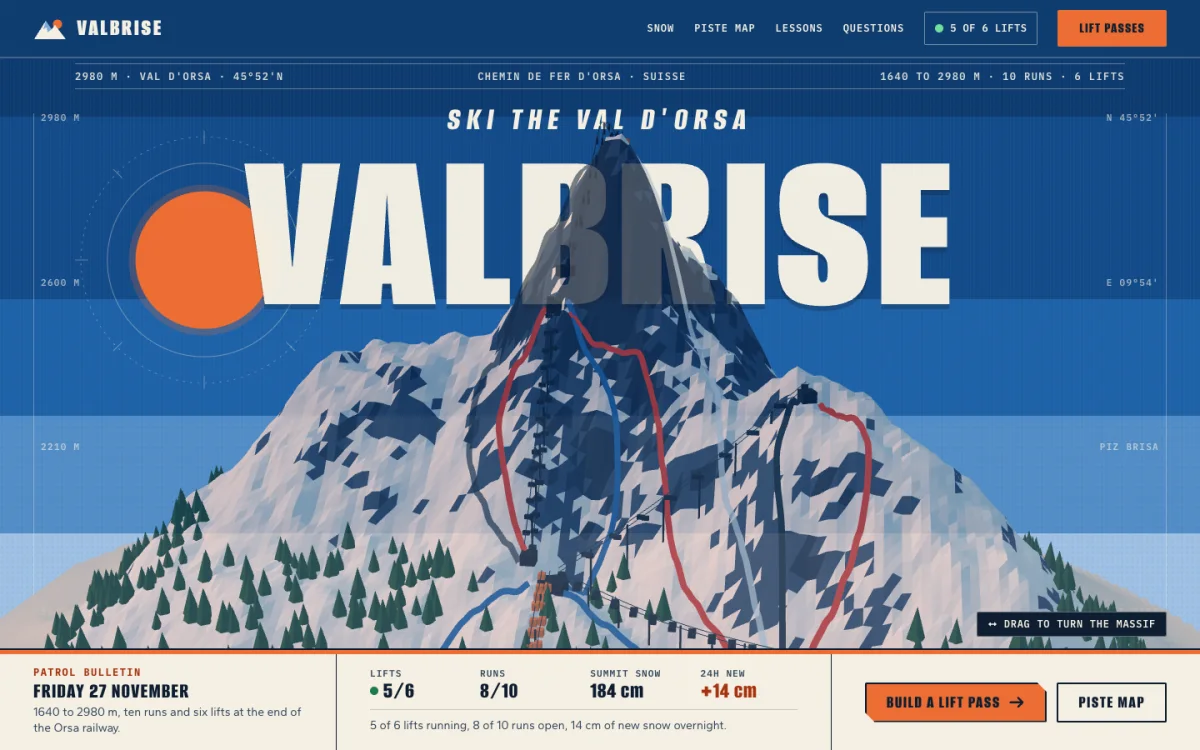
A 1930s Swiss PLM lithograph travel poster meets a high-altitude altimeter: deep cobalt sky bands with poster grain, archival cream stock, alpine fir and alpenglow vermilion, monumental condensed poster capitals piercing a live low-poly Three.js massif, and a cream Swiss railway-timetable telemetry ribbon.
The first screen is a 1930s Swiss PLM travel poster paired with a high-altitude altimeter. A stepped cobalt sky with subtle lithograph grain frames an altimeter sun dial, elevation telemetry rails, and colossal condensed lettering pierced by a monumental live Three.js massif. Below the peak, a cream Swiss railway-timetable ribbon reports live lifts, open runs, snow depth, and an angled ticket CTA.
Below the patrol snow report (three scale stakes in an elevation gauge frame, overnight facts, avalanche danger and a three-day bulletin), the piste map is the centre of the page. Every run and lift carries its status, open, on hold or closed, on the 3D relief and in the list. Filter by difficulty or open runs only, then pick a run to inspect its length, vertical drop, gradient and lift chain. The perforated lift pass configurator prices days, ages and insurance with multi-day discounts, validates the date and party, and issues a printed Swiss pass on success.
Lessons are grouped by what you ski now in an alpenglow vermilion print, kiosk questions sit on crisp hairline rules, and the footer closes in poster type. Without WebGL or JavaScript the same massif renders as a drawn SVG lithograph poster and interactive SVG piste map.
The brand is fictional: Valbrise, a small ski area of ten runs and six lifts at the end of the road in the invented Val d'Orsa. Names, people and figures on the page are invented.
What works
- Hero mountain: slow automatic orbit, drag to turn with a mouse; pauses offscreen and stops for reduced motion
- Piste map: drag to turn, click a piste or its number tag to select it, reset view; the camera eases toward the selected run
- Difficulty filter chips and an open-now-only toggle, with an empty state
- Run detail: length, vertical drop, average gradient, lifts needed with their status, warnings for closed lifts and the lift back up
- Lift and run status in the list, on the 3D map (greyed closed runs, pulsing on-hold runs, station colours, stopped cabins) and on the SVG map
- Lift pass builder: date within the season, 1 to 7 days, four age groups with steppers, insurance, discounts and a live total
- Validation with specific messages, loading, a recoverable error and a success pass with booking code
- Lesson tabs by level with arrow-key navigation; questions accordion
States you can link to
script.js reads these from the URL, so you can open the page in a given state to review it, screenshot it or show it to an agent.
| Parameter | What it does |
|---|---|
?state=storm | storm day: B, C and F closed, D on hold, three runs open, deeper snow, storm notice. Open ?state=storm |
?state=powder | powder day: 38 cm new, every lift and run open including the Couloir Orsa. Open ?state=powder |
?state=evening | after closing: every lift and run closed for the day. Open ?state=evening |
?run=5 | selects a run (1 to 10) on the map and shows its detail. Open ?run=5 |
?filter=black | filters the map to one difficulty (blue, red, black, itin). Open ?filter=black |
?pass=demo | fills the pass builder: 2 adults, 1 youth, 1 child, 6 days with insurance. Open ?pass=demo |
?state=success | submits the demo pass and shows the printed pass. Open ?state=success |
?state=error | submits the demo pass and shows the ticket office error; submitting again succeeds. Open ?state=error |
?state=invalid | submits a pass with an under-6 alone, no name and a broken email to show the validation. Open ?state=invalid |
?state=loading | submits the demo pass and stays in the loading state. Open ?state=loading |
?state=storm,success | day and form states combine with commas: a storm day with the paid pass shown. Open ?state=storm,success |
?level=red | opens the lessons on a level (first, blue, red, off). Open ?level=red |
?nogl | skips WebGL and shows the drawn SVG poster and SVG piste map. Open ?nogl |
Use it
Copy templates/alpine/ into your project, or download the zip, which has the Screenery badge script already removed. Colours, type, spacing and radii are custom properties at the top of style.css. This template loads no libraries: only its own files and web fonts.
The docs explain the token pattern and how to move a template into React, Vue, Svelte or Astro. The guide has prompts for handing it to a coding agent.
Inspection
Loaded in Chromium 156.0.8078.4 (Playwright, headless) on 27 November 2026 at 1440, 1024, 768, 390 pixels wide and once more with reduced motion requested. Every check passed at every width.
- 1440 px
- Pass
- 1024 px
- Pass
- 768 px
- Pass
- 390 px
- Pass
- Reduced motion
- Pass
- Page weight
- 450 KB, 12 requests
Requests and transferred size were measured at 1440 pixels on a cold cache and include web fonts and any CDN library. The full result is in the viewer: open the Checks panel. How templates are checked.