Brightwater
Cloud backup landing page template · Software and web
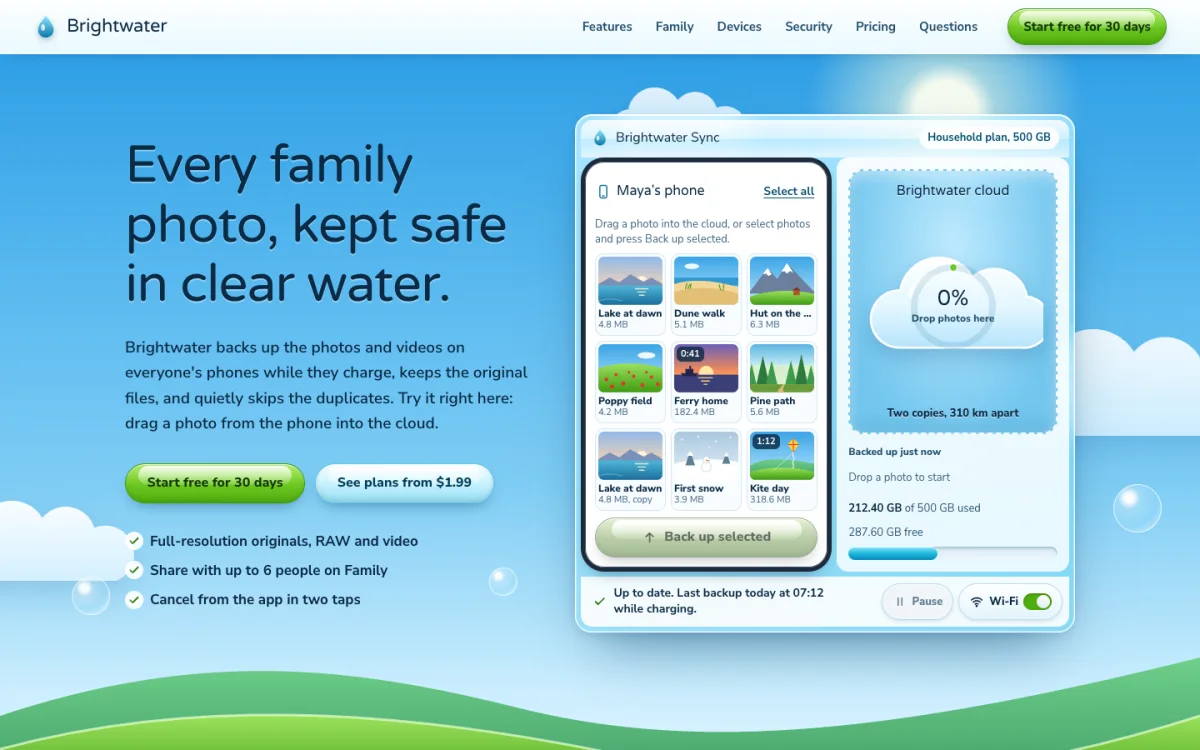
Frutiger Aero, revived: an azure sky with soft clouds and rising bubbles, glossy aqua and lime pills, translucent glass windows and a rolling grass horizon, optimistic nature-meets-tech.
The first screen is a bright Aero sky over green hills, and beside the headline is a working sync window. Maya's phone holds nine photo cards, each a small drawn landscape: seven photos, two videos, and one photo saved twice. Drag a card into the Brightwater cloud, or select cards and press Back up selected, and each one floats up as a soap bubble along a curve while the progress ring fills, the card is stamped Safe, and the storage meter adds exactly its size to the plan.
The window behaves like real backup software. The duplicate is recognised by its fingerprint and skipped with a friendly note that it used no space. Uploads can be paused and resumed, switching the Wi-Fi off mid-upload stops the queue with an offline message and picks up again when it comes back, and a nearly full Pocket plan refuses the file that does not fit, says how much is left, and offers to move to Household and retry.
Below are the features on glossy orbs beside a drawn night-time charger, the family on the plan as avatar bubbles floating on a pond (each shows their share of the birthday album and their storage, which add up to the family pool), drawn devices on a glass shelf, the security facts under the water line, three plans with monthly or yearly billing and a price per GB that follows, a sign-up form with inline validation, loading, error and success, questions, and a footer standing on the grass. Everything is drawn in CSS and SVG.
The brand is fictional: Brightwater, a family photo backup and sync service (fictional), with Maya Lindqvist's family on the plan. Names, people and figures on the page are invented.
What works
- Sync window: drag photo cards (mouse, pen or touch) into the cloud; dragging a selected card carries the whole selection
- Keyboard path: select cards with Space or Enter, Select all, Back up selected
- Bubble flight along a curve per upload, progress ring, Safe and Duplicate tags, a strip of what was just backed up
- Storage meter in GB that adds each file's size; free space switches to MB when under 1 GB
- Duplicate detection with a friendly skipped note; re-dropping a safe photo is refused politely
- Pause and resume; Wi-Fi switch with an offline state that resumes when it is back
- Full plan state: the file that does not fit is refused, with Move to Household and retry
- Family pond: choose a person (arrow keys work) to see their album share, storage and devices
- Pricing: monthly or yearly billing (arrow keys), price per GB recalculates, choosing a plan fills the sign-up form
- Sign-up: inline validation with specific messages, show password, loading, error with retry, success, start again
- Mobile menu with Escape to close; questions accordion
States you can link to
script.js reads these from the URL, so you can open the page in a given state to review it, screenshot it or show it to an agent.
| Parameter | What it does |
|---|---|
?state=syncing | five files dropped and going up one by one, including a video and the duplicate. Open ?state=syncing |
?state=done | all nine handled: eight safe, one duplicate skipped, 212.93 GB of 500 GB used. Open ?state=done |
?state=offline | Wi-Fi off with three files waiting and the offline message. Open ?state=offline |
?state=full | Pocket plan at 49.98 GB: three photos fit, Poppy field is refused with 3.8 MB left and an upgrade offer. Open ?state=full |
?plan=family | the sync window on Family (2 TB), Family highlighted in pricing and chosen in the form. Open ?plan=family |
?billing=yearly | yearly prices and per-GB rates in pricing and the sign-up summary. Open ?billing=yearly |
?form=error | fills and submits the sign-up form, which fails to reach the server; submitting again succeeds. Open ?form=error |
?form=success | fills and submits the sign-up form and shows the check-your-inbox state. Open ?form=success |
Use it
Copy templates/aero/ into your project, or download the zip, which has the Screenery badge script already removed. Colours, type, spacing and radii are custom properties at the top of style.css. This template loads no libraries: only its own files and web fonts.
The docs explain the token pattern and how to move a template into React, Vue, Svelte or Astro. The guide has prompts for handing it to a coding agent.
Inspection
Loaded in Chromium 156.0.8078.4 (Playwright, headless) on 27 November 2026 at 1440, 1024, 768, 390 pixels wide and once more with reduced motion requested. Every check passed at every width.
- 1440 px
- Pass
- 1024 px
- Pass
- 768 px
- Pass
- 390 px
- Pass
- Reduced motion
- Pass
- Page weight
- 195 KB, 7 requests
Requests and transferred size were measured at 1440 pixels on a cold cache and include web fonts and any CDN library. The full result is in the viewer: open the Checks panel. How templates are checked.